# Welcome to Kinto

This page provides an introduction to the network.

<figure><img src="/files/INxaNeC2EeUQxfUra3UY" alt=""><figcaption></figcaption></figure>

\
Welcome to Kinto! **Kinto is the modular exchange**. Access the best opportunities in DeFi through our tailored blockchain and non-custodial smart wallet, engineered for maximum security and seamless user experience.\
\
Kinto boasts an **L2 focused on providing safe access to on-chain finance**. It's built on top of the **Ethereum network** using the [<mark style="color:purple;">Arbitrum Nitro Stack</mark>](https://docs.arbitrum.io/why-nitro), and it's non-custodial, transparent, permissionless, and governed by the community.

Kinto has been designed from the ground up to provide a **safe environment for users and financial institutions**.  Kinto has two unique features at the chain level to enhance the security of the chain:

* By default, Kinto provides KYC,  AML & fraud monitoring at the blockchain level. All participants in the network are KYC'ed, and the network runs AML on all of the participants. **Transactions can then only be performed by verified participants achieving Sybil Resistance**. PII is only saved in identity providers chosen by governance. Users' information cannot be linked to their on-chain accounts except when they choose to do so with an application that requests it.
* Kinto **gives every single user a smart contract wallet** powered by Account Abstraction. **The Kinto wallet aims to be invisible.** The user does not need to worry about complicated browser extensions, seed phrases or gas while still receiving the benefits of non-custodial ownership. Kinto wallet offers similar security assurances to a Gnosis safe, the standard in on-chain security.

Kinto has a **two-layer governance system fully on-chain**. The protocol parameters, sequencer, and treasury will be voted on-chain by 9 Nios (Guardians). Token-holders elect these 9 guardians on a rolling 6-month basis.

You can read our initial announcement [<mark style="color:purple;">here</mark>](https://medium.com/mamori-finance/%EF%B8%8F-introducing-kinto-%EF%B8%8F-dae3666b2b3f).


# Terminology

This page explains the common terms used in Kinto.

#### Kinto ID

An NFT token that grants access to Kinto - minted upon successful KYC completion by the user. Once users receive an NFT, they are verified participants in the network.

#### Verified Participant

All users on Kinto are verified participants - this means they are KYC'ed, and the network runs AML on them continuously.&#x20;

#### User-owned KYC&#x20;

Kinto's KYC process is owned by its users. This means that users effectively curate the list of KYC providers available and pick their own when onboarding into the network. For more information, please read the medium post on [<mark style="color:purple;">User-Owned KYC</mark>](https://medium.com/mamori-finance/user-owned-kyc-45b54f73d76b?source=collection_home---4------3-----------------------).

#### Engen&#x20;

“Engen” means Origin. Engen is Kinto’s pre-launch campaign.&#x20;

#### Partner&#x20;

A partner describes an entity that has built or will build a product on Kinto or contributes to Kinto's ecosystem, such as a third-party KYC provider.&#x20;

#### Nios

“Nio” means Guardian. For Kinto, there will be 9 Nios that form a crucial part of Kinto governance. Voters will elect the Nios on-chain on a 6-month rolling basis. System upgrades, treasury allocations, and fee changes will be voted on-chain by the 9 Nios (Guardians), requiring a majority to pass.

#### Identity Nodes

Identity Nodes are part of Kinto's KYC architecture. They interact with Kinto IDs and leverage KYC providers who store users' PII. Identity nodes perform actions such as minting the Kinto ID NFT, granting access for applications built on Kinto to specific PII when a user permissions this via signing a message, processing AML/KYC updates and handling stolen identities/lost wallets.

#### KYC Provider&#x20;

KYC providers are third-party partners who form part of Kinto's KYC architecture. These providers undertake KYC checks for users on the network in order for them to access Kinto. Users are able to select their preferred KYC provider from those approved by governance.  KYC providers do not have access to on-chain account information at any time.&#x20;


# Litepaper

Overview of the most important concepts behind Kinto.

### Abstract

Kinto is an **L2 focused on providing safe access to financial services**.

#### Mission

Blockchain technology has the potential to improve all financial services drastically. You can now create more efficient services that are **non-custodial, decentralized, and free of rent-seeking middlemen**.

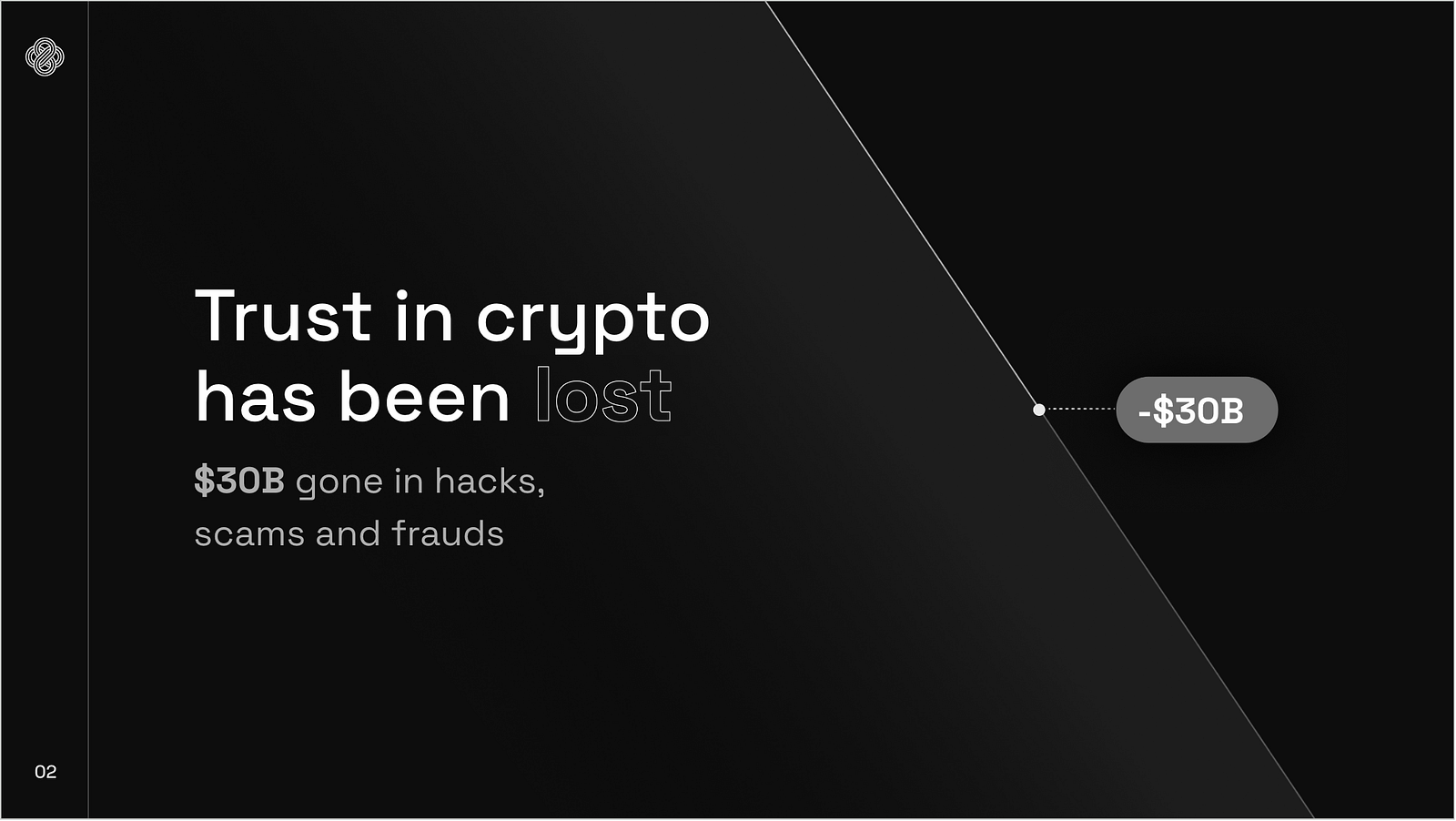
However, all these benefits are dwarfed by the constant scams, smart contract hacks, and rug pulls plaguing the industry. If these problems are insufficient, the current UX forces users to safeguard and manage complex cryptographic keys or risk all their funds. More than $30B was lost in 2022 alone.

Kinto is the first blockchain network designed to address all these problems at the root to support a new wave of secure financial applications.

#### Vision

<figure><img src="/files/ee3l7SqBMY3XLgUcUIaw" alt=""><figcaption></figcaption></figure>

"Kinto" literally means golden road.  In this case, a safe road to bridge the gap between traditional finance and the blockchain-based financial system. This road is open, everyone can set up business along its path, and guardians protect travelers passing through 24/7.

Kinto is an L2 rollup based on Arbitrum Nitro technology that **settles on Ethereum Mainnet**. The network has been designed from the ground up to provide a safe environment for users and financial applications alike.

By default, Kinto provides KYC, insurance, and AML & fraud monitoring at the blockchain level. All participants are KYC'ed, and the network runs AML on all of them continuously. **Transactions can then only be performed by verified participants**. PII is only saved in select identity providers chosen by each user. The available providers are curated by network governance (Synaps, Plaid). Their information cannot be linked to their on-chain accounts except when each user grants it to an application that requests it.

Furthermore, using Kinto, users can access crypto financial services without being forced to install a browser extension or store seed phrases or private keys. Thanks to **native account abstraction** at the chain level, applications can offer easy onboarding and account creation through username/password, 2FA, or mobile device keys.

Finally, Kinto will provide financial institutions and developers with a **secure SDK ecosystem to develop upon**. Through Kinto, they can access all public and liquid protocols on the Ethereum Mainnet safely.&#x20;

Users and developers get ownership and governance rights by using and developing applications on the network. Kinto has a **two-layer governance system fully on-chain**. The protocol parameters, sequencer, and treasury will be voted on-chain by **9 Nios** (Guardians). Token-holders elect these nine guardians on a rolling 6-month basis.

#### Motivation

You can read more about the principles behind Kinto below:

* **KYC, yet permissionless**. Everyone can join the network. You don't need permission from any single company or individual. There is a clear rule at the entrance: Participants in the network need to **KYC**. All the other participants in the network enforce this rule.
* **10x safer**. KYC plus AML at the network level makes the network ten times safer than other blockchains. Smart contract hacks, rugs, or scams are highly unlikely; perpetrators are identified immediately.
* **Non-custodial.** Users retain ownership over their digital assets and data. The protocol and applications built on top must request access to personal data. Only the owner of the data can grant access. The network doesn't store PII.
* **Gateway to Ethereum**. It's imperative to remain connected to the main crypto highway. Ethereum is the leading blockchain network in terms of developers, liquidity, and financial innovation. Through Kinto, you can connect to Ethereum financial applications safely.
* **Decentralized Financial System**. Everyone can create safe financial applications on top of Kinto and safely unleash blockchain technology's possibilities. We are convinced all asset classes will eventually be tokenized and available through public blockchains. Kinto's features are uniquely designed to satisfy all the compliance requirements to offer real-world and digital assets.

#### Differentiation with other blockchains

Currently, there are two different kinds of smart contract platforms.

On one side, you have **general-purpose networks that are decentralized, open, and permissionless,** like Ethereum, or layer-2s like Arbitrum or Optimism.  They are extremely powerful but routinely suffer from smart contract hacks and scams.

On the other side, many efforts have been made to provide **private** **blockchain networks** for financial applications. Many of these approaches suffer from the same problem; they are creating a closed system that is not connected to where the activity and innovation are. Provenance is one example.

We believe there is a **huge gap in the market for a safer blockchain that is open and connected to the main hub of Ethereum but with high-security guarantees and compliance tooling built in**.

### Kinto Main Features

Kinto's main features are as follows:

* **KYC & AML.**  By default, Kinto provides KYC, insurance, and AML & fraud monitoring at the blockchain level. All participants are KYC'ed, and the network runs AML on all of them continuously. **Transactions can then only be performed by verified participants**. PII is stored by identity providers chosen by each user and curated by governance. Personal information cannot be linked to on-chain accounts except when each user chooses to grant it.
* **Built-in Insurance.** The network also offers **insurance against black swan events** to all the smart contracts and applications built on top of Kinto. Sequencer fees from the network are given as a yield to network underwriters.
* **Default Revenue Stream**. Kinto offers Contract Secured Revenue. Sequencer fees are shared with every smart contract based on their tx volume.
* **Magical UI, aka Account Abstraction.**  Users can access crypto financial services without being forced to install a browser extension or store seed phrases or private keys. Thanks to native account abstraction at the chain level, applications can offer easy onboarding and account creation through username/password, 2FA, or mobile device keys while remaining non-custodial.
* **Full on-chain governance**. Governance will fully control the Treasury, fees, integrations, identity providers, and main chain parameters. Governance will be implemented using Open Zeppelin's governor. The votes are binding, and insiders cannot bypass, cancel or prevent the execution of proposals.
* **100% Finance**. Kinto is 100% focused on financial use cases. Kinto offers a native infrastructure that connects to the main DeFi protocols, oracles, and everything in between so you can focus on building the future of finance.

#### Use Cases

Kinto is the best platform to build the new wave of financial applications. You can leverage blockchain technology's unique benefits without the associated headaches and risks.

Kinto is for you if:

* You are a **financial institution** that wants to invest in digital assets, but existing solutions don't allow you to meet your compliance requirements.
* You are a **developer** that wants to build a smart contract application, but you are afraid of smart contract hacks.
* You are an **investor** tired of being a victim of smart contract hacks, rugs, and scams.

Kinto's network offers the opportunity to bring highly valued traditional financial products on-chain while providing the optimal environment for crypto-native financial products to thrive. For example:

* You can build an **asset management protocol** that offers access to real-world assets.
* An **investment club platform** where users can pool funds to invest in different digital assets.
* A **secondary offering market** to give liquidity to employees and early investors in private companies.

### Network Architecture

#### Arbitrum Stack <a href="#arbitrum-stack" id="arbitrum-stack"></a>

The [<mark style="color:purple;">Arbitrum Nitro stack</mark>](https://docs.arbitrum.io/why-nitro) is the standardized, shared, and open-source development stack that powers Arbitrum, maintained by the Arbitrum Foundation.

**Kinto is the first L2 built on the Arbitrum Nitro Stack as an Optimistic Rollup parallel to Arbritrum One and Nova**. Kinto settles on **Mainnet Ethereum and has a fully compatible EVM**. Kinto has a modified execution layer that reverts transactions not originating from KYC'ed addresses.

**Kinto collects all sequencer fees (gas) from all the txs sent to the network**. The network's profit is the spread between all these fees and the cost of settling the batched transactions on Ethereum Mainnet.

**Developer experience is the same as Arbitrum** and almost the same as Mainnet Ethereum. If you are brand new to Arbitrum, we recommend [<mark style="color:purple;">you follow this gentle introduction to Arbitrum</mark>](https://docs.arbitrum.io/for-devs/gentle-introduction-dapps).

### KYC Architecture

Kinto KYC Architecture relies on three components:

1. NFT Smart Contract - Kinto ID
2. Identity Nodes
3. KYC Providers

Kinto introduces a new series of nodes that perform KYC-related functionality. These nodes are called **Identity Nodes.**

Identity Nodes interact with a smart contract deployed on Kinto L2 called Kinto ID that gives untransferrable NFTs to users that have completed the KYC process.

Identity Nodes leverage different KYC providers to store the user's private information. The user can choose which KYC provider to use, and governance can add/remove KYC providers.

#### User-Privacy First

It is imperative to break the link between personal data and on-chain addresses. Kinto takes many steps to ensure data privacy is preserved:

* Kinto doesn't store any user data. **None**.
* **Kinto ID NFT doesn't have any personal data**. It only has flags identifying whether a user has KYC'd, accreditation, and whether or not there are AML violations in different jurisdictions.
* **Personal data is stored in the KYC provider chosen by the users**. Only the most trusted and secure Identity providers, including Plaid and Synaps, are available. Data stored doesn't include your wallet address, so nobody can link your account even if they suffer an unlikely security breach.
* **Personal data can only be accessed with permission from the user**. User needs to sign messages giving permissions to applications built on Kinto. These applications will call an API with the signature to receive the data granted from the user.
* In an emergency like a smart contract hack or an exploit, **governance can access the hacker's information and provide it to the relevant authorities.**

#### Kinto ID NFT Contract

**This NFT token grants access to Kinto.** Users cannot send a single transaction on the Kinto network without it. The token cannot be transferred to a different wallet. These NFTs are unique; one real-world identity can only receive one NFT.

At the same time, a **KYC user can create delegated addresses**, which are secondary addresses tied to the same unique NFT, and can use the network based on the primary identity & NFT.

#### KYC Providers

Plaid, Synaps.

#### Stolen Identity/ Lost Wallet Process

There needs to be a process to handle several edge cases:

* **Lost wallet** - The user wants to move his NFT to a new address. The user needs to KYC with the same information one more time and provide both the old wallet address and a signature that proves ownership of the new address. Then the endpoint will verify that the KYC exists, burn the old NFT, and mint a new one to the new address.
* **Stolen & black market KYC** detected by a KYC provider. KYC providers can trigger callbacks on the identity nodes to burn NFTs flagged as risky.

#### Identity Nodes & API

Identity Nodes perform the following functions:

* Given a user signature and PII information from a KYC provider, the node will **mint the Kinto ID NFT gas-free to the user**, allowing the user to transact within Kinto.
* Suppose a user wants to grant access to his PII information to an application built on top of Kinto. In that case, the application needs to request data from the user, and the user can **grant access to specific personal fields** by signing a message. The API endpoint will return the appropriate fields to the requester application.
* The identity nodes also **process AML & KYC updates** based on callbacks from KYC providers. The relevant information is updated on the Kinto ID smart contract whenever required.
* Finally, the identity nodes also have API endpoints to handle stolen identities and lost wallets explained above.

It is essential to highlight that the code of the identity nodes will be open-sourced, and anyone will be able to run their own.

### $KINTO Token

*The text below should only be considered a proposal that must be ratified. There is no guarantee that a token will be released at any time.*

The $KINTO token is the governance & utility token for the Kinto network. It ensures that **Kinto is owned by its users & developers.**

**60% of $KINTO tokens belong to the community,** dynamically rewarding developers, investors, and financial institutions for the activity they generate.

The network goal is to attract the safest financial blockchain applications. The network will provide a safe passage for investors to interact with the best of DeFi safely.

#### Token Distribution

10 million $KINTO will be minted during the token generation event. The $KINTO is distributed as follows:

* **Kinto community members: 55% initial token supply**. Most of it will be distributed to users and developers building on top of it.
* **Investors: 25% initial token supply**.&#x20;
* **Team and advisors: 20% initial token supply**. Three-year vesting period.

*Community Distribution Split*

The 5,500,000 tokens allocated to the community will be split as follows:

* **500,000 for Engen participants.** Launch members will receive tokens proportional to the Engen credits they accumulated.
* **2,000,000 in Participation Mining rewards for the community.** They will be awarded to developers and users based on their activity. The initial program will last for 10 years, slowly decaying over time. Rewards are higher at the beginning.
* **1,000,000** reserved for the **$KINTO liquidity** event.
* **2,000,000 for the network treasury** to fund new initiatives and pay contributors.

More details on the proposed $KINTO token can be found [<mark style="color:purple;">here.</mark>](/kinto-the-modular-exchange/governance/kinto-token)&#x20;

### Mining Program

Let’s start with the **supply curve**. The supply curve is designed to optimize the long-term sustainability of the network. The rewards are front-loaded, slowly decreasing quarter by quarter.

Participation rewards will run for **10 years initially**. We target a specific number of quarterly rewards, but the network may under-allocate or over-allocate depending on the market conditions.

Here is how we will calculate the rewards target for a given quarter E:

$$
RewardsQuarter(E)=R\_q(E) = RP -RP\*(1/1.05)^E - RpSpent(E)
$$

$$
RP = KIN for Mining Program = 4,000,000
$$

$$
RpSpent(E) = Rewards SpentUntilE
$$

Given the supply curve, we can calculate how many rewards we can distribute per second of a specific quarter. Rq(E) for a given epoch E. An epoch is three months or a quarter.

Then we calculate the max number of rewards to distribute in a second divided by the number of seconds in the epoch. Rs (Rewards per second) is then calculated as follows:

$$
Rs(E) = Rq(E) /(90 days/Epoch \* 24 h/day \* 60 min/h \* 60 secs/min)
$$

The rewards will be calculated and rewarded every week.&#x20;

More details on the proposed mining program can be found [<mark style="color:purple;">here.</mark> ](#mining-program)

### Token Utility

**Sequencer fees will be collected by the network on the treasury contract**, wholly owned by on-chain governance and its representatives.

Here is a proposal of how the fees can be redistributed to increase the utility of the network:

* 📈 **CSR - Contract Secured Revenue**: **10%** of the sequencer fees collected through the smart contract are given to the contract developer.
* 🛡️ **Safety Module**: **10%** of the sequencer fees collected through a smart contract are set aside in the reserve pool to buy smart contract insurance and offer yield to the safety module liquidity providers.
* 🏛 **Treasury**: **80%** of the fees will be **returned to the treasury** to increase Network Controlled value and liquidity.

*Safety Module*

There will be a USDC Safety Module. In emergencies, this safety pool will be used as a guarantor of last resort. **Underwriters can supply USDC in exchange for a yield generated from 10% of the staking fees**.

* The max supply of this pool will be capped at 10% of the total TVL secured in the network.
* For the first two years, the treasury will guarantee an % yield for underwriters, making up any shortfall that couldn't be filled with fees alone.
* Optionally, you can supply USDC and KINTO to get a 20% yield.

### Governance

Users and developers get ownership and governance rights by using and developing applications on the network. Kinto has a **two-layer governance system fully on-chain**.&#x20;

Once the initial version of the protocol has been developed, control will be given to to $KINTO holders on public launch.

$KINTO holders will share **network ownership** and **vote on proposals** through an on-chain governance system called the Kinto Governor. If you are new to blockchain governance, [<mark style="color:purple;">you can read more here</mark>](https://blockgeeks.com/guides/what-is-blockchain-governance-ultimate-beginners-guide/).‌

We have designed the protocol with the goal of **self-sustainability** and **governance minimization**. Coordination is a complex and expensive task. Members need assurances that the protocol will not change against their interests.

$KINTO holders may change over time. To remain credible, the protocol needs to be resistant to value capture. Kinto has the smallest governance surface area needed to function, also known as “[<mark style="color:purple;">**essential governance**</mark>](https://www.fehrsam.xyz/blog/governance-minimization)”.

Governance will control the following:‌

* **Treasury Management**. How to allocate the fees collected by the protocol.
* **Network Fees**. Management and performance fees can be changed through governance.
* **$KINTO Participation Rewards Program**. Governance controls the parameters of the $KINTO Participation Rewards Program.
* **System upgrades**. Proposals can upgrade several core components of the network.

#### Handing over the 🔑

Kinto will work towards **progressive decentralization**. The goal is to create a secure and usable protocol that reaches **protocol-market fit**. These are the expected stages of decentralization:

* Development and Alpha/Beta. Initially, there will be a **multi-sig** comprised of trusted individuals that can change the protocol parameters and perform rescue functions in case of an emergency.
* Once the protocol is battle-tested and has reached a stable equilibrium, upgradeable contracts will be removed and **full control of the multi-sig will be handed over**. On-chain governance through Kinto Governor will be enabled.

#### Governance Guardians - Nios

Governance will be performed in two levels. First, voters elect Nios on-chain through Governor Bravo using **$KINTO weighted voting**. $KINTO holders will elect nine guardians of Nios on a 6-month rolling basis.

System upgrades, treasury allocations, and fee changes will be voted on-chain by **9 Nios** (Guardians), requiring a simple majority to pass.

We expect these 9 Nios to participate in all governance proposals. If a Nio misses two proposals in a row, his position will be automatically vacated, and a new election will start.

<figure><img src="/files/LBVIJJ2qCBQi92DKBJKS" alt=""><figcaption></figcaption></figure>

## **Modular Exchange Thesis**&#x20;

Wallets need to devour CEXs to reach mass adoption.

Why do we have to go through CEXs to access crypto applications?

Why do we force users to install clunky browser extensions as wallets?

Why do we accept this painful onboarding process as a given?

These **CEXs are traditional software companies** that offer you a tiny sliver to the crypto universe and they charge you obscene fees for this “privilege”.

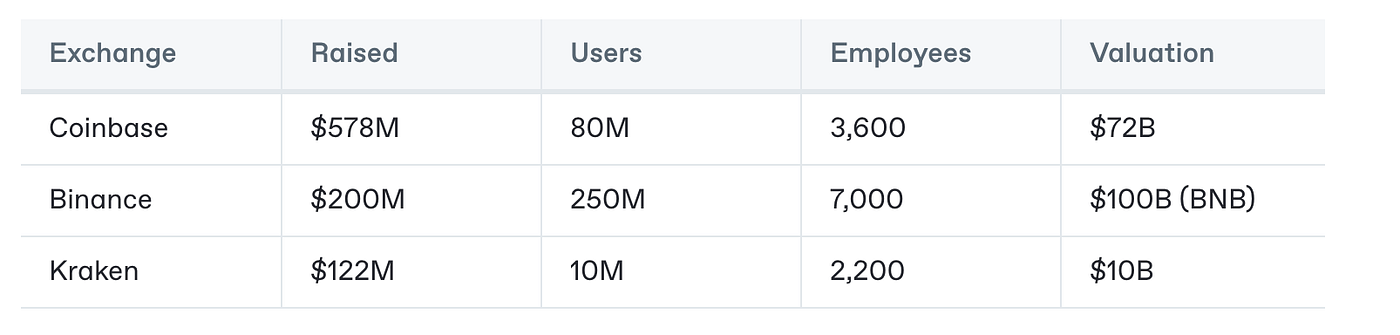
Worst of all, the users end up paying a premium **without experiencing any of the benefits of the decentralized technology**. Most users never install a crypto wallet and do not leave their walled gardens due to complicated onboarding flows and poor user experience. **That’s why users do not understand what crypto is**. Using Coinbase or Binance is no different than using a well-run fintech application.

A similar thing happened in the web era when Yahoo and other search directories monopolized the entries and exits into the web. **Centralized exchanges are the current embodiment of search directories.**

In order to bring mass adoption to the on-chain financial system, we need a new type of exchange, the modular exchange.

#### What is the modular exchange? <a href="#id-810a" id="id-810a"></a>

**The modular exchange is built on decentralized technology, with non-custodial wallets and fintech level UI/UX.** Featuring the best features from CEX like fiat onramps and account recoverability without becoming a honeypot of user’s private information.

The modular exchange is **non-monolithic** and permeates every layer of the stack. Each layer is **built upon the leaders of DeFi**. Same way the apple store is not a separate application that you need to visit before opening a mobile app or the browser is not a separate app that you need to use before browsing a site. **They are seamless integrated experiences**.

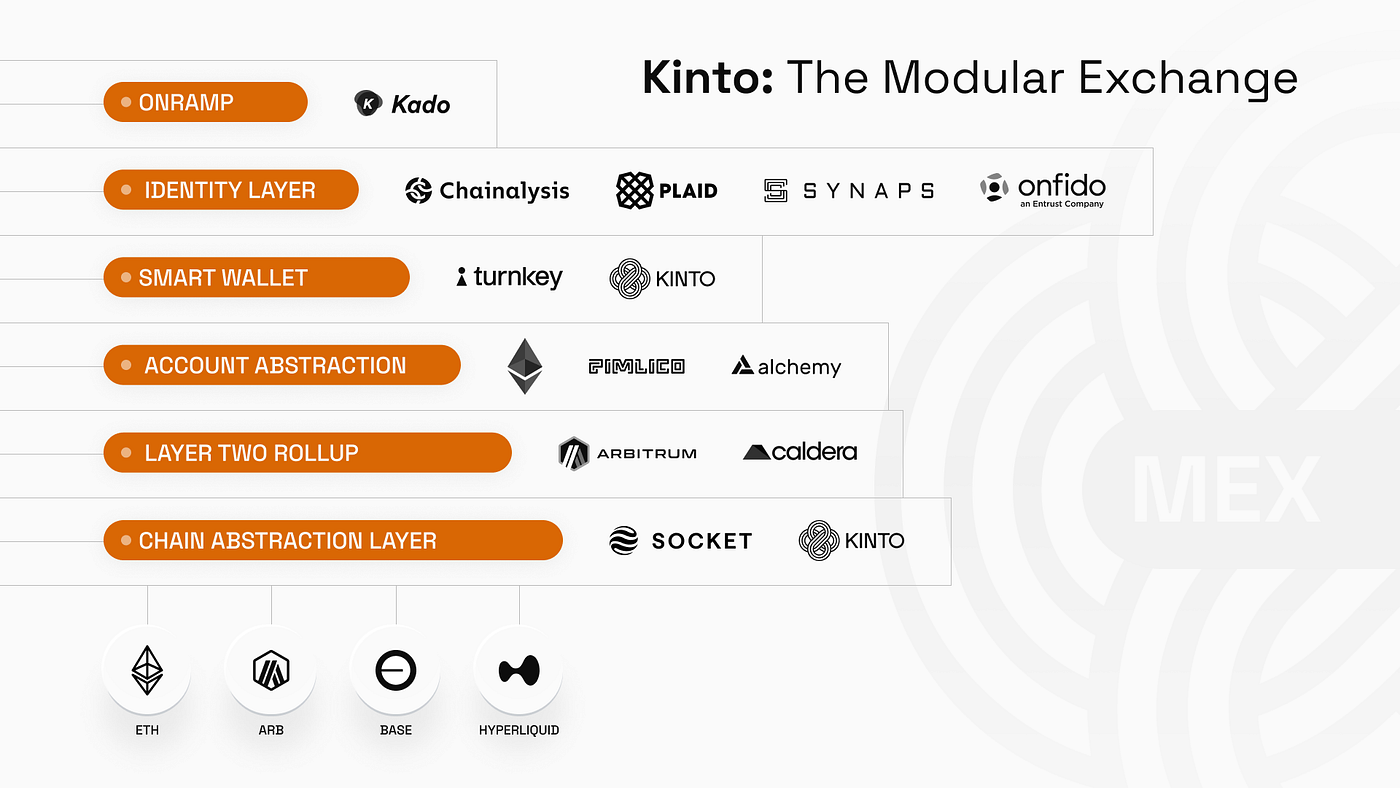
The modular exchange needs the following layers from top to bottom:

1\. **A non-custodial smart wallet that is fully recoverable and allows you to access the crypto ecosystem freely**. Account abstraction is a must to be able to bundle users transactions and abstract gas costs.

2\. An **identity layer that meets compliance requirements but always keeps users in charge of their own data**. User’s data is private and on-chain information is not linked to users PII.

3\. An **onramp/offramp layer** that allows users to buy/sell crypto directly from their bank account or debit/credit cards.

4\. A **chain abstraction layer that allows you to connect to all the best protocols and primitives of DeFi**, wherever they are.

5\. **A custom L2 rollup** to provide gasless transactions and preserve the KYC/AML compliance requirements.

<figure><img src="/files/fQYOLZid2Iel8PiKmUNe" alt=""><figcaption></figcaption></figure>

#### The Portal to On-Chain Finance <a href="#id-1933" id="id-1933"></a>

Centralized exchanges typically provide swapping, trading, staking and other financial services. **All of these services are now available on-chain, with comparable liquidity, better performance and lower fees.**

A modular exchange does not rebuild these services, it builds on top of the leading protocols and puts them in front of its users.

<figure><img src="/files/6mQY6gCHumNduROeVzmF" alt=""><figcaption></figcaption></figure>

For example:

* Why swap on a CEX when you can swap directly on **Uniswap** without paying their spread premium?
* Why stake on a CEX and lose rewards when you can stake directly on **Lido**?
* Why lend/borrow on a CEX when you can lend/borrow directly on **Aave** and get higher rates?
* Why use their centralized order book when you can trade on **Hyperliquid** or dYdX?

Why settle for copycats when you can go directly to the best protocols in each-category on-chain?

A **modular exchange offers the best from each vertical.**

#### Security is not a choice <a href="#id-3167" id="id-3167"></a>

It’s crazy that after FTX, Mt Gox and multiple other centralized exchange hacks, people are still keeping their funds on exchanges.

**Centralized exchanges are not secure**. They are natural honeypots for hackers where both your identity and your funds are at risk. Worst of all, in order to meet ancient and outdated laws, these exchanges are forced to hold your KYC information and if there is a breach, they can be used as leverage against you.

A **modular exchange is non-custodial**, meaning only users can access their own funds. A modular exchange **should not store any user’s data.** The link between your identity and your on-chain address must be kept separate to avoid compromising user’s security.

A modular exchange should also **include wallet insurance by default**.

#### The Compliance Paradox <a href="#cc90" id="cc90"></a>

A modular exchange **must have features to KYC/AML users yet remain decentralized, non-custodial and user-owned.**

We can use the modular thesis to solve this problem. Users should always be in charge of their data and pick how they trust to store it. Meaning users should be able to choose their KYC provider so their data where they choose. Even if these providers were hacked, they do not have the users on-chain address and cannot link the accounts.

**A modular exchange does not store user PII and it is not a honeypot. Yet, it has KYC/AML features to offer fiat onramps and sybil resistance.** Even if the IRS manages to pass its [<mark style="color:purple;">onerous broker requirements</mark>](https://www.theblock.co/post/332496/us-irs-finalizes-controversial-tax-rule-requiring-defi-brokers-to-collect-user-trading-information), the modular exchange can meet these requirements.

Again, unlike CEXs, a modular exchange is also **non custodial** so users are always in charge of their own funds.

#### Power to the People <a href="#id-1db1" id="id-1db1"></a>

**One of the main benefits of crypto is that users become stakeholders with skin in the game**. Unfortunately, traditional exchanges operate like traditional companies and are governed as such even when they have released a token like Binance with BNB.

The **modular exchange is decentralized and user-owned with credible on-chain governance** that manages the fees collected.

<figure><img src="/files/mgjVe8yglYlZTleI1jkC" alt=""><figcaption></figcaption></figure>

#### Kinto as the first modular exchange <a href="#b17a" id="b17a"></a>

The modular exchange is not marketing hype or a whitepaper, it is a real product that you can use today.

Kinto **is the first modular exchange**. Kinto boasts a non-custodial smart wallet, identity layer, chain abstraction substrate and a custom rollup with enforced account abstraction and decentralized on-chain governance.

That allows Kinto to offer the onramp rails and compliance features typical of centralized exchanges while remaining **decentralized, non-custodial and credibly neutral**.

**On the flip side, Kinto is 10x more secure than any other rollup, wallet or centralized exchange**. Native wallet insurance, full non-custodial account recovery and a custom-built L2 that enforces account abstraction and disables EOAs to maximize security.

<figure><img src="/files/XK5Lr0lNv9JZaWQQh0CF" alt=""><figcaption></figcaption></figure>


# One Pager

## What Kinto Is

Kinto is the first blockchain network capable of supporting traditional financial services and DeFi. Combining over 100 interviews with leaders in traditional finance, and years of crypto experience, Kinto was created to allow for the seamless integration of capital, services, and assets from traditional finance and the crypto economy.&#x20;

&#x20;As a 100% KYC’ed Ethereum Layer 2 protocol with built-in insurance, **Kinto vastly reduces regulatory and financial risks** that are unavoidable on other chains and still maintains access to capital from the largest DeFi ecosystem in the world. &#x20;

**There is a chasm between regular finance and decentralized finance.** The Kinto network allows both TradFi and DeFi to interact with each other.  By bringing DeFi and traditional finance under one roof, Kinto creates a new interoperable and composable financial services ecosystem that will erase the barrier between the two.

By offering a safer, simpler, faster, and cheaper network built to DeFi and traditional finance requirements, Kinto provides the most attractive infrastructure for users, builders, and investors from both worlds.

## Key Features

<figure><img src="/files/OSHS0pwJXmsIGRzwpzjw" alt=""><figcaption></figcaption></figure>

## **Why is Kinto Necessary**

**The Problem: Crypto Capital is Isolated from the Financial System**

There is an oil and water separation between DeFi and traditional finance.  Institutional capital doesn’t want to deploy on a chain where anyone can [<mark style="color:purple;">dust their wallet with sanctioned funds</mark>](https://blockworks.co/news/defi-web-apps-block-users-hit-by-tornado-cash-dust-attack), and no protocol is safe from [<mark style="color:purple;">exploits</mark>](https://cryptoslate.com/crypto-lost-2-77-billion-to-hacks-exploits-in-2022/). &#x20;

**Traditional markets are cut off from the $1T of capital on-chain they could access and provide services to**. Startups trying to offer real-world assets on-chain have their hands tied behind their back: existential compliance risk prevents them from allowing the assets to be transferable or usable on other protocols.  Bluechip DeFi protocols have gone so far as to launch [<mark style="color:purple;">KYC’ed instances of their service where companies can interact</mark>](https://blockworks.co/news/aave-arc-to-provide-30-financial-institutions-access-to-private-pools-of-defi-liquidity). Still, those **walled gardens operate in an isolated pool without access to the rest of the capital in DeFi.**&#x20;

And this separation is growing even starker as new regulatory regimes are already coming into place that requires[ <mark style="color:purple;">KYC even for simple on-chain transfers</mark>](https://www.kitco.com/news/2023-03-28/European-Parliament-to-impose-a-limit-of-1-000-on-unverified-crypto-payments.html)–which would make it impossible to use other chains even for basic transactions.&#x20;

**The Solution: KYC’ed Layer 2**

By offering KYC at the network level and sitting on top of Ethereum mainnet’s liquidity as an L2, Kinto is the only network where there doesn’t need to be a separation between the real-world financial system and DeFi. The network continuously verifies that all participants are OFAC compliant.  Security tokens can have additional built-in checks that prevent them from being transferred to a non-accredited investor.  Regulators can require KYC checks on any transactions, and Kinto is the only network that can easily provide that. But, beyond reducing regulatory risk,&#x20;

Kinto does this in an environment where financial risk has been reduced thanks to the impossibility of anonymous exploits and network-wide insurance. Kinto offers all this with the cutting-edge blockchain infrastructure whose attractive speed and low transaction costs have already [<mark style="color:purple;">drawn most of the on-chain activity off of L1 Ethereum and onto L2s</mark>](https://l2beat.com/scaling/activity).

**The Future: Kinto’s Unified Financial System**

Kinto makes the kind of composability and rehypothecation between DeFi protocols possible between DeFi and traditional finance’s investment products and services.  On Kinto, tokenized traditional ETFs can be provided as liquidity in an AMM.  Your bank could be linked to your wallet and automatically approves and issues a mortgage using funds from an on-chain money market and the tokenized deed to your house as collateral.  Corporate treasuries could be held in on-chain assets, and corporate debt issuance could happen through a Dapp. Any modern financial asset can be issued and traded on-chain, and any modern financial service can be provided on-chain.  Kinto is a cost-efficient, 24-hour, automated, insured network infrastructure for every financial product and service.


# Links

Podcasts, media appearances and articles featuring Kinto.

### Media

[<mark style="color:purple;">CoinDesk: Blockchain Startup Kinto Plans 'First KYC'd' Ethereum Layer-2 Network After Raising $5M</mark>](https://www.coindesk.com/business/2023/11/15/blockchain-startup-kinto-plans-first-kycd-ethereum-layer-2-blockchain-after-raising-5m/?_gl=1*6zm49q*_up*MQ..*_ga*MTc0MTEyMTc1LjE3MDAwNzkzMzc.*_ga_VM3STRYVN8*MTcwMDA3OTMzNi4xLjAuMTcwMDA3OTMzNi4wLjAuMA..)

[<mark style="color:purple;">Yahoo Finance: Kinto Raises $5 Million to Launch First KYC'd Layer 2 Blockchain for Financial Institutions and Decentralized Protocols</mark>](https://finance.yahoo.com/news/kinto-raises-5-million-launch-143000821.html)

[<mark style="color:purple;">Blockster: Kinto’s 100% KYC’d L2 Blockchain Secures $5M to Bridge TradFi and DeFi</mark>](https://blockster.com/banking-the-unbanked-kinto-raises-5-million-to-pave-the-way-for-kycd-layer-2-blockchain)

[<mark style="color:purple;">Crypto News: Blockchain Startup Kinto Plans 'First KYC'd' Ethereum Layer-2 Network After Raising $5M</mark>](https://cryptonews.net/news/finance/27842888/)

[<mark style="color:purple;">The Block: Ethereum Layer 2 Kinto migrates to the Arbitrum ecosystem</mark>](https://www.theblock.co/post/263948/ethereum-layer-2-kinto-migrates-to-arbitrum-ecosystem)

[<mark style="color:purple;">Cision PR Newswire: Kinto Launches as a Layer 2 in Arbitrum Ecosystem</mark>](https://www.prnewswire.com/news-releases/kinto-launches-as-a-layer-2-in-arbitrum-ecosystem-301993897.html?tc=eml_cleartime)

[<mark style="color:purple;">The Currency Analytics: Bridging Traditional Finance and DeFi - Ethereum Layer 2 Kinto Migrates to Arbitrum</mark>](https://thecurrencyanalytics.com/altcoins/bridging-traditional-finance-and-defi-ethereum-layer-2-kinto-migrates-to-arbitrum-82370.php/amp)

[<mark style="color:purple;">Blockonomi: Kinto Migrates to Arbitrum, Bringing Compliance to DeFi</mark>](https://blockonomi.com/kinto-migrates-to-arbitrum-bringing-compliance-to-defi/)

[<mark style="color:purple;">International Business Times: Crypto Must Embrace KYC To Attract TradFi Into DeFi by Ramon Recuero</mark> ](https://www.ibtimes.com/crypto-must-embrace-kyc-attract-tradfi-defi-3719033)

[<mark style="color:purple;">Cryptonews: Crypto KYC Solutions Advance to Ensure Adoption and Better User Experience</mark>](https://cryptonews.com/news/crypto-kyc-solutions-advance-to-ensure-adoption-and-better-user-experience.htm)

[<mark style="color:purple;">Blockworks: Wall Street is missing out on DeFi by Ramon Recuero</mark>](https://blockworks.co/news/wall-street-defi-security-compliance)

[<mark style="color:purple;">Cointelegraph: BlackRock aware that RWAs are ‘multitrillion-dollar opportunity’ — Kinto co-founder</mark>](https://cointelegraph.com/news/blackrock-aware-that-rwas-are-multi-trillion-dollar-opportunity-kinto-co-founder)

[<mark style="color:purple;">Cryptonews: Kinto CEO Ramon Recuero on the impact of real-world assets</mark>](https://crypto.news/kinto-ceo-ramon-recuero-on-the-impact-of-real-world-assets/)\
\
[<mark style="color:purple;">Business Wire: Tokenized Asset Coalition Announces New Member Cohort and Releases 2024 State of Tokenization Report</mark>](https://www.businesswire.com/news/home/20240926935746/en/Tokenized-Asset-Coalition-Announces-New-Member-Cohort-and-Releases-2024-State-of-Tokenization-Report)\
\
[<mark style="color:purple;">Permissionless: The Mission to Tokenize $1T Onchain</mark> ](https://vimeo.com/1020239766/c5388fd33f)

[<mark style="color:purple;">CoinDesk: Brevan Howard Digital Deploys $20M on Ethereum-Based Kinto in Institutional DeFi Push</mark>](https://www.coindesk.com/business/2025/02/17/brevan-howard-digital-deploys-usd20m-on-ethereum-based-kinto-in-institutional-defi-push)

[<mark style="color:purple;">Cryptonews: SkyBridge Capital founder Anthony Scaramucci backs Kinto</mark>](https://crypto.news/skybridge-capital-founder-anthony-scaramucci-backs-kinto/)

[<mark style="color:purple;">Crypto.news: Crypto was supposed to be an exit—why are we more trapped than ever? by Ramon Recuero</mark> ](https://crypto.news/crypto-was-supposed-to-be-an-exit-why-are-we-trapped/)

[<mark style="color:purple;">Blockmedia: 킨토(KINTO), 보안과 개방성 동시에 잡는 ‘모듈형 DEX’ 실험</mark> ](https://www.blockmedia.co.kr/archives/879290?utm_source=telegram\&utm_medium=social)

[<mark style="color:purple;">Decrypt: Kinto to List $K Token on Gate.io, MEXC, and Kinto Exchange, Pioneering Fair Tokenomics in DeFi</mark>](https://decrypt.co/311903/kinto-to-list-k-token-on-gate-io-mexc-and-kinto-exchange-pioneering-fair-tokenomics-in-defi)

### Reports

[<mark style="color:purple;">Blockworks: Kinto: A Security-First L2</mark>](https://app.blockworksresearch.com/unlocked/kinto-a-security-first-l2)

[<mark style="color:purple;">Four Pillars: Kinto: The Secure Golden Road Guided by Modular DEX</mark> ](https://x.com/FourPillarsFP/status/1904830908332691589)

[<mark style="color:purple;">Four Pillars: 킨토: 모듈형 DEX가 안내하는 안전한 골든로드</mark>](https://x.com/FourPillarsKR/status/1904831146841825586)

### Podcasts

[<mark style="color:purple;">Crypto Hipster: Ramon Recuero, October 26 2023 - Why KYC AML and Black Swan Insurance are Essential Pillars to Onboard Institutions into Decentralized Protocols</mark>](https://podcasters.spotify.com/pod/show/crypto-hipster-podcast/episodes/Why-KYC--AML-and-Black-Swan-Insurance-are-Essential-Pillars-to-Onboard-Institutions-into-Decentralized-Protocols--with-Ramon-Recuero--Kinto-e2b2fvg/a-aahb59f)

[<mark style="color:purple;">Living on Blockchain: Decoding the Future of Finance with Ramon Recuero, CEO and Co-founder of Kinto</mark> ](https://podcasters.spotify.com/pod/show/livingonblockchain/episodes/EP-66-Decoding-the-Future-of-Finance-with-Ramon-Recuero--CEO--Co-founder-of-Kinto-e2cluua/a-aamc5jt)

[<mark style="color:purple;">Leviathan News: How Kinto is Building a Safer L2 w/ Ramon Recuero</mark>](https://www.youtube.com/watch?v=oel2wdMASbk)

[<mark style="color:purple;">Wallfacer Labs Podcast: Kinto - Building a safer L2 with Alan Keegan</mark>](https://www.buzzsprout.com/2254231/14371316-6-alan-keegan-kinto-building-a-safer-l2)

[<mark style="color:purple;">The Crypto Narratives Podcast: Kinto with Ramon Recuero</mark>](https://open.spotify.com/episode/6BGhqFeyxpXd0sm3OI5JTo)&#x20;

[<mark style="color:purple;">Empire: Can a KYC'ed L2 Chain Unlock the Next Wave of Crypto Adoption? | Ramon Recuero, Kinto Co-Founder</mark>](https://www.youtube.com/watch?v=LEP1Uko69SQ)

[<mark style="color:purple;">DeFi Download: Kinto: Is a KYC L2 the way that institutional capital gets brought on chain? with Ramon Recuero</mark>](https://www.youtube.com/watch?v=OQ4Q_f5MCT0)

[<mark style="color:purple;">The Agenda: Real-world asset tokenization puts everything on blockchain (feat. Kinto) with Ramon Recuero</mark> ](<https://www.buzzsprout.com/2096305/15466181-real-world-asset-tokenization-puts-everything-on-blockchain-feat-kinto >)

[<mark style="color:purple;">Smart Economy Podcast: Interview with Ramon Recuero from Kinto at Permissionless III 2024</mark>](https://www.youtube.com/watch?v=eo1Sz5S_pPg\&feature=youtu.be)

### Articles

[<mark style="color:purple;">Introducing Kinto - Ramon Recuero</mark> ](https://medium.com/mamori-finance/%EF%B8%8F-introducing-kinto-%EF%B8%8F-dae3666b2b3f)

[<mark style="color:purple;">Kinto Unveils KYC Demo - Ramon Recuero</mark>](https://medium.com/mamori-finance/%EF%B8%8F-kinto-unveils-kyc-demo-1f7cf8da3bc7)

[<mark style="color:purple;">Kinto Launch Partner Program - Ramon Recuero</mark> ](https://medium.com/mamori-finance/kinto-launch-partner-program-71f69d638f92)

[<mark style="color:purple;">User Owned KYC - Ramon Recuero</mark> ](https://medium.com/mamori-finance/user-owned-kyc-45b54f73d76b)

[<mark style="color:purple;">Centralization is a Cost - Alan Keegan</mark> ](https://medium.com/mamori-finance/centralization-is-a-cost-72f631369b42)

[<mark style="color:purple;">The RWA Cycle: This Time It’s Different - Alan Keegan</mark>](https://medium.com/mamori-finance/the-rwa-cycle-this-time-its-different-8cb71bc0ecad)

[<mark style="color:purple;">Kinto's Native Sybil Resistance - Kinto Team</mark> ](https://medium.com/mamori-finance/kintos-native-sybil-resistance-cad334ccafd3)

[<mark style="color:purple;">Kinto's Launch: Engen - Ramon Recuero</mark>](https://medium.com/mamori-finance/kintos-launch-engen-1755d7cd53d6)&#x20;

[<mark style="color:purple;">Kinto launches as an Arbitrum L2 - Ramon Recuero</mark>](https://medium.com/mamori-finance/kinto-is-now-an-arbitrum-l2-61f8a8e6763e)&#x20;

[<mark style="color:purple;">Why Kinto Is Building On-Chain KYC - Kinto Team</mark>](https://medium.com/mamori-finance/why-kinto-is-building-on-chain-kyc-8cc5a2f407cc)

[<mark style="color:purple;">Kinto and the Art of Invisible Tech with Web3 Account Abstraction - Kinto Team</mark>](https://medium.com/mamori-finance/kinto-and-the-art-of-invisible-tech-with-web3-account-abstraction-91965ce1594b)

[<mark style="color:purple;">Kinto goes modular with Celestia - Ramon Recuero</mark> ](https://medium.com/mamori-finance/%EF%B8%8F-kinto-goes-modular-with-celestia-43bbff3a7e30)

[<mark style="color:purple;">Simplifying Self-Custody: Smart Accounts on Kinto - Victor Sanchez</mark>](https://medium.com/mamori-finance/simplifying-self-custody-smart-accounts-on-kinto-0f10c4840923)

[<mark style="color:purple;">Kinto’s Launch: The Set-Up - Ramon Recuero</mark>](https://medium.com/mamori-finance/%EF%B8%8F-kintos-launch-the-set-up-7eddfbb4bc38)

[<mark style="color:purple;">Engen Phase III — The Rescue - Ramon Recuero</mark>](https://medium.com/mamori-finance/engen-phase-iii-the-rescue-37a986dc81f8)

[<mark style="color:purple;">Kinto Oshigaru Program is now live - Kinto Team</mark>](https://medium.com/mamori-finance/kinto-oshigaru-program-is-now-live-17ffd2db7e46)

[<mark style="color:purple;">Securing Kinto - Ramon Recuero</mark>](https://medium.com/mamori-finance/securing-kinto-bd1c87e7f5dd)

[<mark style="color:purple;">Engen Phase IV - The Commitment - Ramon Recuero</mark> ](https://medium.com/mamori-finance/engen-phase-iv-the-commitment-b8f5cf58d4cd)

[<mark style="color:purple;">Engen Update — Numbers/Rewards - Ramon Recuer</mark>](https://medium.com/mamori-finance/%EF%B8%8F-engen-update-numbers-rewards-00f96370ceac)<mark style="color:purple;">o</mark>&#x20;

[<mark style="color:purple;">Kinto announce new badge: Follower - Kinto Team</mark>](https://medium.com/mamori-finance/kinto-announce-new-badge-follower-%E3%81%97%E3%82%93%E3%81%98%E3%82%83-%E4%BF%A1%E8%80%85-ec98c9196b5e)

[<mark style="color:purple;">Engen Update — Launch is Coming - Ramon Recuero</mark> ](https://medium.com/mamori-finance/%EF%B8%8F-engen-update-launch-is-coming-6daf25c6c27a)

[<mark style="color:purple;">Engen Is Over. Kinto is launching - Ramon Recuero</mark>](https://medium.com/mamori-finance/%EF%B8%8F-engen-is-over-kinto-is-launching-d9f2dd49fb2e)

[<mark style="color:purple;">Engen Rewards - Ramon Recuero</mark> ](https://medium.com/mamori-finance/%EF%B8%8F-engen-rewards-99f5012aac56)

[<mark style="color:purple;">Kinto & Socket — Chain Abstraction - Ramon Recuero</mark> ](https://medium.com/mamori-finance/kinto-socket-chain-abstraction-78928bbbe04d)

[<mark style="color:purple;">Kinto Constitution - Ramon Recuero</mark> ](https://medium.com/mamori-finance/kinto-constitution-ad0a49d1a96e)

[<mark style="color:purple;">Kinto Launch: Mountain Protocol - Ramon Recuero</mark> ](https://medium.com/mamori-finance/kinto-launch-mountain-protocol-45e365384321)

[<mark style="color:purple;">Kinto Mining Program is live - Ramon Recuero</mark> ](https://medium.com/mamori-finance/%EF%B8%8F-kinto-mining-program-is-live-344891cbaa4b)

[<mark style="color:purple;">Kinto launches USDe & sUSDe - Ramon Recuero</mark> ](https://medium.com/mamori-finance/%EF%B8%8F-kinto-launch-usde-susde-ec03f51e27e0)

[<mark style="color:purple;">Kinto launches SolvBTC - Kinto Team</mark>](<https://medium.com/mamori-finance/%EF%B8%8F-kinto-launches-solvbtc-c00d6b7e7650 >)

[<mark style="color:purple;">Kinto launches USD+ - Kinto Team</mark>](https://medium.com/mamori-finance/%EF%B8%8F-kinto-launches-usd-fef7978aa811)

[<mark style="color:purple;">June 2024 - Community Update - Kinto Team</mark>](https://medium.com/mamori-finance/%EF%B8%8F-june-2024-community-update-c69f6bc1922f)

[<mark style="color:purple;">Kinto launches Wallet Insurance - Ramon Recuero</mark> ](https://medium.com/mamori-finance/kinto-launches-wallet-insurance-d61c4de9626a)

[<mark style="color:purple;">Kinto integrates stUSD - Kinto Team</mark>](https://medium.com/mamori-finance/%EF%B8%8F-kinto-integrates-stusd-6d0a6ed9f7be)

[<mark style="color:purple;">Kinto is now using 'blobs' - Victor Sanchez</mark> ](https://medium.com/mamori-finance/kinto-is-now-using-blobs-057122be67dd)

[<mark style="color:purple;">New Kinto Badge: Gakusha - Kinto Team</mark>](https://medium.com/mamori-finance/new-kinto-badge-gakusha-%E5%AD%A6%E8%80%85-bc049ab998f8)

[<mark style="color:purple;">Kinto launches XAUt - Kinto Team</mark>](https://medium.com/mamori-finance/%EF%B8%8F-kinto-launches-xaut-55fa15e80bac)

[<mark style="color:purple;">July 2024 - Community Update - Kinto Team</mark>](https://medium.com/mamori-finance/%EF%B8%8F-july-2024-community-update-fa350dfd50ad)

[<mark style="color:purple;">Kinto launches Wallet SDK - Ramon Recuero</mark>](https://medium.com/mamori-finance/kinto-launches-the-wallet-sdk-239a88265f17)

[<mark style="color:purple;">Kinto launches the Developer’s Forge - Victor Sanchez</mark> ](https://medium.com/mamori-finance/kinto-launches-the-developers-forge-caaa41742584)

[<mark style="color:purple;">New Discord Role: Follower - Kinto Team</mark>](https://medium.com/mamori-finance/new-discord-role-follower-b17aee40b704)

[<mark style="color:purple;">Kinto launches Stock Trading - Ramon Recuero</mark> ](https://medium.com/mamori-finance/️-kinto-launches-stock-trading-be592398fde9)

[<mark style="color:purple;">Pyth Price Feeds Launch on Kinto - Kinto Team</mark>](https://medium.com/mamori-finance/pyth-price-feeds-launch-on-kinto-aab65d7cc554)

[<mark style="color:purple;">Kadai (課題) — Kinto Community Assignment - Kinto Team</mark>](https://medium.com/mamori-finance/kadai-%E8%AA%B2%E9%A1%8C-kinto-community-assignment-9c0958ecdba8)

[<mark style="color:purple;">Kinto Launches Blockscout Block Explorer for Kinto - Kinto Team</mark>](https://medium.com/mamori-finance/kinto-launches-blockscout-block-explorer-for-kinto-7fa341b31b58)

[<mark style="color:purple;">August 2024 - Community Update - Kinto Team</mark>](https://medium.com/mamori-finance/%EF%B8%8F-august-2024-community-update-2b0a5a6599f7)

[<mark style="color:purple;">Kinto Launches SOL - Kinto Team</mark>](https://medium.com/mamori-finance/%EF%B8%8F-kinto-launches-sol-db73f738a966)

[<mark style="color:purple;">Kinto is now integrated in Tenderly.co - Victor Sanchez</mark>](https://medium.com/mamori-finance/kinto-is-now-integrated-in-tenderly-co-b78ab9390345)

[<mark style="color:purple;">Kinto Launches Maker (MKR)</mark>](https://medium.com/mamori-finance/%EF%B8%8F-kinto-launches-maker-mkr-c44cac82cc32) <mark style="color:purple;">- Kinto Team</mark>

[<mark style="color:purple;">Kinto Launches S\&P 500 ETF (SPY.d) - Kinto Team</mark>](https://medium.com/mamori-finance/%EF%B8%8F-kinto-launches-s-p-500-etf-spy-d-306637b8fd95)

[<mark style="color:purple;">Kinto becomes a member of the Tokenized Asset Coalition - Kinto Team</mark>](https://medium.com/mamori-finance/kinto-becomes-a-member-of-the-tokenized-asset-coalition-d73384c64372)

[<mark style="color:purple;">Announcing the Kinto Security Council - Victor Sanchez</mark>](https://medium.com/mamori-finance/announcing-the-kinto-security-council-ff26c7eb2c11)

[<mark style="color:purple;">Introducing ETHOnline Kinto Winner: CollabX - Kinto Team</mark>](https://medium.com/mamori-finance/introducing-ethonline-kinto-winner-collabx-4440264956e3)

[<mark style="color:purple;">Musubi — Chainless Swaps - Ramon Recuero</mark> ](https://medium.com/mamori-finance/musubi-chainless-swaps-b3074bcdefb9)

[<mark style="color:purple;">Kinto Launches EIGEN - Kinto Team</mark>](https://medium.com/mamori-finance/%EF%B8%8F-kinto-launches-eigen-017148f311d6)

[<mark style="color:purple;">September 2024 — Community Update - Kinto Team</mark>](https://medium.com/mamori-finance/%EF%B8%8F-september-2024-community-update-a3d65ed3fb9f)

[<mark style="color:purple;">Airdrop Season One— Momiji - Ramon Recuero</mark>](https://medium.com/mamori-finance/airdrop-season-one-momiji-8aee69b665a1)

[<mark style="color:purple;">Kinto Launches Tesla Inc. - Kinto Team</mark>](https://medium.com/mamori-finance/%EF%B8%8F-kinto-launches-tesla-inc-tsla-d-197fbfd2587e?source=collection_home---4------0-----------------------)

[<mark style="color:purple;">Memes on Kinto - Ramon Recuero</mark> ](https://medium.com/mamori-finance/memes-on-kinto-b83c717b0bcc)

[<mark style="color:purple;">Kinto Launches Coinbase Wrapped Staked ETH (cbETH) - Kinto Team</mark>](https://medium.com/mamori-finance/kinto-launches-coinbase-wrapped-staked-eth-cbeth-227e118371d0)

[<mark style="color:purple;">Kinto Launches Coinbase Wrapped BTC (cbBTC) - Kinto Team</mark>](https://medium.com/mamori-finance/kinto-launches-coinbase-wrapped-btc-cbbtc-723a43b67bd6)

[<mark style="color:purple;">October 2024 - Community Update - Kinto Team</mark>](https://medium.com/mamori-finance/%EF%B8%8F-%EF%B8%8Foctober-2024-community-update-1d42378111b0)

[<mark style="color:purple;">Musubi — Lending & Borrowing - Ramon Recuero</mark> ](https://medium.com/mamori-finance/musubi-chainless-lending-376cc24b313c)

[<mark style="color:purple;">Kinto launches GHO, the Aave-native stable coin - Kinto Team</mark>](https://medium.com/mamori-finance/kinto-launches-gho-the-aave-native-stable-coin-83904168567c)

[<mark style="color:purple;">Kinto launches Rocket Pool ETH (rETH) - Kinto Team</mark>](https://medium.com/mamori-finance/kinto-launches-rocket-pool-eth-reth-4cab98b163d9)

[<mark style="color:purple;">Kinto launches ARB, the native token of Arbitrum - Kinto Team</mark>](https://medium.com/mamori-finance/kinto-launches-arb-the-native-token-of-arbitrum-2051f6793a40)

[<mark style="color:purple;">Kinto launches LINK - Kinto Team</mark>](https://medium.com/mamori-finance/kinto-launches-link-944afdb61c68)

[<mark style="color:purple;">November 2024 - Community Update - Kinto Team</mark>](https://medium.com/mamori-finance/%EF%B8%8F-%EF%B8%8Fnovember-2024-community-update-d2959c6d76dc)

[<mark style="color:purple;">Airdrop Season Two — Onsen - Ramon Recuero</mark> ](https://medium.com/mamori-finance/%EF%B8%8F-airdrop-season-two-onsen-a57e766e9818)

[<mark style="color:purple;">Kinto Launches MSTR, MicroStrategy Inc. Stock</mark>](https://medium.com/mamori-finance/kinto-launches-mstr-microstrategy-inc-stock-aaa9577b293c)[ <mark style="color:purple;">- Kinto Team</mark>](https://medium.com/mamori-finance/kinto-launches-mstr-microstrategy-inc-stock-aaa9577b293c)

[<mark style="color:purple;">Kinto Launches QQQ, an ETF based on the Nasdaq-100 Index - Kinto Team</mark>](https://medium.com/mamori-finance/kinto-launches-qqq-an-etf-based-on-the-nasdaq-100-index-a1d6b85fe7bd)

[<mark style="color:purple;">Musubi - Hyperliquid Perpetuals - Ramon Recuero</mark> ](https://medium.com/mamori-finance/musubi-hyperliquid-perpetuals-bd112ac1be9c)

[<mark style="color:purple;">Kinto Launches HOOD, the stock of Robinhood Markets, Inc. - Kinto Team</mark>](https://medium.com/mamori-finance/kinto-launches-hood-the-stock-of-robinhood-markets-inc-d6bfacd15e2d)

[<mark style="color:purple;">Kinto Launches GME, the stock of GameStop Corp - Kinto Team</mark>](https://medium.com/mamori-finance/kinto-launches-gme-the-stock-of-gamestop-corp-4a3a6944551b)

[<mark style="color:purple;">The Modular Exchange - Ramon Recuero</mark> ](https://medium.com/mamori-finance/the-modular-exchange-997c39215d5c)

[<mark style="color:purple;">Kinto Launches Meta Platforms, Inc. Class A Common Stock - Kinto Team</mark>](https://medium.com/mamori-finance/kinto-launches-meta-platforms-inc-class-a-common-stock-b0d5c81b420c)

[<mark style="color:purple;">December 2024 — Community Update - Kinto Team</mark>](https://medium.com/mamori-finance/%EF%B8%8F-%EF%B8%8Fdecember-2024-community-update-00659a7ef4b4)

[<mark style="color:purple;">Kinto Launches Hut 8 Corp Stock - Kinto Team</mark>](https://medium.com/mamori-finance/kinto-launches-hut-8-corp-stock-4e3811f87dcd)

[<mark style="color:purple;">Kinto Launchpad - ICOs are back - Ramon Recuero</mark> ](https://medium.com/mamori-finance/kinto-launchpad-icos-are-back-47a402b9f44b)

[<mark style="color:purple;">K is here — How to join the token sale - Ramon Recuero</mark> ](https://medium.com/mamori-finance/%EF%B8%8F-k-token-sale-ico-mechanics-6e364e427c0a)

[<mark style="color:purple;">January Community Update - Kinto Team</mark> ](https://medium.com/mamori-finance/%EF%B8%8F-%EF%B8%8Fjanuary-2024-community-update-7c18fe924778)

[<mark style="color:purple;">Kinto Token Auction Results - Ramon Recuero</mark> ](https://medium.com/mamori-finance/%EF%B8%8Fkinto-token-auction-results-a5755c6e63be)

[<mark style="color:purple;">Beyond TVL — A New Age - Ramon Recuero</mark> ](https://medium.com/mamori-finance/%EF%B8%8F-beyond-tvl-kinto-25518ac6419b)

[<mark style="color:purple;">Introducing the $K Economy - Ramon Recuero</mark>](https://medium.com/mamori-finance/%EF%B8%8F-introducing-the-k-economy-7dbe26ad7d6b)

[<mark style="color:purple;">Spring Mining Season — Sakura - Ramon Recuero</mark> ](https://medium.com/mamori-finance/spring-mining-season-sakura-d529db8399f7)

[<mark style="color:purple;">Kinto is now a Stage1\* Appchain - Victor Sanchez</mark> ](https://medium.com/mamori-finance/%EF%B8%8F-k-listing-day-guide-3780ec003040)

[<mark style="color:purple;">$K Listing Day Guide - Ramon Recuero</mark> ](https://medium.com/mamori-finance/%EF%B8%8F-k-listing-day-guide-3780ec003040)

[<mark style="color:purple;">$K Reloaded — Tokenomics Update - Ramon Recuero</mark>](https://medium.com/mamori-finance/%EF%B8%8F-k-reloaded-tokenomics-update-60bd17eaa2e1)

[<mark style="color:purple;">$K is now DeFi Collateral - Ramon Recuero</mark>](https://medium.com/mamori-finance/%EF%B8%8F-k-is-now-defi-collateral-d8ba57ad47d7)&#x20;

[<mark style="color:purple;">New Kinto Season — Natsu (夏) - Ramon Recuero</mark> ](https://medium.com/mamori-finance/%EF%B8%8F-summer-season-natsu-%E5%A4%8F-695736230402)

[<mark style="color:purple;">Post-Mortem — $K Proxy Hack & Our Path Forward - Ramon Recuero</mark> ](https://medium.com/mamori-finance/%EF%B8%8F-post-mortem-k-proxy-hack-our-path-forward-c2c3809882c6)


# Partners and Collaborators

This page contains Kinto's announced partnerships and collaborations - we have plenty more coming so watch this space for developments.

[<mark style="color:purple;">Adapt3r</mark>](https://www.adapt3r.com/)

[<mark style="color:purple;">Ethena</mark>](https://ethena.fi/)

[<mark style="color:purple;">Mountain Protocol</mark> ](https://mountainprotocol.com/)

[<mark style="color:purple;">TProtocol</mark> ](https://www.tprotocol.io/)

[<mark style="color:purple;">Opdefi</mark>](https://opdefi.com/)

[<mark style="color:purple;">Dinari</mark>](https://dinari.com/)

[<mark style="color:purple;">Centrifuge</mark>](https://centrifuge.io/)

[<mark style="color:purple;">Truefi</mark>](https://truefi.io/)

[<mark style="color:purple;">SolvBTC</mark> ](https://app.solv.finance/solvbtc)

[<mark style="color:purple;">Angle</mark>](https://www.angle.money/)

[<mark style="color:purple;">Gas.zip</mark>](https://www.gas.zip/)

[<mark style="color:purple;">Collar Protocol</mark> ](https://www.collarprotocol.xyz/)

[<mark style="color:purple;">Backed</mark>](https://backed.fi/)

[<mark style="color:purple;">RWA.xyz</mark>](https://www.rwa.xyz/)

[<mark style="color:purple;">Polytrade</mark>](https://www.polytrade.finance/)

[<mark style="color:purple;">Atlendis</mark>](https://www.atlendis.io/)

[<mark style="color:purple;">Zoth</mark>](https://zoth.io)

[<mark style="color:purple;">Revest</mark> ](https://app.revest.finance/)

[<mark style="color:purple;">Hinkal</mark>](https://hinkal.pro/)


# FAQ

This page answers common questions about Kinto.

**What is Kinto?**

Kinto is the modular exchange. Access the best opportunities in DeFi through our tailored blockchain and non-custodial smart wallet, engineered for maximum security and seamless user experience. You can think about Kinto as offering the best of both worlds from a CEX and a DEX as well as opportunities that aren't available on either. You can read more [<mark style="color:purple;">here</mark>](https://medium.com/mamori-finance/the-modular-exchange-997c39215d5c).

**Is there a signup walkthrough?**&#x20;

You can find one [<mark style="color:purple;">here</mark>](https://docs.kinto.xyz/kinto-the-safe-l2/user-guides/kyc-walkthrough).&#x20;

**When did Kinto launch?**

Kinto launched in May 2024.&#x20;

**What is $K?**

$K is the governance token of Kinto.

**When was Kinto Token listed?**

31st March 2025.

**Why do I need to complete KYC to join Kinto?**

KYC helps keep the network more secure and makes it sybil resistant. It also enables use cases that are not possible else where on-chain - such as holding stocks and other RWA products as well as enabling institutions with specific compliance requirements to participate on-chain.&#x20;

**What is a passkey and why does Kinto use them?**

A passkey is a way to sign in without passwords. It utilises the security capabilities of your devices and is more secure and easier to use than both passwords and 2FA methods. For example, passkeys range from Touch or Face ID to device PIN. If you want to test whether your device can create passkeys, a great demo can be found [here](https://www.passkeys.io/).

**What is user-owned KYC?**&#x20;

User-owned KYC or Self-Sovereign KYC enables the difference between owning your identity and having no identity.&#x20;

To create a wallet on the Kinto network, every user must pass a KYC check, but PII is NEVER tied to the user’s blockchain identity.&#x20;

Users can selectively reveal the minimum possible identity information to access certain financial services while retaining complete sovereignty over their identity.&#x20;

With user-owned KYC, Kinto retains decentralized finance's openness and self-sovereignty while eliminating the barriers to integration and usage between traditional financial institutions and decentralized protocols. Learn more about user-owned KYC [<mark style="color:purple;">here</mark>](https://medium.com/mamori-finance/user-owned-kyc-45b54f73d76b).

**What is Account Abstraction?**

Account abstraction enables users to access crypto financial services without being forced to install a browser extension or store seed phrases/ private keys. On Kinto, applications can offer easy onboarding and account creation through username/password, 2FA, or mobile device keys while remaining non-custodial.

**How do I participate in the mining program?**

All you have to do is deposit capital onto Kinto. Read more[ <mark style="color:purple;">here.</mark>](/kinto-the-modular-exchange/reward-programs/mining-program)

**What’s the minimum deposit to participate in the mining program?**

As little as $20 via Base or Arbitrum - but higher capital and longer commitment will equal higher rewards.

**What does “Kinto” mean?**&#x20;

“Kinto" means golden road. &#x20;

**What is Engen/ Can I still earn Engen?**&#x20;

Engen was Kinto launch program that ran from November 2023 to 17th May 2024 when Kinto launched. Engen was credited to individuals who participated during this period.&#x20;

**What is Engen for/ What does being a Kinto Founding Member mean?**&#x20;

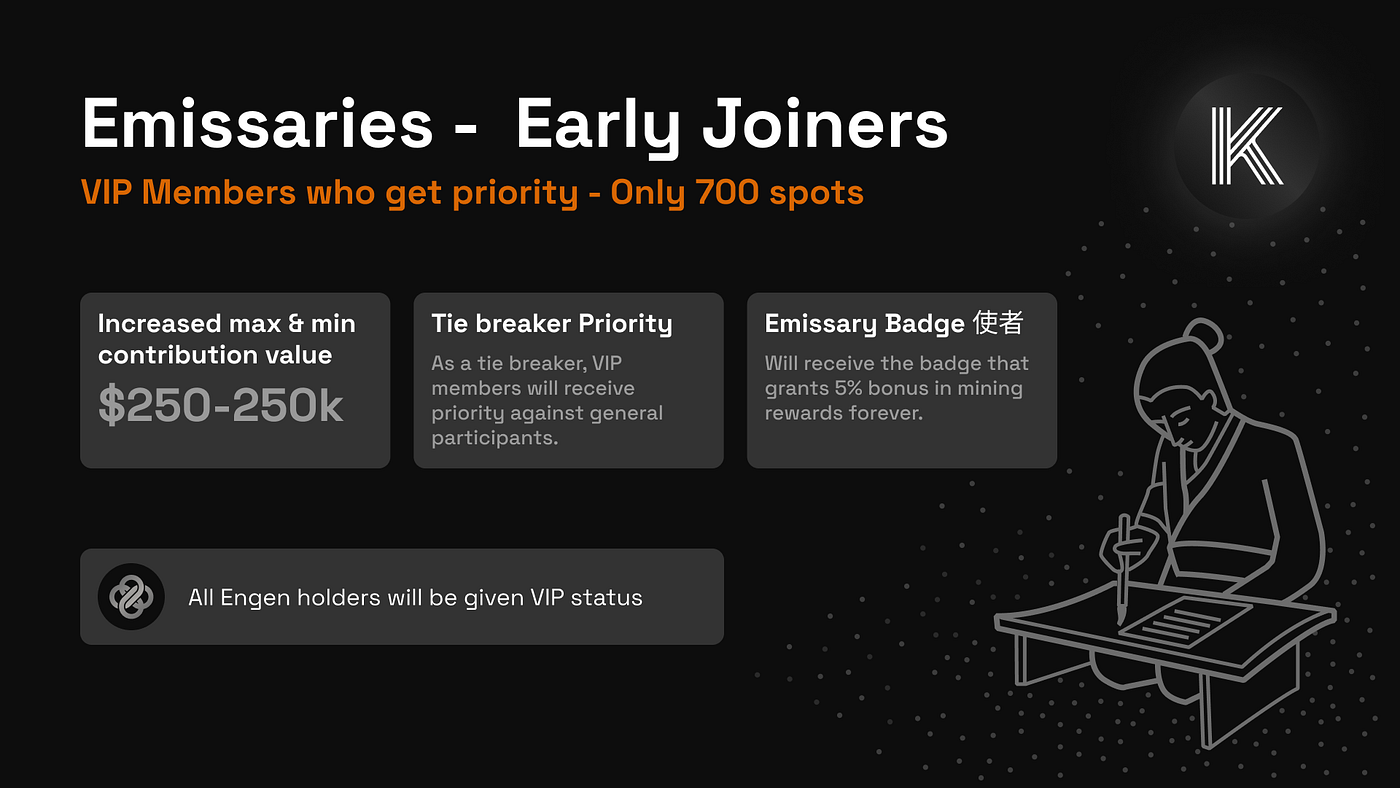
Everyone who participated in the Engen launch program before the end date is a Kinto Founding Member. These users were awarded Engen soulbound token - giving them the right to vote on three vital proto-governance proposals. You can read more about Engen proto-governance [<mark style="color:purple;">here</mark>](/kinto-the-modular-exchange/governance/engen-proto-governance).  These proposals were approved by the community and Engen holders will also be entitled to $K token allocation and a permanent 15% bonus in the mining program.&#x20;

**How can I provide feedback or contact Kinto?**

The best way to contact Kinto is to send a message in our [<mark style="color:purple;">Discord</mark>](https://discord.com/invite/utEYFxKFgB).

**What is the Kinto ID?**&#x20;

The Kinto ID is an NFT token that grants access to Kinto. It is provisioned to the user upon successful KYC completion with the users’ chosen KYC partners.&#x20;

Users cannot send a single transaction on the Kinto network without it. The token cannot be transferred to a different wallet. These NFTs are unique; one real-world identity can only receive one NFT.

**Does Kinto store any PII?**

Kinto does not store or own ANY user data. None.&#x20;

**Can PII be linked to on-chain accounts?**

PII is only saved in identity providers approved by governance and selected by the user. Information held by the identity providers cannot be linked to users' on-chain accounts except when each user chooses to do so with an application that requests it.

**How does Kinto ensure maximum security?**

Kinto provides KYC, insurance, AML, and fraud monitoring at the blockchain level.&#x20;

**How will Kinto be governed?**

Kinto will have a two-layer governance system fully on-chain. The protocol parameters, sequencer, and treasury will be voted on-chain by 9 Nios (Guardians).&#x20;

Token-holders will elect these 9 Nios on a rolling 6-month basis.&#x20;

You can learn more about Kinto’s governance in the [<mark style="color:purple;">Kinto Constitution</mark>](/kinto-the-modular-exchange/governance/kinto-constitution)<mark style="color:purple;">.</mark>

**Where can I see Kinto’s TVL?**&#x20;

You can check [<mark style="color:purple;">L2Beat</mark>](https://l2beat.com/scaling/projects/kinto). but this is only a partial view of TVL. With Musubi, our cross-chain liquidity engine, we’re not just securing idle TVL in our chain — we’re actively managing capital for our users across Mainnet, Arbitrum, Base, and Hyperliquid.

**Where can I find important links for the token?**&#x20;

* Contract on Arbitrum: <https://arbiscan.io/token/0x6ba19ee69d5dde3ab70185c801fa404f66fedb58>&#x20;
* Contract on Kinto: [https://explorer.kinto.xyz/token/0x010700808D59d2bb92257fCafACfe8e5bFF7aB8](https://explorer.kinto.xyz/token/0x010700808D59d2bb92257fCafACfe8e5bFF7aB87)&#x20;
* CoinGekco: <https://www.coingecko.com/en/coins/kinto>&#x20;
* CoinMarketCap: <https://coinmarketcap.com/currencies/kinto/>
* (Deprecated) contract on Arbitrum: <https://arbiscan.io/token/0x010700ab046dd8e92b0e3587842080df36364ed3><br>

***

**How will exchanges distribute new $K token after the hack?**\
\
Kinto has distributed enough new $K token to exchanges for them to apply the following rules:\
\
\- For any old $K tokens held at the block before the hack (ARB:[356170028](https://arbiscan.io/block/356170028)) users will receive new $K token at 1:1 ratio. (ie if you had 10 old $K, you will get 10 new $K)\
\
\- For any old $K tokens purchased in the 2h window after the hack users will get: (net purchase value)/7.48 new $K tokens. (7.48 was the $K token trading value before the hack)\
\
\- Any old $K deposited in exchanges after the hack will not be elegible for any new $K<br>


# Closing FAQ

**General**

Why shut down?\
577 ETH was stolen and new $1M debt was raised to restore operations. Although we were successful in restoring operations, difficulty in fundraising and market conditions made continuing impossible. We’re shutting down responsibly to protect users and creditors.

What happens to trading?\
We’ve pulled DEX liquidity and notified [<mark style="color:purple;">CEXs</mark>.](http://cexs.it) Users provided liquidity in Uniswap will remain until users withdraw their liquidity.\
\
Was Kinto L2 hacked?\
No. The exploit hit the legacy $K token proxy on Arbitrum via the CPIMP proxy vector. Kinto L2, wallets, user assets on the Kinto network and core infra were never breached.\
\
[<mark style="color:purple;">https://dedaub.com/blog/the-cpimp-attack-an-insanely-far-reaching-vulnerability-successfully-mitigated/</mark>](https://dedaub.com/blog/the-cpimp-attack-an-insanely-far-reaching-vulnerability-successfully-mitigated/?utm_source=chatgpt.com)

***

#### Assets & Withdrawals

How do I withdraw?\
Use the Kinto UI/Bridge/Wallets before Sep 30. A guide for withdrawals can be found in our docs here: <https://docs.kinto.xyz/kinto-the-modular-exchange/user-guides/kinto-withdrawals>

What if I forget to withdraw by Sep 30?\
We’ll convert remaining balances to USDC on Ethereum mainnet and deposit them into a perpetual claim contract you can claim anytime (contract address posted early Oct).

What about assets on Aave and Hyperliquid?\
You need to unwind the positions and withdraw your assets before Sep 30th.

Do I need to open a ticket to claim later?\
No. It’s an on-chain claim on mainnet from your wallet signer. Make sure you update your wallet signers. We will grab the first external signer that is set in your Kinto wallet.

***

#### Hack Victims (Morpho & Royco)

What do I receive?\
You will receive up to $1,000 per eligible address thanks to a founder good will grant ex-gratia. You will also receive any amount recovered from the hackers until every victim is covered.

Am I eligible?\
If your address appears in the datasets derived from:

* Kinto (Morpho): 0x5A1E00cA7E14CcA18b7a6EAb0A586ed7801bAbd3<br>
* Arbitrum (Royco): 0xD9e3c29Af13638B1F610C1272eC3c1Ad14d08f1A\
  …you’ll see your admitted amount in the portal.

You can see the full spreadsheet [<mark style="color:purple;">here</mark>](https://docs.google.com/spreadsheets/d/1RikCnzbx3yaP5hD5tHdzKsxvV7kHwEstJxWDu2hXlXw/edit?gid=1021741449#gid=1021741449). If you believe you should be on this list as a Kinto Morpho and/or Royco supplier please connect with through our discord server and open a ticket. We are also available at contact(at)kinto.xyz

What do I claim on October 1st?

* Founder Goodwill Grant (personal funds): up to $1,000 per eligible address (ex-gratia; doesn’t reduce future recovery).<br>
* CVR: Opt in (by signing once) to receive 100% of any future net recoveries until you’re made whole.\ <br>

Where do I claim?\
👉[ <mark style="color:purple;">https://kinto.xyz/cvr-claim</mark>](https://kinto.xyz/cvr-claim?utm_source=chatgpt.com)

Deadline?\
Please Accept & Claim by Nov 30, 23:59 UTC. Unclaimed provisional entries may be forfeited per the program terms.

Sanctions/AML?\
If your wallet is flagged, payments may be held until cleared.

***

#### Community Waterfall (only if excess)

Do holders/stakers get anything?\
Only if hacker recoveries exceed total victim amounts (100% repaid). Any excess is shared ex-gratia by snapshot:

* Staked $KINTO = 1.3× weight\ <br>
* Unstaked $KINTO = 1.0× weight\
  Snapshot block numbers will be posted in the portal.\ <br>

***

#### Staking & Airdrops

What about the ERA airdrop?\
Still happening as promised on Ethereum mainnet (target Oct 15).\
\
We’ll share details/tx when it goes live.

Anything I need to do?\
Ensure your Kinto wallet signers are updated before Sep 30 so any future distributions (if any) can be recognized to your wallet. Make sure you update your wallet signers. The first external signer that is set in your Kinto wallet that is not the passkey will be set to claim the airdrop.

***

#### Phoenix Creditors

Where does the remaining treasury go?\
100% of remaining protocol assets (\~$850k) are dedicated to repay Phoenix creditors (concurrent, pro-rata). This does not affect victim claims on any future hacker recoveries.

***

#### Key Dates

* Sep 30 — Last day to withdraw via Kinto UI/Bridge/Wallets; update EOA signers.<br>
* Oct 1st — Claim portal (CVR) for Morpho Victims and Kinto holders.<br>
* Early Oct — Mainnet USDC withdrawal contract live for any unwithdrawn user assets.<br>
* Oct 15 (target) — ERA airdrop on mainnet.<br>
* Sep 30, 23:59 UTC — Suggested deadline to Accept & Claim in CVR portal.<br>

***

#### Need help?

* Portal (victims):[ <mark style="color:purple;">https://kinto.xyz/cvr-claim</mark><br>](https://kinto.xyz/cvr-claim?utm_source=chatgpt.com)
* Support: open a ticket here or email [<mark style="color:purple;">contact@kinto.xyz</mark><br>](mailto:contact@kinto.xyz)
* Full post with details & links: [<mark style="color:purple;">https://medium.com/mamori-finance/kinto-is-shutting-down-fca59862f0e7</mark>](https://medium.com/mamori-finance/kinto-is-shutting-down-fca59862f0e7)\ <br>

Thank you for your patience and strength. We’re closing this chapter responsibly and will keep pursuing attacker recoveries for victims.

<br>


# Sign Up Walkthrough

This page contains a walkthrough of Kinto's sign up process.

When you arrive on the 'Welcome to Kinto' page, click 'Get Started'.&#x20;

<figure><img src="/files/IFEkdie3VYtLWKXeNiZ7" alt=""><figcaption></figcaption></figure>

Enter your email address to create your account and click 'Authenticate with Passkeys'.

<figure><img src="/files/I1ztoN3mjYW1IidkIsiB" alt="" width="563"><figcaption></figcaption></figure>

Create a passkey following the instructions on screen. You can decide how you would like the passkey generated - for example via, USB device, phone, tablets, your chrome profile or other 3rd party services.&#x20;

<figure><img src="/files/RbP7KUGUthsdymKYHKDd" alt="" width="563"><figcaption></figcaption></figure>

Once you have selected how you want the passkey generated, continue the process by clicking 'Continue'.&#x20;

<figure><img src="/files/Mb7lds2NVq2kxC9PXAoU" alt="" width="563"><figcaption></figcaption></figure>

You will then be prompted to verify your email. Check your email inbox and enter the verification code into the UI.&#x20;

Next you will see a page telling you to Verify your Identity. Select from 'I am and Individual' if you are a person or 'I am a corporation' if you are submitting on behalf of a business.&#x20;

<figure><img src="/files/gddr7Xae8Why14YxMTz5" alt="" width="563"><figcaption></figcaption></figure>

You will then be prompted to select a provider. You can learn more about the following steps required for each provider in the walkthrough pages for [<mark style="color:purple;">Synap</mark>](/kinto-the-modular-exchange/user-guides/kyc-walkthrough-1/synaps-walkthrough)<mark style="color:purple;">s</mark> and [<mark style="color:purple;">Plaid</mark>](/kinto-the-modular-exchange/user-guides/kyc-walkthrough-1/plaid-walkthrough)<mark style="color:purple;">.</mark>&#x20;

Once you have successfully completed KYC and it has been approved, it's time to create mint your KintoID. Your KintoID is like your passport to the Kinto network - it lets Kinto and the other products on the network know certain information about you without revealing any personal identifiable information e.g. this user has a valid KYC/AML check. Minting your ID is as simple as clicking a button and signing with your passkey.&#x20;

<figure><img src="/files/BxPhOlte7vkfJIhT15zr" alt=""><figcaption></figcaption></figure>

After your KintoID has been created, you will see a transaction confirmed pop up. Select 'close' to continue onto the next part of the process.&#x20;

<figure><img src="/files/IXnDMyqH9kCFOGkWjBVk" alt=""><figcaption></figcaption></figure>

After creating your KintoID, you need to create your wallet. The first step is to claim $1 in Kinto ETH. This is a simple click of a button which will prompt you to sign with your passkey. Once complete, you will see the same 'Transaction confirmed!' pop up above.&#x20;

<figure><img src="/files/5tawx71QnRmsj20QkFqb" alt=""><figcaption></figcaption></figure>

Next, set up your Mamori Wallet. Your Mamori Wallet is the wallet you will use on the Kinto network. It is non-custodial, gasless and password free. There are no seed phrases to keep safe on Kinto. Click 'Create wallet' to continue on the process and sign with your passkey. Once successfully created, the 'Transaction confirmed!' pop up will show again.&#x20;

<figure><img src="/files/JQNOdFsp2BO3379GwHSG" alt=""><figcaption></figcaption></figure>

The final stage of the set up process is to set up the keys to your wallet - authentication. The Mamori Wallet is multi-sig by default, giving you the best security available. To complete any transactions, multiple signers will be required - how many signers depends on the policy you select. The first of your signers is your passkey that you use to log into Kinto (your email along with the password/biometric element etc).  Select how many additional signers you would like to add and select 'choose policy' to move to the next page.&#x20;

<figure><img src="/files/AlA4H8W1tLdpaXPcmkvk" alt=""><figcaption></figcaption></figure>

Next you will see the page where you can add the keys. The first 'Turnkey' signer visible is your passkey.&#x20;

Select '+Add' to create an additional key. Additional keys can be other wallets from alternative networks (such as Coinbase, Metamask etc.), hardware devices (Leger or Trezor) or even your Twitter account. You will see the options available when you click '+Add'.&#x20;

<figure><img src="/files/8gzWP0FOey3uv5YT8fOj" alt=""><figcaption></figcaption></figure>

Once you have set up your keys, congratulations - you are ready to use Kinto!&#x20;


# KYC Walkthrough

Here you can find walkthroughs for the KYC process with each KYC Provider.

{% content-ref url="/pages/JibP1pfFdWlOD8fPsXYA" %}
[Onfido Walkthrough](/kinto-the-modular-exchange/user-guides/kyc-walkthrough-1/onfido-walkthrough)
{% endcontent-ref %}

{% content-ref url="/pages/9UbxJvcuSBxCKAj562We" %}
[Synaps Walkthrough](/kinto-the-modular-exchange/user-guides/kyc-walkthrough-1/synaps-walkthrough)
{% endcontent-ref %}

{% content-ref url="/pages/Az8kVf3KDLtv4wviLrBh" %}
[Plaid Walkthrough](/kinto-the-modular-exchange/user-guides/kyc-walkthrough-1/plaid-walkthrough)
{% endcontent-ref %}


# Onfido Walkthrough

This page gives a brief overview of submitting KYC to Onfido.

Once you have registered and verified your email, you will see a screen prompting you to select whether you are an individual or corporation. Please select 'I am an Individual' unless you wish to submit a 'Know Your Business' (KYB) application.&#x20;

<figure><img src="/files/7Ybe5xlbl1wQ8uK5xLyi" alt=""><figcaption></figcaption></figure>

You will then be prompted to select a KYC provider. Please make sure you are happy with your choice, once selected you are unable to change your mind. For Onfido, select 'Onfido' and continue.&#x20;

<figure><img src="/files/XwDBeyYgzXBLRmmf9JgE" alt=""><figcaption></figcaption></figure>

Click 'Start Verification' to continue.&#x20;

<figure><img src="/files/kNPudVz9mExV6wYUVUEI" alt=""><figcaption></figcaption></figure>

Next, select your country of residence.&#x20;

<figure><img src="/files/RtEit7SlnNbljuDETu0i" alt=""><figcaption></figcaption></figure>

You will then be prompted to add personal information including your full name, date of birth, phone number and nationality.&#x20;

<figure><img src="/files/NquCtXJVs6w3hGoWTrCS" alt=""><figcaption></figcaption></figure>

You will then be asked to provide your address.&#x20;

<figure><img src="/files/LAcO7zgUZc5UaAx1mCL5" alt=""><figcaption></figcaption></figure>

Next, select the issuing country of your ID document. Once you have selected, you will see that the accepted document section populates indicating which documents are valid. Please select the document type you wish to submit and continue.&#x20;

<figure><img src="/files/b9bwpSsaaedJiXaeDUka" alt=""><figcaption></figcaption></figure>

Please read the instructions for providing the document carefully and click 'continue'.&#x20;

<figure><img src="/files/HUqHzS2bd917wrYtbeZq" alt=""><figcaption></figcaption></figure>

If you're on a computer, you will be given the option to continue on your phone for ease of use taking an image of your ID. When you select 'continue' you will be given a QR code to scan with your phone camera - please scan and follow the instructions on the webpage that populates.&#x20;

You can also continue on your computer and upload and image of the ID - it must be an image as scans or photocopies will not be accepted.&#x20;

<figure><img src="/files/6tldJ0rsBEphWubCn2hu" alt=""><figcaption></figcaption></figure>

If using your phone please take an appropriate image of your ID document.

Next, undertake the liveness check. The liveness check entails using your phone camera to take a video of yourself - please follow the instructions provided on screen. This can also be done on a laptop camera etc.&#x20;

<figure><img src="/files/5uI94SkWZtrR2Z7FMYhx" alt=""><figcaption></figcaption></figure>

After liveness is complete, please follow the instructions to upload an appropriate proof of address document - read the instructions and select 'Start verification'.&#x20;

<figure><img src="/files/qAGFdAD1iReuzeEGFeK6" alt=""><figcaption></figcaption></figure>

Next select the issuing country of your proof of address.&#x20;

<figure><img src="/files/yO4vKLUcyJha9mxERCUV" alt=""><figcaption></figcaption></figure>

You will then see the proof of address options that are available for verification in your country. Please select which one you would like to upload.&#x20;

<figure><img src="/files/bHLvX1WQduVZ53qjLEQ2" alt=""><figcaption></figcaption></figure>

Read the instructions carefully in order to ensure that the proof of address you upload is acceptable. Click continue and upload a clear image of the document.&#x20;

<figure><img src="/files/T7UUPv35QROrJs5wZAAB" alt=""><figcaption></figcaption></figure>

Once complete, please wait for your KYC to be processed. This can take up to 24 hours but can be much faster depending on volumes being processed at the time.&#x20;


# Synaps Walkthrough

This page gives a brief overview of submitting KYC to Synaps.

Once you have registered and verified your email, you will see a screen prompting you to select whether you are an individual or corporation. Please select 'I am an Individual' unless you wish to submit a 'Know Your Business' (KYB) application.&#x20;

<figure><img src="/files/7Ybe5xlbl1wQ8uK5xLyi" alt=""><figcaption></figcaption></figure>

You will then be prompted to select a KYC provider. Please make sure you are happy with your choice, once selected you are unable to change your mind. For Synaps, select 'Synaps' and continue.&#x20;

<figure><img src="/files/BsCWg0WflliSiHBGry1K" alt=""><figcaption></figcaption></figure>

Click 'Start Verification' to continue.&#x20;

<figure><img src="/files/QoqQtza61d08LYGJq5Zd" alt=""><figcaption></figcaption></figure>

First, commence your face scan. This can be done either via your laptop or phone. Please follow the instructions carefully.&#x20;

<figure><img src="/files/LV5E2jn8wKjrtibWba3p" alt=""><figcaption></figcaption></figure>

Next move onto providing your ID document, select the issuing country of your ID.&#x20;

<figure><img src="/files/pDKA9tbI9QX2ihNf8cPM" alt=""><figcaption></figcaption></figure>

Once you have selected the issuing country, you will be able to see the accepted document types. Please select from the list. &#x20;

<figure><img src="/files/KRO1x6C2gQDnFCT6eS3T" alt=""><figcaption></figcaption></figure>

You can decide whether to upload a picture directly (you have an option to move from laptop to phone if it's easier) or to upload a file. Please ensure a clear image is uploaded, photocopies and scans will not be accepted.&#x20;

<figure><img src="/files/lGbncqaYvPCPey9RisGi" alt=""><figcaption></figcaption></figure>

Next, you will be able to move onto providing proof of address. Select 'continue verification'.&#x20;

<figure><img src="/files/5HhkZPTq9Euoz4iI6hlu" alt=""><figcaption></figcaption></figure>

Select the proof of address type you wish to provide and upload.&#x20;

<figure><img src="/files/DFpzAdjZ8xPtUiUH2mdA" alt=""><figcaption></figcaption></figure>

You will then be prompted to upload the requested document. Please make sure to read the instructions and requirements before submitting.&#x20;

<figure><img src="/files/ld5OZ5pmFIdkVElrA6Rm" alt=""><figcaption></figcaption></figure>

Finally, verify your phone number. You will recieve a text message with a verification code to enter into the UI.&#x20;

<figure><img src="/files/97ONSvxUEiGcgGxPm4cG" alt=""><figcaption></figcaption></figure>

Once this is complete you're all set - it can take up to 24 hours for KYCs to be approved.  You will get an email from Kinto when it is complete.&#x20;

<figure><img src="/files/wQ9H1CnQuN8smC9jaUgD" alt=""><figcaption></figcaption></figure>


# Plaid Walkthrough

This page gives a brief overview of submitting KYC to Plaid.

Once you have registered and verified your email, you will see a screen prompting you to select whether you are an individual or corporation. Please select 'I am an Individual' unless you wish to submit a 'Know Your Business' (KYB) application.&#x20;

<figure><img src="/files/7Ybe5xlbl1wQ8uK5xLyi" alt=""><figcaption></figcaption></figure>

You will then be prompted to select a KYC provider. Please make sure you are happy with your choice, once selected you are unable to change your mind. For Plaid, select 'Plaid' and continue.&#x20;

<figure><img src="/files/jgi9QK2QZnKwHpixQvbV" alt=""><figcaption></figcaption></figure>

Click 'continue' to start the verfication process.&#x20;

<figure><img src="/files/V6B3WZee7ypb3PTIvfYG" alt=""><figcaption></figcaption></figure>

First, verify your phone number. Select the country you live in and enter your mobile number and full legal name.&#x20;

<figure><img src="/files/T1MbeMDqt9QjIUGE7vOG" alt=""><figcaption></figcaption></figure>

Enter the verification code into the UI and click 'continue'.&#x20;

<figure><img src="/files/7bCQEIRbaDOnjufLLldM" alt=""><figcaption></figcaption></figure>

Next, enter your full address and date of birth.&#x20;

<figure><img src="/files/hafV3U4TZB5FxMNJqFzh" alt=""><figcaption></figcaption></figure>

If you're on a computer, you will be prompted to complete the process on your phone. Scan the QR code with your phone camera and follow the prompts to continue on your mobile device.&#x20;

<figure><img src="/files/E7kIeREz0A0waOnfKNlI" alt=""><figcaption></figcaption></figure>

On your phone, you will be prompted to take a picture of your ID. Based on the country you provided, you will be able to select a document type to upload.&#x20;

<figure><img src="/files/wXohE3WYS2VCp1e3Unj7" alt=""><figcaption></figcaption></figure>

Follow the capture instructions carefully to ensure that your document image meets the requirements.&#x20;

<figure><img src="/files/dqfCSQ86SJFUS1ItziSe" alt=""><figcaption></figcaption></figure>

Next, on your phone you will be prompted to undertake a 'liveness' check on your mobile device. Allow camera access and follow the instructions carefully to complete the selfie check.&#x20;

<figure><img src="/files/dqlNX2ATB2IC80m341kH" alt=""><figcaption></figcaption></figure>

Once you have completed the selfie check, you will be prompted to return to your original device and view a finishing screen. This could display that your KYC is pending or it's 'finished' and approved depending on volumes being processed at the time. If you used your phone the entire session, you will see the finished screen there.&#x20;

<figure><img src="/files/NIJM5eDkyyFYX1A0opbN" alt=""><figcaption></figcaption></figure>

<figure><img src="/files/L6tvlocesjAgSyUta0VG" alt=""><figcaption></figcaption></figure>


# KYB Walkthrough

This page describes the KYB process in detail.

Welcome to Kinto's KYB process walkthrough. The following page aims to assist you to complete the KYB process with as much ease as possible. We recommend reading this entire page before commencing the KYB to ensure you have the correct documentation.&#x20;

Upon signing up and successfully verifying your email, you will see a prompt to verify your identity. Please select 'I am a corporation'.&#x20;

<figure><img src="/files/QJSXqHSQ0FjaeakSGbal" alt=""><figcaption></figcaption></figure>

Next, you will see a prompt to select a KYB provider. Currently Synaps is enabled. Select and click 'Verify identity with Synaps'.&#x20;

<figure><img src="/files/Hc2OrE6kYNuJjyxeTTPz" alt=""><figcaption></figcaption></figure>

Next, you will see a page prompting you to select 'New verification' or 'Already verified'. If you have already completed KYB with Synaps you will be able to use this so you do not have to submit further documentation. If you are verifying with Synaps for the first time, please select 'New verification' and continue.&#x20;

<figure><img src="/files/RionpAEBh4zJV5trbDd7" alt=""><figcaption></figcaption></figure>

First, you will be prompted to fill out your corporate information. Please fills this in and click continue.&#x20;

<figure><img src="/files/RzHj4Ossw45QNfBh6ws3" alt=""><figcaption></figcaption></figure>

Once complete, you need to complete the page for your designated company individual.  You will need to provide to following documetnation for the person submitting the application:

* A face scan (prompted by the site and done live)
* An official ID document (such as passport or driving license)&#x20;
* Proof of address (dated within the last 90 days)&#x20;

<figure><img src="/files/TSjtFJHdCSQm5AtaRzwm" alt=""><figcaption></figcaption></figure>

The individual completing the application can be a shareholder/director or someone else. If the person completing this application is not a shareholder or director, please toggle the relevant box to download and complete the Legal Authorization form. This form needs to be signed by a shareholder/director and the person completing the application.

<figure><img src="/files/P7eKvrUUS5rQoRD876tz" alt=""><figcaption></figcaption></figure>

Next you will see a page where you will have to upload numerous documents, as these are approved they will go green stating 'approved'. While pending, they will remain 'pending verification'. Sometimes, no items are approved until the whole application is submitted.&#x20;

<figure><img src="/files/TxBeMILC7pPHTL2rnvfz" alt=""><figcaption></figcaption></figure>

Following are a breakdown of the documents required for this part of the process:

1. **Certificate of Incorporation**&#x20;

This is a state or non-governmental issued document for company formation.

Example documents include:

* The Certificate of Formation / Notice of incorporation
* The certificate of Registration
* LLC Registration
* Kbis extract
* Business profile documents

2. **Memorandum of Association**&#x20;

The memorandum of association sets up the company and the articles of association govern it.

Example documents include:

* Latest version of the Memorandum of Association
* Latest version of the Articles of Association
* Acceptable equivalent documents by laws, by the Constitution or the operating agreement.
* In some jurisdictions, registry extract may be accepted if it's a sole proprietorship.

3. **Register of directors and shareholders**&#x20;

Company's publicly available information from the country's Companies Register, including address, directors, and shareholders, which must be updated annually.\
\
Example documents include:&#x20;

* Certificate of incumbency
* Official document from the registry with the registry seal clearly visible
* Document certified by a corporate service provider
* Certified or notarised document by a lawyer/attorney/solicitor/barrister/notary

Note: This document has to show the % of each shareholder/directors interest in the company. It is possible for the document to only show the names of the shareholders whose % exceeds 25% with the remaining names redacted. If this document is not an official government document it is possible to get it stamped/notarised by a legal professional.&#x20;

Once these documents have been uploaded, please select 'continue'.&#x20;

Next you will need to verify Ulimtate Beneficial Owners whose stake in the company exceeds 25%. This can be both individuals and corporations. For corporations, another KYB process will be instigated.&#x20;

<figure><img src="/files/fJuMn0LeiOhuHB7A2NoQ" alt=""><figcaption></figcaption></figure>

Please add a new shareholder for every relevant party holding more than 25% of business interest. For each shareholder, an identification process will be instigated. For individuals, please input their information and status within the company including ownership % (this will appear once relevant information is provided). In addition, the following documentation will be required:&#x20;

* An official ID document (such as passport or driving license)&#x20;
* Proof of address (dated within the last 90 days)&#x20;

<figure><img src="/files/lwUi2jKPREaTszoKF646" alt=""><figcaption></figcaption></figure>

Once complete, please select 'Submit for verification'.&#x20;

You will be updated via email regarding the progress of your KYB. However, you can also log in at any time to find the latest status.&#x20;

If additional information is required you will see the following screen, click 'Resubmit needed documents' to continue.&#x20;

<figure><img src="/files/ZR8JaJisiPNHh9Lb7wqk" alt=""><figcaption></figcaption></figure>

Next you will see the following page where you can access your application via 'Update my corporate'. It is strongly recommended that you read details provided to you under 'View details' prior to resubmission where notes will have been left for you by the verifier regarding issues and next steps for your KYB process.&#x20;

<figure><img src="/files/OoZRrqDCIDASjPRS0Np1" alt=""><figcaption></figcaption></figure>

Once you have updated anything required you will be able to resubmit for further checks.&#x20;

Kinto are here to support you throughout your KYB journey - if you have any challenges, please reach out to <contact@kinto.xyz>.&#x20;


# Passkeys on Windows Walkthrough

This page gives a brief overview into what a Passkey is and help troubleshooting common issues with passkeys in Windows.

A passkey is a way to sign in without passwords. It utilises the security capabilities of your devices and is more secure and easier to use than both passwords and 2FA methods. For example, passkeys range from Touch or Face ID to device PIN. If you want to test whether your device can create passkeys, a great demo can be found [<mark style="color:purple;">here</mark>](https://www.passkeys.io/).&#x20;

Passkey creation happens when a new user registers for an account. Passkeys can be added or changed when an authenticated user creates a new passkey for their existing account. Currently, Kinto facilitates resetting passkeys via the login page using the 'Lost your Passkey' button.&#x20;

## Windows Walkthrough

We know some users face challenges utilizing passkeys in Windows - the guide below offers a step-by-step guide to help.

<figure><img src="/files/P7zXGhVJTiQ3qlDzeRp5" alt=""><figcaption></figcaption></figure>

Enter your email and click 'Login with passkeys'.

<figure><img src="/files/mu6lnxpfOcp9VihCm3JK" alt=""><figcaption></figcaption></figure>

A 'Create a passkey' pop-up should appear - please select 'Windows Hello or external security key'.

<figure><img src="/files/yGuwpYvmMon4aHZOBhpP" alt=""><figcaption></figcaption></figure>

Please select the 'PIN' option, enter your PIN, and continue. Your PIN is usually the number you log into your machine with. Some Windows machines enable face or fingerprint sign-in; these are also recommended.&#x20;

<figure><img src="/files/pj17UInOmC1z4TEJLSzj" alt=""><figcaption></figcaption></figure>

Next, you should see a screen stating 'Verify your identity' - you can now continue with the KYC process.

If you do not see a 'PIN,' 'Face', or 'Fingerprint' option in Windows Hello, please try to undertake the process in Incognito mode.&#x20;

If Incognito mode does not resolve, please undertake the following steps:&#x20;

<figure><img src="/files/biGT9KMPeBRPY82ccyek" alt=""><figcaption></figcaption></figure>

Navigate to 'Start' in the menu bar - the farthest icon on the left in the above image.

<figure><img src="/files/VRCAKXzpTgB01vriXvBD" alt=""><figcaption></figcaption></figure>

Search for 'Windows Hello' and select 'Sign-in options'.

<figure><img src="/files/HmbfbEGGJH1gP5iV0HAF" alt=""><figcaption></figcaption></figure>

Please ensure that 'PIN (Windows Hello)' Sign in option is enabled - if it is not, please enable it.&#x20;

### Notes on PIN enablement:&#x20;

1. If you are using a machine that does not belong to you (e.g., a work device), you cannot enable PIN without permission from your IT department. We recommend access via a personal device.&#x20;
2. You may have to set up a 'Password' to enable a PIN. You will find the 'Password' option in the same menu as the 'Facial recognition,' 'Fingerprint recognition', and 'PIN' options. Please set up a 'Password' and then return to set up a 'PIN'. Once a PIN is set up, you can complete the steps above.&#x20;

If you are viewing something different from the above walkthrough, please contact support via [<mark style="color:purple;">Discord</mark>](https://discord.com/invite/utEYFxKFgB).&#x20;


# Setting up a 1Password Passkey

This page describes setting up a 1Password Passkey on Kinto.

[<mark style="color:purple;">1Password</mark>](https://1password.com/) enables you to use your passkey across multiple devices. To begin, please install 1Password extension on both your PC and mobile device and create an account. &#x20;

Once you have installed the relevant 1Password extensions on your device, you can create a Kinto passkey that is stored in 1Password. If it is your first time signing up on your PC, you will be prompted to create the passkey using the extension on your browser. You can also change your passkey to reside on 1Password by following the steps after clicking 'lost your passkey' on the Kinto log in page. When creating the passkey you will see a pop-up in the top corner of your browser prompting you to create the passkey in your 1Password.&#x20;

<figure><img src="/files/DLSoFMdU5rSwztLVJJkd" alt=""><figcaption></figcaption></figure>

Provided you are logged into 1Password on both your mobile device and your PC, you will be able to use the passkey seamlessly across both devices when logging in. On PC, you will see the same pop up as when you created the passkey to enable the log in. On mobile devices you will see something similar to the below prompt.&#x20;

Note: If you have any issues with your 1Password passkey, please manually input the email into the log in box rather than relying on the auto-population.&#x20;

<figure><img src="/files/jwwwpcbN6fUnHFzQWvtE" alt="" width="375"><figcaption></figcaption></figure>


# Troubleshooting/Help

**Unable to sign up**

If you are having difficulties signing up, please try the following steps:

1. Use Chrome browser incognito mode
2. Use an alternative device&#x20;
3. Ensure you have good internet connection - Wi-Fi is better than mobile data

If you continue to have challenges, please contact support on [<mark style="color:purple;">Discord</mark>](https://discord.com/invite/utEYFxKFgB).&#x20;

**Unable to log in**

Please reset your passkey using the 'Lost your Passkey' button and follow the instructions.&#x20;

**Issue resetting passkey**&#x20;

Please try the following:

1. Use Chrome browser incognito mode
2. Use an alternative device&#x20;
3. Ensure you have good internet connection - Wi-Fi is better than mobile data

If you continue to have challenges, please contact support on [<mark style="color:purple;">Discord</mark>](https://discord.com/invite/utEYFxKFgB).&#x20;

**The page is stuck on 'pending verification'/unable to see the final dashboard**&#x20;

The KYC validation process can take up to 24 hours - please check back after 24 hours for an update on your KYC process.&#x20;

If it has been more than 24 hours, please contact support on [<mark style="color:purple;">Discord</mark>](https://discord.com/invite/utEYFxKFgB).&#x20;

**KYC has failed - what are the next steps?**

All KYCs are subject to a second review. In the unlikely event that an error has been made, you will receive an email from Kinto letting you know that you are able to resubmit for another KYC check. You will receive this email within 7 days of signing up and your KYC failing.&#x20;

**What is a passkey/how is one obtained?**&#x20;

A passkey is generated by your device. If you are having challenges generating a passkey, we recommend trying an alternative device as a next step. If you are on a Windows device and only have the USB passkey option, you can learn more about setting up alternative passkey options [<mark style="color:purple;">here</mark>](/kinto-the-modular-exchange/user-guides/windows-passkey-walkthrough).&#x20;

**General troubleshooting advice:**&#x20;

1. Check that your device is running on at least these options or higher: IOS 16, Windows 11 or Android 14
2. Check your browser – Kinto works best on Chrome or Safari
3. Check your connection has good speed&#x20;
4. Clear your cache – log out, clear your cache and then log back in
5. Try an alternative device


# Kinto Deposits

Login to Kinto and go to:  <https://engen.kinto.xyz/explore>

1. <https://engen.kinto.xyz/explore>

<figure><img src="/files/Embl8Fh5vXaJNJXS0GD0" alt=""><figcaption></figcaption></figure>

2. Click on the asset you want to deposit, in this case we are going to deposit Lido's wstETH. Once here, click on DEPOSIT.

<figure><img src="/files/lfv5yDkKQwUZEIloq0XN" alt=""><figcaption></figcaption></figure>

3. Now select where your funds will come from, in this case we chose EXTERNAL WALLET. Click now on CONTINUE.

<figure><img src="/files/MUr8gwqFiiXiFyZl2DNL" alt=""><figcaption></figcaption></figure>

4. Select the chain your funds are coming from, in this example we will chose BASE and click on CONTINUE.

<figure><img src="/files/qpAfLmxT7mJLY4SDkEUV" alt=""><figcaption></figcaption></figure>

5. Select the external wallet you wish to use. If you're adding one for the first time, select 'Link a new wallet' in the bottom left corner.&#x20;

<figure><img src="/files/qO03xqlYWjqoLTsl8zHQ" alt=""><figcaption></figcaption></figure>

6. Select the wallet you wish to connect to and follow the instructions.&#x20;

<figure><img src="/files/gbIf7a86mmMIDJKVFIeJ" alt=""><figcaption></figcaption></figure>

7. Once connected, input the amount that you want to input, in this case we are depositing 50 DAI. Click on DEPOSIT 50 DAI.

<figure><img src="/files/xbYcnA5zx6QOHqds3AGg" alt=""><figcaption></figcaption></figure>

7. Sign the transaction.

<figure><img src="/files/nZh65IUfsQzg32kQNeOS" alt=""><figcaption></figcaption></figure>

8. Wait 5-6 minutes and go to: <https://engen.kinto.xyz/portfolio>

Note: If you wish to deposit 'From Exchanges', you will be provided a passkey address to deposit your funds to. Send the funds to the address provided in the screenshot on the correct network. Once the minimum funding amount in an accepted asset is met, you will be able to progress to the next stage of the deposit process - step 7 above.&#x20;

<figure><img src="/files/3LizeVrNORScqGXdMC88" alt=""><figcaption></figcaption></figure>


# Onramp on Kinto

This page describes the process of onramping funds from your bank account to Kinto.

Onramp is available on Kinto, enabling you to deposit from various methods. Kinto's primary onramp partner is [<mark style="color:purple;">Onramper</mark>](https://onramper.com/) - due to the extensive coverage Onramper provides, you may need to undertake another KYC process to use their partners. Onramper [<mark style="color:purple;">support over 150 countries.</mark>](https://onramper.com/coverage)\
To onramp, select an asset and then click 'deposit'. Next select 'Credit Card/ Bank Account' from the menu and click continue.&#x20;

<figure><img src="/files/TJYG11LMXDrdnNdmawoZ" alt="" width="375"><figcaption></figcaption></figure>

Next, you will see an interface to input the amount you will pay in your native currency, the amount you will recieve in USDC and the conversion rate. It will also show you the options you have to fund and who your provider will be based on your location. The wallet you need to fund is your passkey wallet - copy the wallet address provided and click 'buy USDC'.&#x20;

<figure><img src="/files/USllkdSzaIO6F5G2YIAk" alt="" width="375"><figcaption></figcaption></figure>

Next you will be prompted through numerous steps by your provider - this may include verifying your phone number, email or undertaking a KYC. Please follow the steps in order to complete the transaction.&#x20;

When you continue on Kinto , you will see your passkey wallet address on Arbitrum.&#x20;

<figure><img src="/files/JTpzXWBZIiMAzJa19Zl7" alt="" width="375"><figcaption></figcaption></figure>

The drop down is automatically populated with ETH, please click and select USDC and you will see the amount sent from the onramper to your passkey address.&#x20;

<figure><img src="/files/BMVFaxU71GJ0UIH9kBTC" alt="" width="375"><figcaption></figcaption></figure>

Once you have selected the USDC, please click 'deposit' to push to Kinto.&#x20;

<figure><img src="/files/JnqFf6zGrnTTL3q87aao" alt="" width="375"><figcaption></figcaption></figure>

You will then see the standard bridging processing screen while this is sent.&#x20;

<figure><img src="/files/pQov6phX32n8cmWATgEH" alt="" width="375"><figcaption></figcaption></figure>

Finally you will see confirmation that the funds have been sent to your Kinto wallet.&#x20;

<figure><img src="/files/l5zWVuMid4p20sV6pqVn" alt="" width="375"><figcaption></figcaption></figure>


# Kinto Withdrawals

Withdrawals and deposits on Kinto are now available thanks to our implementation of Socket's Super Bridge.

Users can withdraw from Kinto into one of the following destination chains, depending on where the asset is available: Arbitrum, Base or Ethereum mainnet.&#x20;

Let's see how to do this step by step:

1. Go to your portfolio: [<mark style="color:purple;">https://engen.kinto.xyz/portfolio</mark>](https://engen.kinto.xyz/portfolio) and click on the asset you wish to withdraw

<figure><img src="/files/ebOYoQeNEWfYfapl7TQE" alt=""><figcaption></figcaption></figure>

2. &#x20;In the asset page, you will see your position and options to deposit/withdraw

<figure><img src="/files/9z7WT3OvFO5LwAKIeBXV" alt=""><figcaption></figcaption></figure>

2. Click on withdraw
3. When you click 'withdraw' you will see the option to either off-ramp to your bank or to send to an external wallet.&#x20;

<figure><img src="/files/278RmbMqRHtmzK2WpHV7" alt="" width="327"><figcaption></figcaption></figure>

4. Select the amount to withdraw and the destination wallet (be aware that destination wallets are limited to the signers you added to your Kinto Wallet). The gas fee is taken from the asset you are withdrawing - no need for any other asset type. You will see the fee at the bottom of the widget.&#x20;

<figure><img src="/files/1e4NM5mfg0aefa4RBv1d" alt="" width="314"><figcaption></figcaption></figure>

4. Select carefully the address you want to withdraw to (your external wallet):

<figure><img src="/files/z48Tgyff6lK8WbR6ZAJv" alt=""><figcaption></figcaption></figure>

7. Click on withdraw:

<figure><img src="/files/9bKO3DsTqce9cypmXMTr" alt=""><figcaption></figcaption></figure>

8. Sign your transaction (a passkey signing prompt will appear)

<figure><img src="/files/kuRWrGZrTDg6C1lQFCo6" alt=""><figcaption></figcaption></figure>

9. Your funds will be available in 3-5 mins in your selected destination chain/address

<figure><img src="/files/d18zJU82y2FDZL9ioEdn" alt=""><figcaption></figcaption></figure>


# Recover funds from my Passkey address

If by mistake you withdraw your funds to your passkey address on Mainnet / Base / Arbitrum you can follow these steps to recover your funds:\
\
1\. Go to your 'account' page and click on 'withdraw' next to your passkey address

<figure><img src="/files/3w2dQbIHxL6VS8cnvHS8" alt=""><figcaption></figcaption></figure>

2. Select the chain you want to recover assets from.

<figure><img src="/files/N9fKg7I0eqHQJO6L3wiI" alt=""><figcaption></figcaption></figure>

3. Click on the dropdown and select on the asset you wish to recover.

<figure><img src="/files/38LPTtbJCy8QnjVjU3zQ" alt=""><figcaption></figcaption></figure>

4. Select the asset you wish to withdraw, in this case USDC.

<figure><img src="/files/kBAtqen7hnc1enmlBJ61" alt=""><figcaption></figcaption></figure>

4. If you see a requirement for gas, please send the required gas to your passkey address on the network you are withdrawing to.&#x20;
5. Once the gas for recovery has been received the WITHDRAW button will activate. Click the button for the recovery tx to be sent.

<figure><img src="/files/q1xSyaelI3f2cDKnR37c" alt=""><figcaption></figcaption></figure>


# Wrapping ETH in your Kinto Wallet

If you already had ETH in your Kinto Wallet from prior transactions, you may require to wrap your ETH into WETH - this process is extremely easy from the Kinto UI.

Go to: [<mark style="color:purple;">https://engen.kinto.xyz/explore/ETH</mark>](https://engen.kinto.xyz/explore/ETH)

1. If you have ETH available for wrapping you will see a button "Wrap ETH".

<figure><img src="/files/GaB85FheVi8bK8MQA7d2" alt=""><figcaption></figcaption></figure>

2. You will need to sign this transaction with one or several signers depending on your policy. Click on the key or keys you want to sign with.

<figure><img src="/files/wQ8ylLaxDrubSi8XPkM3" alt=""><figcaption></figcaption></figure>

3. Once signed, click on Confirm Transaction.

<figure><img src="/files/N0E7xW7A7m6sjWYKgYi5" alt=""><figcaption></figcaption></figure>

4. Done! Once your ETH gets wrapped into WETH you will be able to retrieve it from your wallet if needed.

<figure><img src="/files/QDtOQhwNmHlOHWwHpnJ1" alt=""><figcaption></figcaption></figure>


# Offramp on Kinto

This page describes the process of offramping funds from Kinto to your bank account.

First, click on the asset you want to withdraw, then 'withdraw'. Note: to withdraw the asset needs to be in USDC. Next a widget will appear prompting you to select how you want to withdraw. For offramp, select 'credit card/bank account'.&#x20;

<figure><img src="/files/jOc51p1QsXOojosdDfLI" alt="" width="375"><figcaption></figcaption></figure>

If the asset you want to withdraw is not USDC, you will be prompted to swap the asset into USDC to continue the offramp process. [<mark style="color:purple;">Follow the steps required</mark>](/kinto-the-modular-exchange/user-guides/swap-on-kinto) to swap the asset to withdraw, the UI will guide you.&#x20;

If the asset is already USDC or once you have swapped the USDC, you will see the below screen illustrating how much USDC you are selling and how much you will recieve in your local currency, as well as the conversion rate. Click 'sell USDC' to continue.&#x20;

<figure><img src="/files/KHOLrlHmzrCj22NqyieA" alt="" width="375"><figcaption></figcaption></figure>

Next you will be prompted through numerous steps by your provider - this may include verifying your phone number, email, or undertaking a KYC. You will also need to provide the details of where the money is being sent. Please follow the steps in order to complete the transaction.&#x20;

Once you have completed the steps, you will recieve the funds on the external account provided.&#x20;


# Swap on Kinto

Users can now swap selected assets on Kinto. Please carefully follow the steps below.

First, select the asset you want to swap from on Kinto. Do this by selecting the asset type in the 'From' box - in the image below it is currently USDC.&#x20;

<figure><img src="/files/MhuyUTJX60CDhogCy2cF" alt="" width="375"><figcaption></figcaption></figure>

You will then see a list of all available assets to swap. Select the asset and enter the amount.&#x20;

<figure><img src="/files/g2cjnGD3nxJKEAi7lqkn" alt="" width="375"><figcaption></figcaption></figure>

Next, do the same for the 'To' box to select the asset you want to swap into.   \
\
In the image below you can see that USDC has been selected to swap into USDT. The amounts have also been populated. The image shows the Swap Fee that will be paid for the transaction at the bottom. Next click 'SWAP' to continue.&#x20;

<figure><img src="/files/MhuyUTJX60CDhogCy2cF" alt="" width="375"><figcaption></figcaption></figure>

Swaps require two txs to be signed. The first bridges to Ethereum and the second swaps and bridges back to Kinto. \
\
\&#xNAN;*<mark style="color:red;">**Users need to ensure that they remain on the page and do not refresh during the process while these tx are processed.**</mark>*&#x20;

Click 'Confirm Transaction' to begin.&#x20;

<figure><img src="/files/ugpXQzo0urSsWggZYuof" alt="" width="375"><figcaption></figcaption></figure>

Please sign the tx as prompted in the UI.&#x20;

<figure><img src="/files/0M3GBH8H2NWF3M1WAPSk" alt="" width="563"><figcaption></figcaption></figure>

Wait for the tx to process. When it is complete you will see 'Funds Bridged' - this can take a few minutes. *<mark style="color:red;">**Do not navigate away from the page while it is loading.**</mark>* Once you see the below screen, click 'continue'.&#x20;

<figure><img src="/files/mH9xORH5BiVEeCUK9k0k" alt="" width="375"><figcaption></figcaption></figure>

Sign the next tx and wait for the funds to be bridged. *<mark style="color:red;">**Do not navigate away from the page while it is loading.**</mark>* Remain patient while this takes place.&#x20;

<figure><img src="/files/mA5RS4PMtZCopwmqo9cO" alt="" width="375"><figcaption></figcaption></figure>

<figure><img src="/files/DnSrEalVZiyZMtDlNFWQ" alt="" width="375"><figcaption></figcaption></figure>

Once it is complete you will see 'Swap Completed'. At this point you can click 'Continue' and see your swapped asset in your portfolio.&#x20;

<figure><img src="/files/yWEhOHuL3blEwEZ3kh1E" alt="" width="375"><figcaption></figcaption></figure>


# Lending & Borrowing

This page contains important user information for lending and borrowing.

Kinto's Musubi enables unified lending and borrowing across multiple chains. Users can lend and borrow assets across different Aave markets available on Mainnet, Base and Arbitrum.\
\
To lend or borrow on Kinto, please navigate to the 'Lend' button on the top menu bar.&#x20;

<figure><img src="/files/ph0oEu4nzVy1RaCWWSMg" alt=""><figcaption></figcaption></figure>

You will then find a page that shows you the following key information:

* The amount you have available to lend in USD value (Available To Lend)&#x20;
* The overall lending APY you are receiving if you have lend (Lending APY)
* The total amount being lent (Total Lending Amount). Learn more about supplying assets [<mark style="color:purple;">here</mark>.](https://aave.com/docs/concepts/supply)&#x20;
* The total amount you are borrowing (Total Borrowings). Learn more about borrowing assets [<mark style="color:purple;">here</mark>](https://aave.com/docs/concepts/borrow).&#x20;
* The Health Factor of the wallet (Health Factor). Learn more about the importance of tracking health factor and  monitoring liquidation risk [<mark style="color:purple;">here</mark>](https://aave.com/docs/concepts/liquidations).&#x20;

<figure><img src="/files/80IhuRdpp5y8OhDTxJjf" alt=""><figcaption></figcaption></figure>

Underneath you will see the assets that are available for lending and borrowing on the right - this list of options displays the available markets and current rates.&#x20;

On the left you will see the console to lend, borrow and withdraw.&#x20;

The user needs to select whether they want to lend, withdraw or borrow using the buttons at the top of the console, select the asset from the drop down and enter the value into the box.&#x20;

In this example, the user is lending 334.82 USDC to Arbitrum. The current lend APY can be seen to be 20.798%. To commence, the user clicks 'Lend'.&#x20;

<figure><img src="/files/MAqOCT2HHT7QHBMB42jV" alt=""><figcaption></figcaption></figure>

The user then is prompted for a **signature to withdraw** the asset from their Kinto wallet to the chain where the asset is going to be lent. The assets are transferred to a user-specific contract deployed on that chain and owned by the Turnkey signer of its Kinto wallet. To continue click 'Confirm Transaction'.&#x20;

<figure><img src="/files/GEPOZO3LHkQ8yPH8z9up" alt=""><figcaption></figcaption></figure>

Once this is complete please click 'continue'.&#x20;

<figure><img src="/files/wqHItkLJ9P9WOOBHwavm" alt=""><figcaption></figcaption></figure>

Once the assets are bridged, the user is prompted for a new signature to perform the lend operation. Click 'Lend with passkey' to continue.&#x20;

<figure><img src="/files/yyTe2WimMfSl0zWD4p4I" alt=""><figcaption></figcaption></figure>

Once complete users will see the following lend complete notification. Right now, it takes two signatures and two transactions, but soon, we will reduce this process to just a single signature by fronting liquidity from our paymaster.

<figure><img src="/files/xo59WHHrCI5LABOHvAEd" alt=""><figcaption></figcaption></figure>

The page will then update to show the new values of the user's lend and borrow portfolio.&#x20;

<figure><img src="/files/PDL2wYbJczKZvSqptfCH" alt=""><figcaption></figcaption></figure>

Borrow and Withdraw functions follow a similar cadence of using the console and signing as required.&#x20;

<br>


# Hyperliquid

The following pages describe the various processes possible in Hyperliquid on Kinto - deposits, creating orders, closing an order and withdrawals.

The [<mark style="color:purple;">Hyperliquid Docs</mark>](https://hyperliquid.gitbook.io/hyperliquid-docs) are a great source for in-depth information on their offerings.&#x20;

Key information for Hyperliquid on Kinto:

* US and Canada users are currently not enabled&#x20;
* The minimum deposit is $100 to get started
* 75 assets are supported up to 50x leverage
* Depositing requires multiple signatures and funds take a few mins to arrive
* PNL is shown on the dashboard, if PNL is in parenthesis it is indicative of a loss, without parenthesis is is indicative of a gain&#x20;
* Under 'closed trades' you can find the history of your trades with the asset, size, closed price, trade value, closed PNL, fee and date/time&#x20;
* On withdrawal, Hyperliquid charges $1&#x20;
* Minimum order size is $11 - remember to be careful with leverage
* Trades are NOT isolated&#x20;
* Hyperliquid can be enabled on 3 devices or browsers due to their policies - please be mindful when you complete set ups. There is a 180 day wait for unused devices or browsers to time-out, enabling another to be added


# Fees

This page describes the fees relating to trading on Kinto via Hyperliquid.

Hyperliquid's standard fee is 0.035% for market orders and 0.01%  for limit orders. Kinto users get a 4% reduction on these fees. You can read more about Hyperliquid fees [<mark style="color:purple;">here</mark>](https://hyperliquid.gitbook.io/hyperliquid-docs/trading/fees).&#x20;

As a standard, Kinto charges a 5bps fee on trades until a user hits $5m in trading volume; on Kinto the more you trade the less fees you pay. Volume is calculated over a 14 day rolling period. The table below illustrates the fee tiers relative to volume.&#x20;

<figure><img src="https://cdn-images-1.medium.com/max/1600/1*qvE5_JoqETeIHZfGq53k4w.png" alt=""><figcaption></figcaption></figure>

In addition, **Engen holders get a lifetime 10% discount on Kinto's trading fees.**&#x20;


# Deposits

This page describes the Hyperliquid deposit process on Kinto.

In the Hyperliquid UI, select 'Deposit' on the right side.&#x20;

<figure><img src="/files/YYN0Nr2iCAEaSt8A813Q" alt=""><figcaption></figcaption></figure>

Next, a widget will appear. For Hyperliquid USDC is required with a minimum of $100. To complete the deposit process, four signatures are required as the funds move across the network. Please ensure to complete all signatures for the funds to reflect on Hyperliquid. If at any point a signature is missed or you navigate away from the page, you can return to the UI and complete the process. \
\
In this example, you can see that the user is adding 100 USDC to Hyperliquid. Once you have input the amount, click 'deposit'.&#x20;

<figure><img src="/files/dKnBSIbsIJZXl3v0YyA9" alt=""><figcaption></figcaption></figure>

As you move through the signature process, you will see this screen while they complete. Continue to sign until it is confirmed complete.&#x20;

<figure><img src="/files/RJ5EliomEMMJRTWi9ObQ" alt=""><figcaption></figcaption></figure>

When you have processed the full transaction and funds are moving to Hyperliquid, you will see the below confirmation screen. It can take up to 2 minutes for them to reflect in the UI - please be patient. Click 'continue' to return back to the Hyperliquid UI.&#x20;

<figure><img src="/files/VtLUmKasSzqW4XvbV8J8" alt=""><figcaption></figcaption></figure>

When the funds are available in Hyperliquid you will see them reflected in the UI, as below. Now you're all ready to commence creating an order.&#x20;

<figure><img src="/files/MPQ9aros6VgJbH6eglJe" alt=""><figcaption></figcaption></figure>


# Creating Orders

This page describes the process of creating an order.

From within the UI, click on the drop down on the left to select a market.&#x20;

<figure><img src="/files/TAVrIbhPyGSLFAAbzYyJ" alt=""><figcaption></figcaption></figure>

The default market is BTC - select this box.&#x20;

<figure><img src="/files/CPrYUBNvoNdFRfKTrwKs" alt="" width="375"><figcaption></figcaption></figure>

Select a perpetual from the list.&#x20;

<figure><img src="/files/uJVKl1COqUe5vkK6keP7" alt=""><figcaption></figcaption></figure>

For this example Fartcoin has been selected. Select buy for longs, sell for shorts. Select a buy amount - the minimum order size is $11. Select your leverage and limit price if appropriate.  *Always review your order size and liquidation price.* Click 'Create Buy Order' to continue.&#x20;

<figure><img src="/files/8tjPaSqM32Agj7V99eEb" alt="" width="342"><figcaption></figcaption></figure>

No signatures are required - you will simply see 'sending order' while it processes.&#x20;

<figure><img src="/files/xZLOUBe84tcqO9GFDwyv" alt="" width="375"><figcaption></figcaption></figure>

When you return to the main dashboard, you will now see a new section at the bottom reflecting your positions.&#x20;

<figure><img src="/files/PdmikBDeXiJLlzlTFFfl" alt=""><figcaption></figcaption></figure>

This new section illustrates your positions and also enables you to action to close them as well as edit your TP/SL. To edit your TP/SL, click 'edit TP/SL'.

<figure><img src="/files/VbOthaGelHzDChi6cGyW" alt="" width="375"><figcaption></figcaption></figure>

Here you can make changes to your take profit and stop loss prices and click 'save exit trigger' whe complete.&#x20;


# Closing an Order

This page describes the process of closing an order.

In the Hyperliquid UI, you can see your postions are the bottom of the screen.&#x20;

<figure><img src="/files/0t0QElRvBfTKQqQQts7d" alt=""><figcaption></figcaption></figure>

Select the 'close' button next to the position you wish to close under 'action'.&#x20;

<figure><img src="/files/8iAUhRLbe7ghJOWN0sSN" alt=""><figcaption></figcaption></figure>

Your order will then be closed and removed from under 'open positions' to 'closed trades'.&#x20;


# Withdrawals

This page describes the process of withdrawing funds from Hyperliquid.

To begin the process, click 'withdraw' on the right hand of the UI next to your balance.&#x20;

<figure><img src="/files/nLAiTQn5DYd91PIkIn65" alt="" width="375"><figcaption></figcaption></figure>

Input the amount you wish to withdraw and press 'withdraw'. Please note the estimated Hyperliquid bridge time for your reference and the standard $1 Hyperliquid fee for Withdrawal.&#x20;

<figure><img src="/files/735y53wxfGlsznVsM46F" alt="" width="375"><figcaption></figcaption></figure>

When the withdrawal is processing, you will see the following screen. Please be patient as this can take around 5 minutes to process, as indicated in the UI. It can sometimes be longer if traffic is high.&#x20;

<figure><img src="/files/zlIe8Irs2X85KpIe5tce" alt=""><figcaption></figcaption></figure>

Next, sign with the passkey to withdraw from Hyperliquid.&#x20;

<figure><img src="/files/42q8zPhsqJroWfUGVFDJ" alt=""><figcaption></figcaption></figure>

Wait for the signature and tx to process.&#x20;

<figure><img src="/files/vNX4dZd2Wc0LIYKhRFrn" alt=""><figcaption></figcaption></figure>

When the withdrawal is complete you will see the below screen. Click 'continue' to return to the Hyperliquid UI.&#x20;

<figure><img src="/files/TImpEpDeFPLaDV9CnnX5" alt=""><figcaption></figcaption></figure>

When you return to the Hyperliquid UI, you will see the change in the balance reflected as the balance has been sent back to your Kinto wallet.&#x20;

<figure><img src="/files/A7gRN89iY8RM1e8VcjuM" alt=""><figcaption></figcaption></figure>


# Send to other Kinto Wallets

This page describes how to send funds to other Kinto wallets.

You can send funds directly from your Kinto wallet to other Kinto wallets - gas free. Select the 'send' button in the menu bar. You will then see the below screen.&#x20;

<figure><img src="/files/VrQrol3ADi8zcT9oX057" alt=""><figcaption></figcaption></figure>

Select the asset you want to send from the drop down - in the screenshot above it auto-populated as WETH and input the amount. Input the Kinto wallet address you want to send the funds to. This feature can only be used to send funds directly to other wallets on Kinto.&#x20;

<figure><img src="/files/ovdRutWoAY0ZKGVdbP4m" alt=""><figcaption></figcaption></figure>

In the screenshot above you can see that the user has chosen to send 185 USDC. Next click 'send' and confirm the transaction with your signer(s).&#x20;

<figure><img src="/files/CCXQ0gocu8gC7rLUxCfv" alt=""><figcaption></figcaption></figure>

When the transaction is complete, you will see the below confirmation. The recipient Kinto wallet will instantly be credited with the funds. Click 'continue' to navigate back to Kinto.&#x20;

<figure><img src="/files/leIpiLZr90BTwT1SOLpN" alt=""><figcaption></figcaption></figure>


# Token Sale Participation

This page describes the process of participating in the token sale.

Participate in the Kinto token sale [<mark style="color:purple;">here</mark>](https://engen.kinto.xyz/ico). In the UI, you can see how many spots are left, select the amount of USDC you wish to use and select a bid price per $K. If you don't have enough USDC on your Kinto wallet, you can deposit more USDC by selecting 'Deposit USDC' and following the standard [<mark style="color:purple;">deposit process</mark>](https://docs.kinto.xyz/kinto-the-modular-exchange/user-guides/kinto-deposits). When bidding you will need to sign with your passkey.&#x20;

<figure><img src="/files/pAXvQLiniLZjOqxOhIBi" alt="" width="375"><figcaption></figcaption></figure>

Once you have placed your initial bid, you can view the amount of USDC you have bid and your bid amount per token. You can you can increase your USDC amount by pressing the relevant button. In the example below, you can see that the user bid $549.09 USDC at $20 per $K token.&#x20;

<figure><img src="/files/NMqJEq0ywsnWlhDauIHD" alt="" width="375"><figcaption></figcaption></figure>


# Full Account Recovery

This page describes the process for Full Account Recovery.

If you have lost your external wallet(s) and can no longer sign for transactions on Kinto you can request full recovery of your account.&#x20;

Navigate to the 'My Account' section and select 'Recovery'. You will then see the below page.

<figure><img src="/files/JZtQLMVOb3W8c6CLBd0L" alt=""><figcaption></figcaption></figure>

Full recovery costs 5 $K. Please make sure you do not have access to your external wallets before commencing the next step as the 5 $K is not refundable.&#x20;

Click 'Start full recovery' and sign the tx with your passkey. Once complete your full recovery is in process. You can cancel the full recovery at any time by signing for a tx on Kinto.&#x20;

After 7 days have passed, you will be able to book a recovery call. Please book the session on the same recovery page and attend with your ID.&#x20;

Once you have attended the session, the full recovery process takes a 24-48 hours to complete - after this time you will be able to change the external wallets on your Kinto account when you log in.&#x20;


# $K Transfer

The following pages describe the methods of transferring $K.

There are four methods of transferring $K on Kinto when listing is enabled on 31st March at 3pm UTC.&#x20;

* [<mark style="color:purple;">Withdraw $K to an external wallet</mark> ](/kinto-the-modular-exchange/user-guides/usdk-transfer/withdraw-usdk)
* [<mark style="color:purple;">Deposit $K to Kinto</mark> ](/kinto-the-modular-exchange/user-guides/usdk-transfer/deposit-usdk)
* [<mark style="color:purple;">Swap $K on Kinto to another asset</mark>](/kinto-the-modular-exchange/user-guides/usdk-transfer/swap-usdk-on-kinto)
* [<mark style="color:purple;">Send $K to another Kinto wallet</mark>](/kinto-the-modular-exchange/user-guides/usdk-transfer/send-usdk-on-kinto)

The following pages provide step by steps for each of the above.&#x20;

Note: Note these pages were created before $K is transferable. Any value of $K indicated in these page is indicative only and not to be understood as the value of $K.&#x20;


# Withdraw $K

This page describes the withdrawal process of $K to another wallet.

Navigate to the $K asset page, you can do this by clicking $K in your portfolio or using the asset page itself to find it.&#x20;

Once there, click 'withdraw'.&#x20;

<figure><img src="/files/41mRnsWE7ZGiMd2JWMDC" alt="" width="563"><figcaption></figcaption></figure>

You will then see another pop up showing your $K position, click withdraw again.&#x20;

<figure><img src="/files/td8cVEajUwjro3d1hIQY" alt="" width="375"><figcaption></figcaption></figure>

You will then see an option to select how to withdraw the funds, to withdraw to another wallet click the 'external wallet' option.

<figure><img src="/files/PZpev9sWRj7sy3NZyBuC" alt="" width="375"><figcaption></figcaption></figure>

Next, you will be prompted to select the chain. $K is on Arbitrum so select 'Arbitrum' and continue.&#x20;

<figure><img src="/files/5N4iJWN9o7fGgT63uoDI" alt="" width="375"><figcaption></figcaption></figure>

You will then see a box that enables you to enter the amount of $K you want to withdraw and where you want to send the $K to. In the example below the user is sending 1 $K to their passkey address. Note that you are only able to withdraw to your signer wallets - if you do not see the address you want to withdraw to there, please change your signers under account and set up. When you're ready to continue press the 'withdraw' button.&#x20;

<figure><img src="/files/UeNHUi4tquQb1LnqqQCm" alt="" width="375"><figcaption></figcaption></figure>

Next you will be prompted to sign for the transaction based on your signer policy set up. Check the address you are sending to is correct, click 'confirm transaction' and sign for it as appropriate.&#x20;

<figure><img src="/files/Ir3MKdQ0js1iCRrqwJEf" alt="" width="375"><figcaption></figcaption></figure>

When your withdrawal is complete you will see the below confirmation. Now your $K is on your external wallet.&#x20;

<figure><img src="/files/zsvuU0PLRL68ZvmfIHuI" alt="" width="375"><figcaption></figcaption></figure>

Note: Note these pages were created before $K is transferable. Any value of $K indicated in these page is indicative only and not to be understood as the value of $K.&#x20;


# Send $K on Kinto

This page describes the process of sending $K to another Kinto wallet.

You can send $K directly from your Kinto wallet to other Kinto wallets - gas free. Select the 'send' button in the menu bar. You will then see the below screen.&#x20;

Select the asset you want to send from the drop down - in this instance $K and input the amount. Input the Kinto wallet address you want to send the funds to. This feature can only be used to send funds directly to other wallets on Kinto.&#x20;

<figure><img src="/files/Xjjm5pBbJixsnc6byxEy" alt=""><figcaption></figcaption></figure>

&#x20;Next click 'send' and confirm the transaction with your signer(s).&#x20;

<figure><img src="/files/CCXQ0gocu8gC7rLUxCfv" alt="" width="375"><figcaption></figcaption></figure>

When the transaction is complete, you will see the below confirmation. The recipient Kinto wallet will instantly be credited with the funds. Click 'continue' to navigate back to Kinto.&#x20;

<figure><img src="/files/leIpiLZr90BTwT1SOLpN" alt="" width="375"><figcaption></figcaption></figure>


# Deposit $K

This page describes the process for depositing $K.

Navigate to the $K asset page, you can do this by clicking $K in your portfolio or using the asset page itself to find it.&#x20;

Once there, click 'deposit'.&#x20;

<figure><img src="/files/41mRnsWE7ZGiMd2JWMDC" alt=""><figcaption></figcaption></figure>

Next, you will see various options to fund the wallet. In the instance of $K select 'external wallet' if $K is on your external wallet or 'from exchanges' if you wish to send directly from an exchange. In this example the user is sending directly from Exchanges.&#x20;

<figure><img src="/files/aDmirG0IvUgSxeTtFmaw" alt="" width="375"><figcaption></figcaption></figure>

Next, select the chain. For $K it is Arbitrum and click 'continue'.&#x20;

<figure><img src="/files/oCAtIPHeCDQsjCeuWO5e" alt="" width="375"><figcaption></figcaption></figure>

Then you will then see a passkey wallet address - send your $K to this address on Arbitrum and click 'continue'.&#x20;

<figure><img src="/files/T6sM1UTiLvkcY2Gt4pLp" alt=""><figcaption></figcaption></figure>

When you click 'continue' you will then see the transaction to confirm - input the deposit amount in the orange box when ready click 'deposit' and sign as appropriate. Note that you need meet the minimum amount to be able to deposit to Kinto.&#x20;

<figure><img src="/files/c4XNDT69Rb64CtK2XK15" alt=""><figcaption></figcaption></figure>

Sign as the UI indicates and your funds will then be on Kinto.&#x20;

Note: Note these pages were created before $K is transferable. Any value of $K indicated in these page is indicative only and not to be understood as the value of $K.&#x20;


# Swap $K on Kinto

This page describes swapping $K on Kinto

First, select the asset you want to swap from on Kinto. Do this by selecting the asset type in the 'From' box - in the image below it is currently USDC.&#x20;

<figure><img src="/files/MhuyUTJX60CDhogCy2cF" alt="" width="375"><figcaption></figcaption></figure>

You will then see a list of all available assets to swap. Select the asset and enter the amount - if you want $K please select $K.&#x20;

<figure><img src="/files/g2cjnGD3nxJKEAi7lqkn" alt="" width="375"><figcaption></figcaption></figure>

Next, do the same for the 'To' box to select the asset you want to swap into.   \
\
In the image below you can see that USDC has been selected to swap into USDT - this is just an example and $K can be swapped in the same manner. The amounts have also been populated. The image shows the Swap Fee that will be paid for the transaction at the bottom. Next click 'SWAP' to continue.&#x20;

<figure><img src="/files/MhuyUTJX60CDhogCy2cF" alt="" width="375"><figcaption></figcaption></figure>

Swaps require two txs to be signed. The first bridges to Ethereum and the second swaps and bridges back to Kinto. \
\
\&#xNAN;*<mark style="color:red;">**Users need to ensure that they remain on the page and do not refresh during the process while these tx are processed.**</mark>*&#x20;

Click 'Confirm Transaction' to begin.&#x20;

<figure><img src="/files/ugpXQzo0urSsWggZYuof" alt="" width="375"><figcaption></figcaption></figure>

Please sign the tx as prompted in the UI.&#x20;

<figure><img src="/files/0M3GBH8H2NWF3M1WAPSk" alt="" width="563"><figcaption></figcaption></figure>

Wait for the tx to process. When it is complete you will see 'Funds Bridged' - this can take a few minutes. *<mark style="color:red;">**Do not navigate away from the page while it is loading.**</mark>* Once you see the below screen, click 'continue'.&#x20;

<figure><img src="/files/mH9xORH5BiVEeCUK9k0k" alt="" width="375"><figcaption></figcaption></figure>

Sign the next tx and wait for the funds to be bridged. *<mark style="color:red;">**Do not navigate away from the page while it is loading.**</mark>* Remain patient while this takes place.&#x20;

<figure><img src="/files/mA5RS4PMtZCopwmqo9cO" alt="" width="375"><figcaption></figcaption></figure>

<figure><img src="/files/DnSrEalVZiyZMtDlNFWQ" alt="" width="375"><figcaption></figcaption></figure>

Once it is complete you will see 'Swap Completed'. At this point you can click 'Continue' and see your swapped asset in your portfolio.&#x20;


# Recover Funds from an X Signer

This page describes how to recover funds from an X signer wallet.

First, navigate to the 'account' then 'set up page' and find the 'Your Keys' section.

In the 'Your Keys' section, click 'change' next to the wallet that is your signer. If the system allows it will enable you to by pass a few of these steps - scroll down on this page until you see the correct image that the UI is showing you. If not, continue as below. If your X wallet is no longer showing as a signer, click 'add' or 'change' on another wallet.&#x20;

<figure><img src="/files/3nZwPUbJ3MlFnZAsoX6D" alt="" width="375"><figcaption></figcaption></figure>

If the system prompts you to log in with your wallet you will see the image below, click 'Continue with Twitter'.&#x20;

<figure><img src="/files/oVvtXG6KPZ7oBdkJQRdR" alt="" width="375"><figcaption></figcaption></figure>

Log in with your X details and wait for it to load.&#x20;

<figure><img src="/files/PnCKgq0zoifgEpBOtbRl" alt="" width="375"><figcaption></figcaption></figure>

Allow Kinto to connect with your X account when prompted.&#x20;

<figure><img src="/files/L9k9kgLgFXIRnw8cOGup" alt="" width="375"><figcaption></figcaption></figure>

If the system takes you back to the 'Your Keys' page, click 'change' next to the wallet again and you will see the below image. Click the cog icon next to the wallet address (in this image it is indicated by an orange dot).&#x20;

<figure><img src="/files/g16MohRI1yBFv51Zh0oj" alt="" width="375"><figcaption></figcaption></figure>

Select 'wallet settings'.&#x20;

<figure><img src="/files/Rcpju3rKaeLanYwXzyPL" alt="" width="375"><figcaption></figcaption></figure>

Click 'recovery phrase'.&#x20;

<figure><img src="/files/OaQVGOqDdRuzNK2SLmen" alt="" width="375"><figcaption></figcaption></figure>

Read the information carefully on the next screen and click 'reveal'. You can then import this wallet elsewhere to recover the funds.&#x20;

<figure><img src="/files/gVg4MyliQC0D2bsJ5NUa" alt="" width="375"><figcaption></figcaption></figure>


# $K Lend and Borrow Market

The following pages describe various functions in the $K Lend and Borrow Market.

The following pages contain guides illustrating how to:

* [ <mark style="color:purple;">Supply USDC to $K Lending Market</mark>](/kinto-the-modular-exchange/user-guides/usdk-lend-and-borrow-market/supply-usdc-to-usdk-lending-market)
* [<mark style="color:purple;">Withdraw USDC from $K Lending Market</mark>](/kinto-the-modular-exchange/user-guides/usdk-lend-and-borrow-market/withdraw-usdc-from-usdk-lending-market)
* [<mark style="color:purple;">Add $K and Borrow USDC</mark>](/kinto-the-modular-exchange/user-guides/usdk-lend-and-borrow-market/add-usdk-and-borrow-usdc)
* [<mark style="color:purple;">Repay USDC and Withdraw $K</mark>](/kinto-the-modular-exchange/user-guides/usdk-lend-and-borrow-market/repay-usdc-and-withdraw-usdk)


# Supply USDC to $K Lending Market

The following page describes how to lend USDC to the $K Lending Market for APY.

Navigate to the Kinto Token asset page and scroll down to the Lending Market section. Once there, you will be able to see the current USDC supply, the total USDC borrowed and the borrow rate as well as the supply rate APY. Click 'supply' to supply USDC to the lending market.&#x20;

<figure><img src="/files/RmB3RCAJSlmlQdrKLyYi" alt=""><figcaption></figcaption></figure>

You will then see a window to input the amount you want to supply. Enter the amount into the box then click 'deposit'.&#x20;

<figure><img src="/files/hijnEin8a9CL0wjrgYec" alt="" width="375"><figcaption></figcaption></figure>

You will. need to sign two transactions with your passkey. Please click 'confirm transaction' to sign the first with your passkey.&#x20;

<figure><img src="/files/zS4YafHhl5jtkicNfyTu" alt="" width="375"><figcaption></figcaption></figure>

You will then see a loading screen, please be patient and wait for the tx to complete.&#x20;

<figure><img src="/files/pbCZabDHZ8OGvBcTsT6B" alt="" width="375"><figcaption></figcaption></figure>

Once it is complete, you will see the below. Click 'continue' to proceed to the next tx.&#x20;

<figure><img src="/files/lMPbYU7bx8pnbkA1eZNt" alt="" width="375"><figcaption></figcaption></figure>

Sign the final tx with your passkey to deposit the USDC to Morpho.&#x20;

<figure><img src="/files/FfqUonesoPrPQ4mqgowW" alt="" width="375"><figcaption></figcaption></figure>

Once complete, you will see the below image. Click 'continue'.&#x20;

<figure><img src="/files/SLbTgryFZBF3AOdpcLWf" alt="" width="375"><figcaption></figcaption></figure>

You will then return to the previous screen. You can there see the amount you have supplied under 'You Supplied' as well as the option to supply more or withdraw in the future.&#x20;

<figure><img src="/files/p4uFwa4ZTZuTOGumn9Ab" alt=""><figcaption></figcaption></figure>


# Withdraw USDC from $K Lending Market

The following page describes how to withdraw USDC provided to the $K Lending Market.

Navigate to the Kinto Token asset page and scroll down to the Lending Market section. Once there, you will be able to see the current USDC supply, the total USDC borrowed and the borrow rate as well as the supply rate APY. Click 'withdraw to withdraw USDC from the lending market.&#x20;

<figure><img src="/files/p4uFwa4ZTZuTOGumn9Ab" alt=""><figcaption></figcaption></figure>

Input the amount of USDC you with to withdraw in the relevant box and click 'withdraw'.

<figure><img src="/files/AITCmTy5nFJHWLufACpX" alt="" width="375"><figcaption></figcaption></figure>

Sign the tx with your passkey.&#x20;

<figure><img src="/files/e5RxKvJHvotbJfOHsMEM" alt="" width="375"><figcaption></figcaption></figure>

You will then see a loading page, be patient while it completes.&#x20;

<figure><img src="/files/UWE3sYcCKcqA4A75Lcs1" alt="" width="375"><figcaption></figcaption></figure>

Once complete, you will then see a confirmation screen. The USDC will have been returned to your Kinto wallet.&#x20;

<figure><img src="/files/16VCmbA47Q3lwBrrfWc4" alt="" width="375"><figcaption></figcaption></figure>


# Add $K and Borrow USDC

This page describes the process of using $K as collateral to borrow USDC.

Navigate to the Kinto Token asset page and scroll down to the Lending Market section. Once there, you will be able to see the current USDC supply, the total USDC borrowed and the borrow rate as well as the supply rate APY. Next to this you will find the widget to obtain USDC against your $K. Click 'Add & Borrow' to provide $K to borrow USDC.&#x20;

<figure><img src="/files/p4uFwa4ZTZuTOGumn9Ab" alt=""><figcaption></figcaption></figure>

Input the relevant information into the box - in the example below you can see the user is supplying 1 $K and borrowing 1 USDC for illustration. The minimum is $10 worth. Once you are happy with the input amounts, click 'Add & Borrow' at the bottom.&#x20;

<figure><img src="/files/WOGDMWHssJZPbZNIWzKs" alt="" width="375"><figcaption></figcaption></figure>

You will then need to sign two txs to process. Click 'Confirm Transaction' and sign with your passkey.&#x20;

<figure><img src="/files/MpqziCk1pp1egCoiLlBw" alt="" width="375"><figcaption></figcaption></figure>

When the first tx is complete you will see the below, click 'continue' to progress to the second tx.&#x20;

<figure><img src="/files/TOFDqEsTIo913ZrMffk1" alt="" width="375"><figcaption></figcaption></figure>

You will then be prompted to sign the second tx. Please click 'Add & Borrow with Passkey' and sign with your passkey.&#x20;

<figure><img src="/files/jYQqkuuztABlxTOxAeoj" alt="" width="375"><figcaption></figcaption></figure>

Be patient while the tx processes.&#x20;

<figure><img src="/files/vZ2SF7YVtNW5xmQRW8Cj" alt="" width="375"><figcaption></figcaption></figure>

Once it's complete you will see the below screen and recieve the USDC in your Kinto wallet.&#x20;

<figure><img src="/files/CwaFGAOOpN1wmrUML51g" alt="" width="375"><figcaption></figcaption></figure>


# Repay USDC and Withdraw $K

This page describes the process of repaying USDC and withdrawing $K.

Navigate to the Kinto Token asset page and scroll down to the Lending Market section. Once there, you will be able to see the current USDC supply, the total USDC borrowed and the borrow rate as well as the supply rate APY. Next to this you will find the widget to repay USDC and withdraw $K.&#x20;

<figure><img src="/files/0zmUzVxFRLzZOYPxV5FK" alt=""><figcaption></figcaption></figure>

In the 'Repay & Withdraw' section, input the amount of USDC you wish tor repay and the amount of $K you will withdraw will be autopopulated. When you're happy with the selection, click 'Repay & Withdraw' to continue.&#x20;

<figure><img src="/files/PKh7irVtjjOwAYr0P2V1" alt="" width="375"><figcaption></figcaption></figure>

Next you will be prompted to sign the tx with your passkey. There are two txs to sign please be patient while they both process.&#x20;

<figure><img src="/files/kNqWqoeNTjYbpfmkwNEk" alt="" width="375"><figcaption></figcaption></figure>

You will see the below screen while the tx processes.&#x20;

<figure><img src="/files/ETPsGpVEest9yqLIUgcg" alt="" width="375"><figcaption></figcaption></figure>

When the first tx is complete, you will see the below image prompting you to continue to the second tx. Please click 'continue'.&#x20;

<figure><img src="/files/YHd0gscs5tYVIGwy3rKU" alt="" width="375"><figcaption></figcaption></figure>

Sign the final tx with your passkey and wait for it to process.

<figure><img src="/files/uqw2Z5uM4OU11w5KAvRd" alt="" width="375"><figcaption></figcaption></figure>

When the tx is complete you will see the below message - click continue. The USDC will have been deducted from your Kinto wallet and the $K will now be present.&#x20;

<figure><img src="/files/y8AZD29fZvyoGcJyq7Ps" alt="" width="375"><figcaption></figcaption></figure>


# Securing Kinto

The below pages provide more information on Kinto security practices

We also wrote a medium post outlining our security process.

{% embed url="<https://medium.com/mamori-finance/securing-kinto-bd1c87e7f5dd>" %}

You can also dive deeper into our security and risk management procedures below.

{% content-ref url="/pages/CVp0QIvZzBMeA0kUgRmR" %}
[Security One Pager](/kinto-the-modular-exchange/security-kyc-aml/security-one-pager)
{% endcontent-ref %}

{% content-ref url="/pages/sG1pnmz0cJ5DwrRgVc7Q" %}
[Security and Risk Management](/kinto-the-modular-exchange/security-kyc-aml/security-and-risk-management)
{% endcontent-ref %}


# Security One Pager

Kinto is the safety-first L2, built on the Arbitrum Nitro stack (first of its class) that features user-owned KYC/KYB, AML, fraud detection and KYT, enforced at the node level. These features are seamlessly integrated with your smart account - multisig by default- [<mark style="color:purple;">wallet</mark>](https://docs.kinto.xyz/kinto-the-safe-l2/building-on-kinto/rollup-features/kintowallet) powered with account abstraction, making Kinto not only the safest L2 but also the most usable.

## 🔒Security before joining KINTO

Kinto’s onboarding starts with the user selecting a KYC/KYB provider (on launch we feature [<mark style="color:purple;">Synaps</mark> ](https://synaps.io/)and [<mark style="color:purple;">Plaid</mark>](https://plaid.com/)), these providers have been selected for their past security history, GDPR compliance and strict PII handling. These KYC/KYB processes always include a biometric liveness check and document fraud/ manipulation detection. It is worth mentioning that no PII is stored on Kinto servers or on the chain itself. All individuals/corporations are also checked for AML, fraud, PEP, OFAC list hits.

Upon approval of this, first-level users are generated a passkey based [<mark style="color:purple;">Turnkey</mark>](https://www.turnkey.com/) (non-custodial) EOA signer and minted a soulbound NFT, the [<mark style="color:purple;">KintoID</mark>](https://docs.kinto.xyz/kinto-the-safe-l2/building-on-kinto/smart-contract-reference/kintoid). Finally, the smart contract [<mark style="color:purple;">wallet</mark>](https://docs.kinto.xyz/kinto-the-safe-l2/building-on-kinto/rollup-features/kintowallet) is deployed and the user can set additional signers and custom signing policy. Every signer added to any Kinto Wallet is also analyzeds via [<mark style="color:purple;">Chainalysis</mark>](https://www.chainalysis.com/). Chainalisys KYT service provides good insight on source of funds (Tornado Cash) and interactions in previous scams, frauds or illegal activities.\
\
Once an individual/corporation has passed all these checks, they are allowed to interact with the network.

## 🔒Security while on KINTO

All transactions to the network need to be initiated by a Kinto Wallet with a valid KintoID, our set of smart contracts together with the node-level whitelisting of the account abstraction EntryPoint achieve this. We have modified the Arbitrum Nitro stack with the help of the Arbitrum team and these changes (alongside all of our smart contracts) are audited by three external teams: Pessimistic, MixBytes and Certora. More information about security, the audits and our processes can be found in our Github security [<mark style="color:purple;">repository</mark>](https://github.com/kintoxyz/security).

\
All of the KYC/KYB and Chainalysis integrations offer continued monitoring systems for all mentioned checks above. KintoIDs will become invalid upon the receival of any flags by these systems. Additionally, KintoIDs also become invalid if not positively monitored by our systems. Protocols can install a firewall that verifies every tx before they happen using [<mark style="color:purple;">IronBlocks</mark>](https://www.ironblocks.com/).

\
The Kinto chain integrated [<mark style="color:purple;">Hypernative</mark>](https://www.hypernative.io/) protections constantly monitoring (statically and dynamically) for hacks/rugs/scams at the smart contract level, analyzing both the contracts themselves and the behaviors of the txs for potential bad actors.

## 🔒Security when leaving KINTO

If none of the previously mentioned systems have been able to stop an attack against the network or its users, our [<mark style="color:purple;">security council</mark> ](https://docs.kinto.xyz/kinto-the-safe-l2/general/litepaper#governance)is able to intervene and reveal the information of the attackers to the KYC/KYB providers and in turn to the authorities. In extreme cases, the security council can stop the bridge itself before the 7 days finality limit.

## 🔒The KINTO team and best practices

Members receive security training, abide by industry best practices in password/passkeys, MFA, hardware based security, VPNs and threats both digital and physical. Team access is limited and audited. All API keys and secrets are managed via enclaves/secret managers/vaults and rotated often based on criticality.

For  more information please contact <mark style="color:purple;"><security@kinto.xyz></mark>&#x20;


# Security and Risk Management

This page summarizes our Security Documentation, Audits, Processes and Security Management Plan, which is our strategy for reducing risks and preventing and responding to incidents.

### Security repository

Our security Github repository is publicly available at: [<mark style="color:purple;">https://github.com/KintoXYZ/security</mark>](https://github.com/KintoXYZ/security)

It includes our [<mark style="color:purple;">Security Audits</mark>](https://github.com/KintoXYZ/security/tree/main/audits), [<mark style="color:purple;">Security Contact PGP</mark>](https://github.com/KintoXYZ/security/tree/main/keys) keys, all future **Public Disclosures** and our soon TBA **Bug Bounty Program**.

### Security Master Plan

Security is an essential pillar of the Kinto L2 design. Our team understands that security is an ongoing process, not an 'add-on' or review that happens once every few months.  We follow a security-by-design process that includes **continuous** actions at the infrastructure and SDLC (Software Development Life Cycle) level. This continuous process is part of our Security Management Plan, which is our strategy for reducing risks and preventing and responding to incidents.

### Methodology

The following agile methodology has been defined in order to identify, address and protect the network from the most dangerous risks:

|        |                                                                                                                                                                                                       |
| ------ | ----------------------------------------------------------------------------------------------------------------------------------------------------------------------------------------------------- |
| Step 0 | **Methodology:** This section defines the agile methodology influenced by the ISO 27000/27001 standards for conducting Risk Assessments and risk Management and setting up an Incident Response Plan. |
| Step 1 | **Threat modeling:** Threat modeling and risk identification through in-depth research about prior, L1s / L2s / DeFi security incidents.                                                              |
| Step 2 | **Technical security analysis:** Identify security issues and bugs by running continuous security audits by internal and/or external staff/companies.                                                 |
| Step 3 | **Risk Assessment and Countermeasures:** Identify main risks and their ideal countermeasures and remediations based on the state of play.                                                             |
| Step 4 | **Projects and initiatives and their prioritization:** Define the Security Risk Management projects, their prioritization and suggest some proposals to improve (Deming Cycle).                       |
| Step 5 | **Approval:** Get Approval                                                                                                                                                                            |
| Step 6 | **Launch the Security Master Plan**                                                                                                                                                                   |
| Step 7 | **Launch the Incident Response Plan**                                                                                                                                                                 |

### Threat Modeling summary

As part of the risk assessment and management process, some of the most relevant security risks are identified below. As part of the security-by-design methodology, our team has identified and implemented several countermeasures  to reduce their impact and/or the probability of occurrence.

<table><thead><tr><th width="387">Security risk</th><th>Associated countermeasures</th></tr></thead><tbody><tr><td>Re-entrancy attacks</td><td>CI/CD, Audits, Dev. best practices</td></tr><tr><td>Running untested code</td><td>CI/CD, Certora live audit, Dev. best practices</td></tr><tr><td>Set-up malicious smartcontracts as official</td><td>Network monitoring, Official documentation</td></tr><tr><td>Financial attacks</td><td>Network monitoring, Partners best practices</td></tr><tr><td>Business logic bugs</td><td>CI/CD, Audits, Dev. best practices</td></tr><tr><td>Losing control/ownership of the service</td><td>IT multisig, security council, governance</td></tr><tr><td>3rd party attacks</td><td>Network monitoring, Provider monitoring, Access control</td></tr><tr><td>Private keys/credentials theft</td><td>Secure enclaves, credential rotation</td></tr><tr><td>Spear phishing</td><td>SSNN monitoring, emailing services, official documentation, community education</td></tr><tr><td>Impersonation/social engineering attacks</td><td>SSNN monitoring, emailing services, official documentation, community education</td></tr><tr><td>RPC Nodes attack </td><td>Multiple providers, Network monitoring, Multisig, Governance</td></tr><tr><td>DDoS attacks</td><td>Multiple providers, Cloudflare, Network monitoring</td></tr><tr><td>PII exfiltration</td><td>Audit logs, key rotations, strictly limited access, end to end encryption</td></tr><tr><td>PII modification</td><td>Webhook verification</td></tr><tr><td>Identity theft</td><td>KYC/KYB, liveness check, criminal ddbb checkups</td></tr><tr><td>Counterparty risk</td><td>KYC/KYB, jurisdiction monitoring, AML, fraud detection</td></tr><tr><td>Source of funds risk</td><td>KYT, AML, Fraud detection</td></tr><tr><td>Malicious smart contract deployment</td><td>Smart contract static analysis</td></tr><tr><td>Malicious smart contract exploits</td><td>Smart contract dynamic analysis</td></tr></tbody></table>

### Technical Security Analysis Summary

The scope of our technical security analysis includes but it is not limited to the following elements:

<figure><img src="/files/TzPwvWwdh4It7o39uIv9" alt=""><figcaption><p>Kinto infrastructure</p></figcaption></figure>

* Nodes infrastructure
* Nodes RPC providers
* Arbitrum Nitro stack + Kinto Fork
* Kinto-Core smart contracts
* KYC/KYB providers
* AML/Fraud detection providers
* DDBBs
* KYT providers
* Autotasks secure enclaves
* OpenZeppelin relayers
* Bridges/Inbox/Outbox
* Sequencer
* Smart contract analysis providers
* Kinto domains & DNS
* Kinto serverless functions
* Kinto websites and UI packages
* Multisig strategies
* Governance strategies
* Threat actors
* Auditors, white hackers and bug bounty programs

#### **Internal (continuous) security audit**

Most organizations run a technical security analysis at certain moments. However, we think it's important to have a **continuous security analysis process.** Any new change, fix or pull request is audited using a security-by-design pattern. The audit is run by a different team member and there should be a minimum of two different team members auditing any code pushed by a third team member.

\
Issues are categorized according to severity:<br>

<table><thead><tr><th width="154">Severity</th><th>Description</th></tr></thead><tbody><tr><td>Critical</td><td>Critical severity issues need to be fixed as soon as possible. They can cause a drastic reduction in the balance of the system or its users without consent. They put in danger the integrity of the system and they can completely stop expected functioning. They damage and negatively impact the future of the whole system and its brand reputation. They represent high risk to the feasibility and future of the system.</td></tr><tr><td>High</td><td>High severity issues are problems that should be fixed. They potentially allow a reduction in the balance of the system or its users without consent. They potentially put in danger the integrity of the system or they can potentially  stop expected functioning. They carry the potential to damage company brand reputation and can put the feasibility or future of the system at risk. </td></tr><tr><td>Medium</td><td>Medium severity issues could potentially result in problems and should be fixed when bandwidth becomes available. </td></tr><tr><td>Low</td><td>Low severity issues are minor details or warnings that can remain unfixed but should preferably be fixed at some point in the future.</td></tr><tr><td>Informative</td><td>This category is raised so all the team is aware of particular behavior of the code. This informs new discussion and potential future decisions. </td></tr><tr><td>To Check</td><td>This category represents pending checks identified by the security auditor to be discussed with the code author before being classified into the corresponding section. They can also be disregarded during this process. </td></tr><tr><td>Checked</td><td>This category represents checks already done not representing an issue (e.g., false positives or not relevant).</td></tr></tbody></table>

The continuous process helps us to identify problems and fix them quickly while we document the pull request that solves the issue. The fix usually includes the exploit to reproduce, validates the issue is exploitable, and includes the patch that disables the exploit.

### **External Security Audits**

We work with external security audit partners to review our code at different snapshots in time. These companies work closely with our internal security audit team.

We work with **three different security companies** for three complete audits (each audit has one to two rounds).

All partners have completed their audits, critical issues have been addressed and all published results can be found in our security repository.&#x20;

### Security Risk Management and Projects Prioritization <a href="#security-risk-management-and-projects-prioritization" id="security-risk-management-and-projects-prioritization"></a>

After a security analysis we implemented several countermeasures, each of which are in a different stage today. This process is considered one of the most important parts of Risk Management. Security Projects are defined by different topics, each with different actions and countermeasures.

Some examples of the most relevant additional countermeasures are:

* **Internal (continuous) security audit (ISA) process**
* **External security audits by different security audit firms**
* **KintoID freezer**
* **Reentrancy guard**
* **Key management policy (2FA, Multisig, etc.)**
* **Security test coverage**
* **Pair programming**
* **Security event management** (monitoring and detection)
* **Cyber exercises**
* **Incident response plan**
* **Vulnerability management**
* **Bug bounty planned**
* **Need to know policy**
* **Awareness raising**
* **Community education**

Following the standards like ISO27K and best practices, we are also identifying new proposals to implement in the future (*Deming cycle*).

### Incident Response Summary <a href="#incident-response-summary" id="incident-response-summary"></a>

Nearly every organization experiences cyber attacks, and unfortunately, Kinto will not be an exception. This is why we have an incident response plan that will allow us to respond more rapidly and contain an incident if/when one occurs.

As part of the incident response plan, we identify different phases, each of them with different sub-processes:

<figure><img src="/files/2vG8SVwLGR5MHO0Lmymo" alt=""><figcaption></figcaption></figure>

We know that **100% security does not exist,** so we need to be prepared for recovery; this is why we work on containment and recovery measures that help Kinto and its users in the event of an incident.

### Monitoring and Detection

We have implemented different mechanisms to provide monitoring and detection capabilities. Some of them are well-known, such as OpenZeppelin Defender, Turnkey, Hypernative, and IronBlocks. We also work with business partners who help Kinto improve its alerting system channels and continuous monitoring systems.

### Support Channel

Users are a key aspect of any chain, so we have opened a support channel for our users - this has the potential to help detect hidden issues or bugs. Any new issue is validated, categorized, and prioritized to support users better.

Note: All security incidents and vulnerabilities must be reported using an encrypted email, as described in the next section below.

### **Security Incidents and Vulnerability Management Program**

Our Vulnerability Management Program has two parts:

* **Bug bounty program (starting soon)**
* **Vulnerability / Security Incident report intake channel (please use encrypted communications using our public PGP/encrypted communication channel)**

At Kinto, we are committed to working with researchers who submit security vulnerability notifications. We will resolve issues within an appropriate timeline and perform a coordinated release, giving credit to the reporter if you prefer.&#x20;

For all security-related issues, Kinto has the following main points of contact:

| Contact  | Public key                                                                | Email                 | Key ID   |
| -------- | ------------------------------------------------------------------------- | --------------------- | -------- |
| Security | [PGP](https://github.com/KintoXYZ/security/blob/master/keys/security.asc) | security at kinto.xyz | 4C0552D8 |

For complete information for disclosure please visit: [<mark style="color:purple;">https://github.com/KintoXYZ/security</mark>](https://github.com/KintoXYZ/security)

### **DeFi Cyber Threat Intelligence and Best Practices**

We believe that crypto security will improve if we foster collaboration between the different chains, Dapps and protocols. If you're interested in sharing best practices or working together, please feel free to reach out.&#x20;

### References

* OpenZeppelin Defender entries from \[Advisor]<mark style="color:purple;">(</mark>[<mark style="color:purple;">https://defender.openzeppelin.com/#/advisor/doclist?)</mark>](https://defender.openzeppelin.com/#/advisor/doclist?\))<mark style="color:purple;">.</mark>
* Magoo graveyard at [<mark style="color:purple;">Github</mark>](https://magoo.github.io/Blockchain-Graveyard/).
* Thesis paper from [<mark style="color:purple;">MIT research</mark>](http://web.mit.edu/smadnick/www/wp/2019-05.pdf).
* Yearn finance security process: [<mark style="color:purple;">https://github.com/yearn/yearn-security</mark>](https://github.com/yearn/yearn-security), [<mark style="color:purple;">https://github.com/yearn/yearn-security/blob/master/SECURITY.md</mark>](https://github.com/yearn/yearn-security/blob/master/SECURITY.md)
* FIRST: [<mark style="color:purple;">https://www.first.org/standards/frameworks/csirts/csirt\_services\_framework\_v2.1</mark>](https://www.first.org/standards/frameworks/csirts/csirt_services_framework_v2.1)
* NIST: [<mark style="color:purple;">https://nvlpubs.nist.gov/nistpubs/SpecialPublications/NIST.SP.800-61r2.pdf</mark>](https://nvlpubs.nist.gov/nistpubs/SpecialPublications/NIST.SP.800-61r2.pdf)
* SEI (Carnegie Mellon): [<mark style="color:purple;">https://resources.sei.cmu.edu/library/asset-view.cfm?assetID=6305</mark>](https://resources.sei.cmu.edu/library/asset-view.cfm?assetID=6305)
* Reference Security Incident Taxonomy Working Group. Reference Security Incident Classification Taxonomy: [<mark style="color:purple;">https://github.com/enisaeu/Reference-Security-Incident-Taxonomy-Task-Force/blob/master/working\_copy/humanv1.md</mark>](https://github.com/enisaeu/Reference-Security-Incident-Taxonomy-Task-Force/blob/master/working_copy/humanv1.md)
* ISO 27001: [<mark style="color:purple;">https://www.iso.org/isoiec-27001-information-security.html</mark>](https://www.iso.org/isoiec-27001-information-security.html)
* ISO 31000: [<mark style="color:purple;">https://www.iso.org/iso-31000-risk-management.html</mark>](https://www.iso.org/iso-31000-risk-management.html)
* ISO 22301: [<mark style="color:purple;">https://www.iso.org/standard/75106.html</mark>](https://www.iso.org/standard/75106.html)
* SecurityMetrics [<mark style="color:purple;">https://www.securitymetrics.com/lp/pci/how-to-make-and-implement-a-successful-incident-response-plan</mark>](https://www.securitymetrics.com/lp/pci/how-to-make-and-implement-a-successful-incident-response-plan)

\ <br>


# Wallet Insurance

<figure><img src="https://cdn-images-1.medium.com/max/2400/1*T0kbO7zDhYFU-Wf2eKNMLg.png" alt=""><figcaption></figcaption></figure>

**TLDR**

* **Kinto becomes the first L2 to offer native wallet insurance**.
* We have partnered with [<mark style="color:purple;">**Breach**</mark>](https://www.breachinsured.com/) to offer this policy to all Kinto users with over $250 in assets.
* Users get **$2,500 default coverage protection** against smart contract hacks and cyber-attacks.
* Kinto users can **increase their coverage by purchasing additional coverage.**

Kinto has been designed from the ground up to provide **safe access to the on-chain financial system**. We created an L2 from scratch to have native sybil resistance via [user-owned KYC](https://medium.com/mamori-finance/user-owned-kyc-45b54f73d76b?source=your_stories_page-------------------------------------) and mandatory [smart contract wallets through account abstraction](https://medium.com/mamori-finance/%EF%B8%8F-kintos-launch-the-set-up-7eddfbb4bc38?source=your_stories_page-------------------------------------).

Today, we are excited to take our commitment to security one step further. Kinto is now the **first blockchain network to offer wallet protection against smart contract hacks** and cyber-attacks to our users.

#### 🛡Security is not a choice

Kinto has the potential to improve our current financial system substantially. Thanks to the unique characteristics of blockchain networks, we can unlock benefits such as **instant settlement, 24/7 access, increased efficiency, and reduced fees** through disintermediation.&#x20;

However, users and investors will not care about these benefits if they get hacked, rugged, or phished repeatedly. More than [$30B was lost in 2022](https://ambcrypto.com/30-billion-lost-in-blockchain-hacks-security-concerns-rise/) alone.

<figure><img src="https://cdn-images-1.medium.com/max/1600/1*6zExoRTeF9P7Gd0EDxhVQQ.png" alt=""><figcaption></figcaption></figure>

Kinto was created as a haven for users to protect them from these traumatic events. Being inside Ethereum allows us to offer t**he best digital and RWA products from the ecosystem** while having our L2, which enables us to customize it and deliver a **10x improvement in security.**

We wrote a [blog post](https://medium.com/mamori-finance/securing-kinto-bd1c87e7f5dd) detailing the security practices that make Kinto the safety-first L2. Thanks to these protective security layers, **we can go one step further and offer insurance through our partnership with** [**Breach**](https://www.breachinsured.com/).

#### 🤝 Breach — Insurance for the Digital Era

[**Breach**](https://www.breachinsured.com/) **is a leading underwriter in the digital asset space**. It is licensed and fully regulated and offers a suite of products for institutional and retail users. The team behind Breach has decades of experience in the underwriting industry, having worked at Allied World, Liberty Mutual, and Uber, among others.

We are delighted to partner with Breach Insurance, a Bermuda IIGB insurer, to offer Kinto wallet coverage against thefts and hacks. Breach Insurance provides and administers the Kinto wallet coverage.&#x20;

<figure><img src="https://cdn-images-1.medium.com/max/1600/1*_2jFrerVYYzdrOgdYnZDcg.png" alt=""><figcaption></figcaption></figure>

This document explains the terms and conditions of this coverage to help you understand your benefits and responsibilities as a Kinto user.

#### 🛡 Wallet Protection

As a Kinto user, you can now check your wallet protection directly on your account page. **You are automatically covered under the policy if you have more than $250 in assets in your Kinto Wallet.**

Head to <https://engen.kinto.xyz/account> to verify your coverage.

<figure><img src="https://cdn-images-1.medium.com/max/1600/1*cDe1LywqtXuOQABtMnwvww.png" alt=""><figcaption><p>Wallet Coverage Tiers</p></figcaption></figure>

You can upgrade your wallet's coverage by clicking on the button above. **Extended coverage lasts one year, and two additional premium tiers are available.**

<figure><img src="https://cdn-images-1.medium.com/max/1600/0*TRbXzUJEcZtXrmUj.png" alt=""><figcaption></figcaption></figure>

Kinto users can use K tokens to increase coverage, giving them an exclusive ability to maximize their security. **Purchasing wallet coverage is the first $K token mechanic**.

I*n case of a claim, Kinto ID holders will file a claim through <claims@breachinsured.com>. This process will take place between the claimant and Breach Insurance directly.*


# User Owned KYC

This page explains how user owned KYC works in detail

{% embed url="<https://medium.com/mamori-finance/user-owned-kyc-45b54f73d76b>" %}

## Introduction

One of the main differences between Kinto and other L2 blockchains is its KYC functionality. In Kinto, this KYC requirement is enforced at the blockchain level. **Users are asked to KYC before they can send txs or create contracts**. However, That doesn’t mean that Kinto is permissioned, has access to any data, or that the PII is tied to the user’s blockchain identity.

This blog post will explain how Kinto provides KYC functionality while remaining open, non-custodial, permissionless, and credibly neutral. Kinto puts the users in charge of the [<mark style="color:purple;">KYC process</mark>](https://docs.kinto.xyz/kinto-the-safe-l2/about-kinto/kyc-process)<mark style="color:purple;">.</mark>

## Power to the people <a href="#id-790b" id="id-790b"></a>

Kinto network users are in control of the KYC process through two different mechanisms:

**Governance of Kinto will curate the list of KYC providers available in the network**. Network participants can onboard new KYC providers and increase the number of choices available.

When a user first visits an application on Kinto, she will be asked to identify herself. The **user can then pick their desired KYC provider** between the alternatives curated by governance.

## How is user data stored <a href="#de6f" id="de6f"></a>

As we saw above, Kinto allows users to pick the data provider that they trust with their data. User data is handled according to three important tenets:

1. **Kinto doesn’t own or store any personal data**. **None**. The smart contract [Kinto ID](https://docs.kinto.xyz/kinto-the-safe-l2/building-on-kinto/smart-contract-api/kinto-id) only has flags identifying whether a user has KYC’d, accreditation, and whether or not there are AML violations in different jurisdictions.
2. **Personal data is stored in the KYC provider chosen by the users**. Personal data include address, date of birth, and government ID. Only the most trusted and secure identity providers are available in Kinto. Information stored in these providers doesn’t include your wallet address so **nobody can link your account**. Even in the unlikely scenario that they suffer a security breach, your on-chain account is safe.
3. **Personal data can only be accessed with permission from the user**. User needs to sign messages giving permissions to applications built on Kinto. These applications will call an API with the signature to receive the data granted from the user. You can read more about how this process works in the [docs](https://docs.kinto.xyz/kinto-the-safe-l2/about-kinto/kyc-process/kyc-pii-reveal-through-signature).

🚨 *In case of an emergency (hack, fraud or an exploit), **governance and only governance can send to the KYC provider the information needed to link the PII with the blockchain account of the user.***

## Enforced at the network level

To create a wallet on the Kinto network, every user must pass a KYC check, which does not reveal to the KYC provider the connection between the identity information and the address of the wallet. &#x20;

This allows them to **selectively reveal the minimum possible identity information to access certain financial services, while retaining complete sovereignty over their identity**.&#x20;

On Kinto, traditional financial institutions can interact with DeFi protocols while knowing all network users have passed a minimum KYC check.  They can also provide services that require more KYC information because the user can seamlessly opt-in to share the required information with individual counterparties.\
\
With self-sovereign KYC, **Kinto retains decentralized finance's openness and self-sovereignty while eliminating the barriers to integration and usage between traditional financial institutions and decentralized protocols**. &#x20;

The Kinto network allows previously difficult or even impossible services on-chain, like tokenized real-world assets being used in DeFi protocols, uncollateralized lending, and more.

By living on the same network and enabling self-sovereign KYC, the kind of composability currently enjoyed within the DeFi ecosystem will be possible between DeFi services and traditional financial services.

## Participants

There are three different participants in the process:

* **End User.** The person that accesses applications built on Kinto from his phone or laptop.
* **KYC Providers**. Third party SaaS providers perform the KYC verification and store the PII data for the user.
* **Kinto Nodes**. A network of servers that processes callbacks from KYC providers and responds to requests from users and developers.
* **Applications/Protocols**. Protocols and applications that are built upon Kinto. The user interacts with these on the smart contract level and through the interface.

## **KYC Providers**

KYC providers verify the user identity and perform AML/PEP screening continuously. They store users' personal data without the wallet address. They are selected by the user when they join Kinto.&#x20;

<figure><img src="/files/Xawl0Uiv5fiLiYXb6OdG" alt=""><figcaption></figcaption></figure>

The list of approved KYC providers is curated by governance. Initial KYC partners include:

* [<mark style="color:purple;">Synaps</mark>](https://synaps.io/)
* [<mark style="color:purple;">Plaid</mark>](https://plaid.com/products/identity-verification/?utm_source=google\&utm_medium=search\&utm_campaign=Search_G_Brand_IDV\&utm_content=Plaid_IDV_Exact\&utm_term=plaid%20kyc\&utm_creative=636972232200\&gad=1\&gclid=CjwKCAjwscGjBhAXEiwAswQqNBPLtkzFR5mPK3taKETh-rgIQZAlGVZOEdWFka6XHnlfPYMX6_mVsRoCTRYQAvD_BwE)&#x20;

## User Workflow

1. The user visits an application deployed on Kinto for the first time and connects his wallet.
2. The application verifies that the user doesn't have the NFT and hasn't completed the KYC process yet.
3. The application **serves as a popup prompting the user to start the KYC** process through a list of verified partners.
4. The **user selects his preferred KYC provider** and completes the process by providing a valid ID and selfie.
5. Once the KYC provider verifies the user's identity, it triggers a callback to a Kinto node that will **mint a soulbound NFT** (Kinto ID) to the user's wallet.
6. This user now has the NFT and can transact on Kinto.

Note: If applications require extra accreditation checks and the user has not completed that part of the process, the user will also need to go through an accreditation process.

## Developer Workflow

The developers building on Kinto have two contact points with the KYC system.

* [<mark style="color:purple;">**Smart Contract API**</mark>](/kinto-the-modular-exchange/building-on-kinto/smart-contract-reference/kintoid).  Through this API, they can check whether a given ETH address is KYC'ed, accredited, belongs to a specific jurisdiction, or has any AML sanctions.
* **PII Request**. If the application needs to store PII for any reason, the developers must explicitly request this data from the user. The user can grant this data by signing a message with their wallet. Then, the application can call a Kinto ID node endpoint with this signature and receive the data stored in the appropriate KYC provider.&#x20;

## Kinto Nodes

Kinto Nodes are responsible for processing KYC/AML callbacks from KYC providers and replying to application requests.

* **Successful KYC completed**. Mints a Kinto ID NFT to the user.
* **AML Sanction detected**. Flags the user appropriately in the KintoID NFT contract.
* **Personal Data Request.** The developer must submit the user's signature along with the request.
* **KYC Recovery.** There are a couple of other endpoints to handle edge cases, including identity theft or account migration.

## **Kinto does not store user data**

It's really important to emphasize that Kinto doesn't store user data. Only KYC providers curated by governance and chosen by each user do so. These partners are the best in security in the industry.

PII stored in these KYC providers does not include the wallet address, so user's on-chain privacy is preserved and can only be disclosed by the user to the applications that he wants to use.


# Enabled Countries

{% hint style="info" %}
Kinto currently supports over 200+ countries.&#x20;

As part of our commitment to AML compliance and the prevention of money laundering, Kinto maintains a list of restricted countries. These countries, identified according to risk criteria established by regulatory authorities and international bodies, are subject to heightened surveillance due to their high level of risk associated with such illicit activities. \
\
The below countries are currently unable to join Kinto due to FATF Blacklist, OFAC Sanctions and other risk factors.&#x20;
{% endhint %}

<table data-header-hidden><thead><tr><th width="138"></th><th width="133"></th><th width="101"></th><th width="141"></th><th></th></tr></thead><tbody><tr><td>Afghanistan</td><td>Belarus</td><td>Cuba</td><td>Democratic People's Republic of Korea (North Korea)</td><td>Democratic Republic of the Congo</td></tr><tr><td>Ethiopia</td><td>Iran</td><td>Iraq</td><td>Lebanon</td><td>Libya</td></tr><tr><td>Mali</td><td>Myanmar</td><td>Palau</td><td>Russia</td><td>Somalia</td></tr><tr><td>Nicaragua</td><td>South Sudan</td><td>Sudan</td><td>Syria</td><td>Ukraine</td></tr><tr><td>Venezuela</td><td>Yemen</td><td></td><td></td><td></td></tr></tbody></table>


# Beware of Scams

Once you're inside Kinto, you're protected by the many security features enabling you to have the safest on-chain experience possible.&#x20;

However remain vigilant, especially outside of Kinto - please double-check any information is coming from a legitimate source and when in doubt NEVER click a link.&#x20;

We have seen multiple accounts on Twitter impersonating Kinto and attempting to get users to click malicious links.&#x20;

These accounts duplicate our Kinto account and buy bot-followers. They retweet posts from our real account - which means that unless you look at their handle directly it can seem very convincing.&#x20;

They comment directly under our own posts impersonating Kinto and attempting to get users to click malicious/scam links.

Examples can be found below.&#x20;

<figure><img src="/files/7ZbOdWLBm3tQrhXUP8EO" alt=""><figcaption></figcaption></figure>

<figure><img src="/files/uWA33K6tXo7oslxzDPX8" alt=""><figcaption><p>Example fake account - it has even reposted our warning about fake Twitter accounts. Only the handle is different. Here it has been redacted for user safety. </p></figcaption></figure>

<figure><img src="/files/WWe22NW3AEGvWqlDSiDs" alt=""><figcaption><p>Example of phising email - Dec 2024.</p></figcaption></figure>

<figure><img src="/files/2AE8KNZBhcG2NY7ZWH2E" alt=""><figcaption><p>Example of a fake website with a wallet drainer</p></figcaption></figure>

When in doubt, whether in relation to Kinto or any other organization:\
\
1\) NEVER click a link until you have confirmed it is from a legitimate source&#x20;

2\) Always recheck where the information is coming from - go to the source and check their accounts - ask for confirmation

3\) Keep bookmarks of legitimate sources to refer to&#x20;

When on Twitter, always check the Kinto account you are looking at has the handle [<mark style="color:purple;">@KintoXYZ</mark>](https://twitter.com/KintoXYZ) and the blue tick next to 'Kinto'.&#x20;

<figure><img src="/files/ntxUd2UeW0ThMmIuY276" alt=""><figcaption></figcaption></figure>

Be safe out there - if you have any doubt about anything related to Kinto, please contact us on [<mark style="color:purple;">Discord</mark> ](https://discord.com/invite/kinto)immediately.&#x20;

A reminder that following are Kinto's ONLY official sites and social accounts:&#x20;

Kinto Website: [<mark style="color:purple;">https://kinto.xyz/</mark>](https://kinto.xyz/)&#x20;

Engen Website: [<mark style="color:purple;">https://engen.kinto.xyz/</mark>](https://engen.kinto.xyz/)&#x20;

Twitter: [<mark style="color:purple;">https://twitter.com/KintoXYZ</mark>](https://twitter.com/KintoXYZ)&#x20;

Medium: [<mark style="color:purple;">https://medium.com/mamori-finance</mark>](https://medium.com/mamori-finance)&#x20;

Mirror: [<mark style="color:purple;">https://mirror.xyz/kintoxyz.eth</mark>](https://mirror.xyz/kintoxyz.eth)&#x20;

Github: [<mark style="color:purple;">https://github.com/kintoxyz</mark>](https://github.com/kintoxyz)

LinkedIn: [<mark style="color:purple;">https://www.linkedin.com/company/mamori-labs</mark>](https://www.linkedin.com/company/mamori-labs)


# Kinto Validators

Some Kinto nodes run as validators for the chain, this means they watch the progression and confirm the state of it is unmodified and uninterrupted.

5 different entities currently run validators for the Kinto Foundation, validators are listed as follows: (in addition to the 5 currently running validators all members from the SC have the ability to run them)

<table><thead><tr><th width="150">Entity</th><th width="158.69921875">Validator strategies</th><th width="238">EOA</th><th>Status</th><th>SC member</th></tr></thead><tbody><tr><td>Caldera</td><td>'Nodemaker'</td><td><a href="https://etherscan.io/address/0x64cf65036a76e3827e448cadbc53d31eefdce04a">0x64cf65036a76e3827e448cadbc53d31eefdce04a</a></td><td>✅ - Active</td><td>Yes</td></tr><tr><td>Mamori Labs</td><td>Defensive</td><td>0x944eB0a2829A859959586b10D54229278534a696</td><td>✅ - Active</td><td>Yes</td></tr><tr><td>Ankr</td><td>Defensive</td><td>0x2bfDA59220413DEd39dD0E443620b5277EcE6348</td><td>✅ - Active</td><td>No</td></tr><tr><td>Hypernative</td><td>Defensive</td><td>0x58028fFbc25aE2e12b96276bDB125955F41D41f3</td><td>✅ - Active</td><td>Yes</td></tr><tr><td>Venn</td><td>Defensive</td><td>0xe528E74302FFCF6F9F6a1c973968d98F0fDbad8f</td><td>✅ - Active</td><td>Yes</td></tr><tr><td>Kinto Foundation</td><td>Defensive</td><td>0x08E674c4538caE03B6c05405881dDCd95DcaF5a8</td><td>Available</td><td>Yes</td></tr><tr><td>Kintsugi Foundation</td><td>Defensive</td><td>0x94561e98DD5E55271f91A103e4979aa6C493745E</td><td>Available</td><td>Yes</td></tr><tr><td>Turnkey</td><td>Defensive</td><td>0xD98B32e5D0Dcb5853e498225a15447a59b7a40e1</td><td>Available</td><td>Yes</td></tr><tr><td>Certora</td><td>Defensive</td><td>0x5FB5040dfC5B8b9Ea40dFBd881188Ec85cDC0621</td><td>Available</td><td>Yes</td></tr></tbody></table>

To understand mode about validator strategies:

* <https://docs.arbitrum.io/run-arbitrum-node/more-types/run-validator-node#validation-strategies>

### Want to run a validator?

If you are interested on running a validator contact developers(at)kinto.xyz In your email please include, the name of your organization, experience running nodes and your Kinto Wallet Address.

Make sure that you can run the minimum required specs:

* <https://docs.arbitrum.io/run-arbitrum-node/more-types/run-archive-node>

If selected to run a validator you will receive an email with all the details to launch and keep your validator running.


# Security Council

The Security Council is a group of 8 signers of a Gnosis multi-sig wallet, which has powers to perform certain Emergency and Non-Emergency Actions, as delegated to it by the Kinto DAO and The Kinto Foundation, and is responsible for upholding critical aspects of the Kinto Constitution. The Security Council is of course subject to oversight and control of all DAO members.

All details can be found in our announcement: <https://medium.com/mamori-finance/announcing-the-kinto-security-council-ff26c7eb2c11>

<figure><img src="/files/NwfBsDiQObaczhlkxuxT" alt=""><figcaption></figcaption></figure>

The security council is represented in the following multisig: <https://app.safe.global/home?safe=eth:0x17Eb10e12a78f986C78F973Fc70eD88072B33B7d>

Its signers as of today, are:

<table><thead><tr><th width="201">Entity</th><th>Address</th></tr></thead><tbody><tr><td>Kinto Foundation</td><td>0x08E674c4538caE03B6c05405881dDCd95DcaF5a8</td></tr><tr><td>Mamori Labs</td><td>0xc1f4D15C16A1f3555E0a5F7AeFD1e17AD4aaf40B</td></tr><tr><td>Kintsugi Foundation</td><td>0x94561e98DD5E55271f91A103e4979aa6C493745E</td></tr><tr><td>Caldera</td><td>0x356000Cec4fC967f8FC372381D983426760A0391</td></tr><tr><td>Hypernative</td><td>0x082CBA3929aD00EbB6d81ebE57B0BD24fBF3Fc6B</td></tr><tr><td>Venn/Ironblocks</td><td>0xe52957E92a372d5a3B544F4C329b606f1A1b4bD2</td></tr><tr><td>Turnkey</td><td>0xD98B32e5D0Dcb5853e498225a15447a59b7a40e1</td></tr><tr><td>Certora</td><td>0x5FB5040dfC5B8b9Ea40dFBd881188Ec85cDC0621</td></tr></tbody></table>


# Network Information

This page contains the network information of Kinto mainnet.

## 1. Mainnet

<table><thead><tr><th width="228">Network Name</th><th>Kinto Mainnet</th></tr></thead><tbody><tr><td>Description</td><td>Kinto Mainnet</td></tr><tr><td>RPC Endpoint</td><td><a href="https://rpc.kinto-rpc.com"><mark style="color:purple;">https://rpc.kinto-rpc.com</mark></a></td></tr><tr><td>RPC Dashboard</td><td><a href="https://kinto-rpc.com/"><mark style="color:purple;">https://kinto-rpc.com/</mark></a></td></tr><tr><td>WSS Endpoint</td><td><a href="wss://rpc.kinto.xyz/ws"><mark style="color:purple;">wss://rpc.kinto.xyz/ws</mark></a></td></tr><tr><td>Chain ID</td><td>7887</td></tr><tr><td>Currency Symbol</td><td>ETH</td></tr><tr><td>Block Time</td><td>0.25s</td></tr><tr><td>Block Explorer</td><td><a href="https://explorer.kinto.xyz"><mark style="color:purple;">https://explorer.kinto.xyz</mark></a><br><a href="https://kinto.parsec.fi/"><mark style="color:purple;">https://kinto.parsec.fi/</mark></a><br></td></tr></tbody></table>

### Deployed Contracts

<table><thead><tr><th width="257.8131416837782">Contract</th><th>Kinto Mainnet Address</th></tr></thead><tbody><tr><td>KintoID</td><td><a href="https://explorer.kinto.xyz/address/0xf369f78E3A0492CC4e96a90dae0728A38498e9c7"><mark style="color:purple;">0xf369f78E3A0492CC4e96a90dae0728A38498e9c7</mark></a></td></tr><tr><td>EntryPoint</td><td><a href="https://explorer.kinto.xyz/address/0x2843C269D2a64eCfA63548E8B3Fc0FD23B7F70cb"><mark style="color:purple;">0x2843C269D2a64eCfA63548E8B3Fc0FD23B7F70cb</mark></a></td></tr><tr><td>KintoWalletFactory</td><td><a href="https://explorer.kinto.xyz/address/0x8a4720488CA32f1223ccFE5A087e250fE3BC5D75"><mark style="color:purple;">0x8a4720488CA32f1223ccFE5A087e250fE3BC5D75</mark></a></td></tr><tr><td>SponsorPaymaster</td><td><a href="https://explorer.kinto.xyz/address/0x1842a4EFf3eFd24c50B63c3CF89cECEe245Fc2bd"><mark style="color:purple;">0x1842a4EFf3eFd24c50B63c3CF89cECEe245Fc2bd</mark></a></td></tr><tr><td>KYCViewer</td><td><a href="https://explorer.kinto.xyz/address/0x33F28C3a636B38683a38987100723f2e2d3d038e?tab=contact_code"><mark style="color:purple;">0x33F28C3a636B38683a38987100723f2e2d3d038e</mark></a></td></tr><tr><td>EngenCredits</td><td><a href="https://explorer.kinto.xyz/address/0xD1295F0d8789c3E0931A04F91049dB33549E9C8F?tab=read_proxy"><mark style="color:purple;">0xD1295F0d8789c3E0931A04F91049dB33549E9C8F</mark></a></td></tr><tr><td>EngenGovernance</td><td><a href="https://explorer.kinto.xyz/address/0x27926a991BB0193Bf5b679bdb6Cb3d3B6581084E"><mark style="color:purple;">0x27926a991BB0193Bf5b679bdb6Cb3d3B6581084E</mark></a></td></tr><tr><td>EngenBadges</td><td><a href="https://explorer.kinto.xyz/address/0x1d950eA52e436854b8d343134863B21454499025"><mark style="color:purple;">0x1d950eA52e436854b8d343134863B21454499025</mark></a></td></tr><tr><td>KintoAppRegistry</td><td><a href="https://explorer.kinto.xyz/address/0x5A2b641b84b0230C8e75F55d5afd27f4Dbd59d5b"><mark style="color:purple;">0x5A2b641b84b0230C8e75F55d5afd27f4Dbd59d5b</mark></a></td></tr><tr><td>Faucet</td><td><a href="https://explorer.kinto.xyz/address/0xa62Bf9b53044885CddFcbC4cA52f51f8ae39eCFE"><mark style="color:purple;">0xa62Bf9b53044885CddFcbC4cA52f51f8ae39eCFE</mark></a></td></tr><tr><td>Counter</td><td><a href="https://explorer.kinto.xyz/address/0xdb791AF345A21588957E4e45596411b2Be2BD4cd"><mark style="color:purple;">0xdb791AF345A21588957E4e45596411b2Be2BD4cd</mark></a></td></tr><tr><td>BridgerL2</td><td><a href="https://explorer.kinto.xyz/address/0x26181Dfc530d96523350e895180b09BAf3d816a0"><mark style="color:purple;">0x26181Dfc530d96523350e895180b09BAf3d816a0</mark></a></td></tr><tr><td>BundleBulker</td><td><a href="https://explorer.kinto.xyz/address/0x8d2D899402ed84b6c0510bB1ad34ee436ADDD20d"><mark style="color:purple;">0x8d2D899402ed84b6c0510bB1ad34ee436ADDD20d</mark></a></td></tr><tr><td>KintoInflator</td><td><a href="https://explorer.kinto.xyz/address/0x336a76a7A2a1e97CE20c420F39FC08c441234aa2"><mark style="color:purple;">0x336a76a7A2a1e97CE20c420F39FC08c441234aa2</mark></a></td></tr><tr><td>PerOpInflator</td><td><a href="https://explorer.kinto.xyz/address/0xfE3857666264Cf6394eDbAfF8907C2B1448D831b"><mark style="color:purple;">0xfE3857666264Cf6394eDbAfF8907C2B1448D831b</mark></a></td></tr><tr><td>L2CustomGateway</td><td><a href="https://explorer.kinto.xyz/address/0x06FcD8264caF5c28D86eb4630c20004aa1faAaA8"><mark style="color:purple;">0x06FcD8264caF5c28D86eb4630c20004aa1faAaA8</mark></a></td></tr><tr><td>L2ERC20Gateway</td><td><a href="https://explorer.kinto.xyz/address/0x87799989341A07F495287B1433eea98398FD73aA"><mark style="color:purple;">0x87799989341A07F495287B1433eea98398FD73aA</mark></a></td></tr><tr><td>L2WethGateway</td><td><a href="https://explorer.kinto.xyz/address/0xd563ECBDF90EBA783d0a218EFf158C1263ad02BE"><mark style="color:purple;">0xd563ECBDF90EBA783d0a218EFf158C1263ad02BE</mark></a></td></tr></tbody></table>

***

### Token Addresses

<table><thead><tr><th width="257.8131416837782">Contract</th><th>Kinto Mainnet Address</th></tr></thead><tbody><tr><td>K</td><td><a href="https://explorer.kinto.xyz/token/0x010700808D59d2bb92257fCafACfe8e5bFF7aB87">0x010700808D59d2bb92257fCafACfe8e5bFF7aB87</a></td></tr><tr><td>DAI</td><td><a href="https://explorer.kinto.xyz/address/0xdA100067134959575D87D11d54F2722Ba3C934aB"><mark style="color:purple;">0xdA100067134959575D87D11d54F2722Ba3C934aB</mark></a></td></tr><tr><td>EIGEN</td><td><a href="https://explorer.kinto.xyz/address/0xe16E00eeFCd866e8aE5a4e43bBdd6831da6391E1"><mark style="color:purple;">0xe16E00eeFCd866e8aE5a4e43bBdd6831da6391E1</mark></a></td></tr><tr><td>ENA</td><td><a href="https://explorer.kinto.xyz/address/0xE040001C257237839a69E9683349C173297876F0"><mark style="color:purple;">0xE040001C257237839a69E9683349C173297876F0</mark></a></td></tr><tr><td>ETHFI</td><td><a href="https://explorer.kinto.xyz/address/0xe70F10CD4bD932a28b80d48D771026a4c88E6285"><mark style="color:purple;">0xe70F10CD4bD932a28b80d48D771026a4c88E6285</mark></a></td></tr><tr><td>USDC</td><td><a href="https://explorer.kinto.xyz/address/0x05DC0010C9902EcF6CBc921c6A4bd971c69E5A2E"><mark style="color:purple;">0x05DC0010C9902EcF6CBc921c6A4bd971c69E5A2E</mark></a></td></tr><tr><td>USDe</td><td><a href="https://explorer.kinto.xyz/address/0x05dE0003C333A503bea5224fCc64f0D4b5446C38"><mark style="color:purple;">0x05dE0003C333A503bea5224fCc64f0D4b5446C38</mark></a></td></tr><tr><td>WETH</td><td><a href="https://explorer.kinto.xyz/address/0x0E7000967bcB5fC76A5A89082db04ed0Bf9548d8"><mark style="color:purple;">0x0E7000967bcB5fC76A5A89082db04ed0Bf9548d8</mark></a></td></tr><tr><td>eETH</td><td><a href="https://explorer.kinto.xyz/address/0xee70005Ec41738eA7ED2B97D7d56ac829F1E99e6"><mark style="color:purple;">0xee70005Ec41738eA7ED2B97D7d56ac829F1E99e6</mark></a></td></tr><tr><td>sDAI</td><td><a href="https://explorer.kinto.xyz/address/0x5da1004F7341D510C6651C67B4EFcEEA76Cac0E8"><mark style="color:purple;">0x5da1004F7341D510C6651C67B4EFcEEA76Cac0E8</mark></a></td></tr><tr><td>sUSDe</td><td><a href="https://explorer.kinto.xyz/address/0x505de0f7a5d786063348aB5BC31e3a21344fA7B0"><mark style="color:purple;">0x505de0f7a5d786063348aB5BC31e3a21344fA7B0</mark></a></td></tr><tr><td>wUSDM</td><td><a href="https://explorer.kinto.xyz/address/0x0050110dd97a2bf4fDD8D69530B3e85d2e3EDfbc"><mark style="color:purple;">0x0050110dd97a2bf4fDD8D69530B3e85d2e3EDfbc</mark></a></td></tr><tr><td>weETH</td><td><a href="https://explorer.kinto.xyz/address/0x0Ee700095AeDFe0814fFf7d6DFD75461De8e2b19"><mark style="color:purple;">0x0Ee700095AeDFe0814fFf7d6DFD75461De8e2b19</mark></a></td></tr><tr><td>wstETH</td><td><a href="https://explorer.kinto.xyz/address/0x057e70cCa0dC435786a50FcF440bf8FcC1eEAf17"><mark style="color:purple;">0x057e70cCa0dC435786a50FcF440bf8FcC1eEAf17</mark></a></td></tr></tbody></table>


# Kinto Rollup Architecture

This page describes the overall architecture of the Kinto Blockchain.

## High-level Description

*Kinto is an Ethereum L2 rollup designed to accelerate the transition to an on-chain financial system. It features permissionless KYC/AML and native account abstraction to solve the two biggest blockers to mainstream adoption: compliance and user experience.*

## Modular Stack

We adopted the modular thesis to **maximize decentralization, credible neutrality, and scalability**. The modular thesis, where different layers of the blockchain architecture are separated and optimized, allows each layer to function more efficiently. Let's analyze the different components of the Kinto rollup:

<figure><img src="/files/D3Jb22ttr9iUng0iYyh3" alt=""><figcaption></figcaption></figure>

* Settlement: From day one, Kinto used **Ethereum as the settlement layer**. Ethereum is the network with the most mature infrastructure for on-chain financial applications and the most censorship-resistant, neutral block space.
* Execution: On the execution layer, we announced our partnership with Arbitrum a few weeks ago, **becoming the first Arbitrum-based L2**. Arbitrum is the undisputed L2 leader in TVL, maturity, and size of its DeFi ecosystem.
* Data Availability:  We have partnered with [<mark style="color:purple;">Celestia</mark>](https://medium.com/mamori-finance/%EF%B8%8F-kinto-goes-modular-with-celestia-43bbff3a7e30).  **Kinto will tap into Celestia via Blobstream on Ethereum Mainnet**, which provides L2s secure on-chain access to Celestia’s data root for integration with the bridge and Nitro. You can read our announcement [<mark style="color:purple;">here</mark>](https://medium.com/mamori-finance/%EF%B8%8F-kinto-goes-modular-with-celestia-43bbff3a7e30).
* Sequencer: Initially, Kinto will run its sequencer, but we are talking with [<mark style="color:purple;">Espresso</mark>](https://www.espressosys.com/) and others to transition to a decentralized sequencing system.

## Kinto Unique Features

* [<mark style="color:purple;">KYC & AML at the chain level.</mark>](broken://pages/T2NKfESZN2GdKgdHrWGA) Every user and developer must undergo our user-owned KYC process before transacting on the network.
* [<mark style="color:purple;">Smart-Contract Wallets Only.</mark>](/kinto-the-modular-exchange/building-on-kinto/rollup-features/kinto-account-abstraction) Users must create their non-custodial Kinto Wallet. Transactions initiated by EOAs are disabled and must be sent via Account Abstraction and its Entry Point.
* Sybil Resistance. Having KYC at the chain level opens a new design space where every application is automatically sybil-resistant.
* Higher Level of Security. Combining KYC/AML and Sybil Resistance with smart contract wallets provides a higher level of safety for both users and developers.

You can read more about the differences with other rollups [<mark style="color:purple;">here</mark>](/kinto-the-modular-exchange/building-on-kinto/differences-with-other-rollups).

## Kinto Participants

Here are the different participants in the Kinto ecosystem:

* Applications/Protocols:  Developers and institutions create and deploy financial applications on top of Kinto.
* Users: End users that visit the financial applications built by the developers above via the account abstraction wallet provided by Kinto.
* [<mark style="color:purple;">KYC Providers</mark>](broken://pages/T2NKfESZN2GdKgdHrWGA#kyc-providers):  Perform KYC/AML services. The different KYC companies approved by governance allow users to complete their identity verification before transacting on-chain.
* Infrastructure Partners: These key partners are integrated into Kinto's rollup architecture and include Arbitrum, Celestia, and Caldera, among others.
* Kinto Core Team: The core team develops the infrastructure and tools needed so developers can build applications and protocols that leverage our native KYC/AML and account abstraction.

## Technical Details

* **Kinto is fully EVM-compatible**.
* To send a transaction, you must have a KintoWallet, and its first signer must hold a [<mark style="color:purple;">Kinto ID</mark>](/kinto-the-modular-exchange/building-on-kinto/smart-contract-reference/kintoid). The transaction must be sent to the entry point.
* **Only four contracts can receive direct transactions from EOAs**: [<mark style="color:purple;">EntryPoint</mark>](/kinto-the-modular-exchange/building-on-kinto/smart-contract-reference/kinto-entrypoint), [<mark style="color:purple;">SponsorPaymaster</mark>](/kinto-the-modular-exchange/building-on-kinto/smart-contract-reference/sponsorpaymaster), [<mark style="color:purple;">KintoWalletFactory</mark>](/kinto-the-modular-exchange/building-on-kinto/smart-contract-reference/kintowalletfactory), and[ <mark style="color:purple;">Kinto ID</mark>](/kinto-the-modular-exchange/building-on-kinto/smart-contract-reference/kintoid).
* **KintoWallet is fully non-custodial**, but there is a way for users to recover their accounts via a week-long recovery process.
* **EOAs can perform calls** that don't alter the chain's state without KYC.
* **Users do not need to pay for transactions**. Developers will charge users and top-up the paymaster to cover the applications users send to their contracts.
* If a user gets added to a sanction list, his **Kinto ID NFT will automatically be updated with this information**.
* **Kinto core contracts are upgradeable**. Upgradeable powers will eventually be handed out to governance.

## Getting Started

Please check the section [<mark style="color:purple;">getting up and running</mark>](/kinto-the-modular-exchange/building-on-kinto/development-setup). \
\
Do not hesitate to contact us at <developers@kinto.xyz> if you need help.


# Differences with other rollups

### Kinto is an Optimistic Rollup

Kinto is an L2 built on the Arbitrum Nitro Stack. Its virtual machine is built by design to be identical to Ethereum EVM. However, there are a few unique differences you need to be aware of.

More details about these differences can be found in[ <mark style="color:purple;">the Arbitrum docs</mark>](https://docs.arbitrum.io/for-devs/concepts/differences-between-arbitrum-ethereum/overview)<mark style="color:purple;">.</mark>

### KYC and Kinto ID

The main difference between Kinto and any other optimistic rollup is the existence of KYC requirements at the chain level. To send any transaction on Kinto, you must have gone through the KYC process through one of the approved providers and received the soulbound NFT called 'Kinto ID.'

### Kinto and Account Abstraction

Kinto implements the EIP-4337 for Account Abstraction. Kinto goes one step further and disables all Externally Owned Accounts. Users must create a non-custodial smart contract wallet to send transactions in the Kinto network.

You can read more about account abstraction [<mark style="color:purple;">here</mark>](/kinto-the-modular-exchange/building-on-kinto/rollup-features/kinto-account-abstraction).


# Rollup Features

Here, you can find the functionality available at the smart contract level on Kinto.

* [<mark style="color:purple;">Create2</mark>](/kinto-the-modular-exchange/building-on-kinto/rollup-features/create2)
* [<mark style="color:purple;">KYC/AML - (KintoID)</mark>](/kinto-the-modular-exchange/building-on-kinto/smart-contract-reference/kintoid)
* [<mark style="color:purple;">Account Abstraction</mark>](/kinto-the-modular-exchange/building-on-kinto/rollup-features/kinto-account-abstraction)
* [<mark style="color:purple;">Kinto Wallet</mark>](/kinto-the-modular-exchange/building-on-kinto/rollup-features/kintowallet)
* [Musubi (Chain Abstraction)](/kinto-the-modular-exchange/building-on-kinto/rollup-features/musubi-chain-abstraction)


# Create2

Learn how to deploy deterministic contracts on Kinto.

The [<mark style="color:purple;">`CREATE2`</mark>](https://eips.ethereum.org/EIPS/eip-1014) opcode lets us predict the address where a contract will be deployed beforehand. This opens up lots of possibilities to improve [<mark style="color:purple;">user onboarding and scalability</mark>](https://blog.openzeppelin.com/getting-the-most-out-of-create2/).

In Kinto, all our contracts use **CREATE2** to ensure proxy addresses are deployed to deterministic addresses. In practice, this means that given the same code and random number (*salt*) the contract will be deployed at the same address.

### Arachnid Proxy

To enable CREATE2 capabilities, we have deployed the Arachnid proxy to the following address.

`0x4e59b44847b379578588920ca78fbf26c0b4956c`

{% hint style="info" %}
To read more about how CREATE2 works under the hood, visit the [<mark style="color:purple;">following page from OpenZeppelin</mark>](https://docs.openzeppelin.com/cli/2.8/deploying-with-create2)<mark style="color:purple;">.</mark>
{% endhint %}


# Kinto Account Abstraction

This page covers all the peculiarities of Kinto's account abstraction implementation.

Kinto only allows transactions from account abstraction-powered wallets. **Externally owned accounts (EOA) are disabled for greater security and to provide a uniform,** delightful user experience.

## Why?

To have a great user experience, Kinto has adopted the Account Abstraction [<mark style="color:purple;">EIP</mark>](https://eips.ethereum.org/EIPS/eip-4337)[<mark style="color:purple;">-4337</mark>](https://eips.ethereum.org/EIPS/eip-4337) standard with a few tweaks. As a result, users will receive the following benefits:

* Have a **non-custodial smart wallet** that can be used like any web2 application
* **Don't have to worry about seed phrases** or browser extensions
* **Don't have to pay for transaction fees** and worry about gas settings
* **Safe and easy recovery procedures** in case of loss

## For Developers

Kinto's account abstraction allows developers to focus on building their financial applications without worrying about the underlying infrastructure.&#x20;

<figure><img src="/files/G8XPXrH65vNVC0LRf08e" alt=""><figcaption><p>EIP-4337 Architecture</p></figcaption></figure>

To facilitate the development process and increase the security of our implementation, we have made a few changes:

* [<mark style="color:purple;">Entry Point</mark>](/kinto-the-modular-exchange/building-on-kinto/smart-contract-reference/kinto-entrypoint)<mark style="color:purple;">:</mark> Checks that the wallet belongs to a whitelisted wallet factory.
* [<mark style="color:purple;">Sponsor Paymaster</mark>](/kinto-the-modular-exchange/building-on-kinto/smart-contract-reference/sponsorpaymaster)<mark style="color:purple;">:</mark> In Kinto, **end contracts must pay for user transactions and charge the users fees on deposit/withdraw/interest**. We'll open a developer dashboard to help developers top up their contracts and ensure an interrupted service.
* [<mark style="color:purple;">Wallet Factory</mark>](/kinto-the-modular-exchange/building-on-kinto/smart-contract-reference/kintowalletfactory)<mark style="color:purple;">:</mark> **Only users who have completed the KYC process can create valid AA wallets in Kinto**.
* [<mark style="color:purple;">Wallet</mark>](/kinto-the-modular-exchange/building-on-kinto/smart-contract-reference/kinto-wallet)<mark style="color:purple;">:</mark> User Wallets have a minimum of one cloud non-custodial signer (Turnkey) and a maximum of three signers. Users can set up an authentication policy that fits their situation. In an emergency, a cloud recovery signer (Turnkey) can start an emergency process that needs to be ratified by the user.

## Smart Contracts

* [<mark style="color:purple;">KintoWalletFactory</mark>](/kinto-the-modular-exchange/building-on-kinto/smart-contract-reference/kintowalletfactory)<mark style="color:purple;">:</mark> The factory to create and manage Kinto Wallets. It also facilitates contract deployments.
* [<mark style="color:purple;">KintoWallet</mark>](/kinto-the-modular-exchange/building-on-kinto/smart-contract-reference/kinto-wallet)<mark style="color:purple;">:</mark>  The Kinto smart-contract wallet. The code contains the code that verifies the execution, recovery, and management of the wallet.
* [<mark style="color:purple;">EntryPoint</mark>](/kinto-the-modular-exchange/building-on-kinto/smart-contract-reference/kinto-entrypoint)<mark style="color:purple;">:</mark> Based on the EntryPoint of the original EIP-4337, the Kinto EntryPoint validates that a valid factory created the wallet.
* [<mark style="color:purple;">SponsorPaymaster</mark>](/kinto-the-modular-exchange/building-on-kinto/smart-contract-reference/sponsorpaymaster)<mark style="color:purple;">:</mark>  In Kinto, end contracts pay for the gas of its users. The sponsor paymaster handles the balance/funding of all contracts in the network.


# KintoWallet

This page explains all the nuances of our wallet implementation.

## What is it?

The Kinto Wallet is a **non-custodial smart contract wallet** compatible with the [<mark style="color:purple;">Base Account</mark>](https://github.com/eth-infinitism/account-abstraction/blob/develop/contracts/core/BaseAccount.sol) from [<mark style="color:purple;">EIP-4337</mark>](https://www.erc4337.io/).

**The wallet has been designed to maximize user security and ease of use**. Our invisible wallet can be used without any browser extensions and has many layers of security to protect user assets from everyday hacks, dusting, and phishing scams.

The following chart shows the essential role the wallet plays in our architecture.

<figure><img src="/files/QJcC2JCvfLvyLKPt5qnj" alt=""><figcaption><p>Kinto Wallet Chart</p></figcaption></figure>

## Features

Here are the key features:

* **The native wallet is the only whitelisted implementation**. That means that to send transactions in the network, they must be sent through the Kinto Wallet.
* Furthermore, the **wallet must have a KYC signer** possessing a valid Kinto ID.
* The **first signer of the account is always secured by Passkeys** and stored in Turnkey, a [<mark style="color:purple;">user-controlled organization</mark>](https://docs.turnkey.com/integration-guides/sub-organizations-as-wallets#sub-organizations-as-end-user-controlled-wallets). All transactions are signed within an enclave, and private keys are never exposed to Turnkey or Kinto.&#x20;
* The wallet **currently supports up to three signers** and different signer policies ranging from one to all signers required to send a transaction. The user can set up hardware wallets as secondary signers.
* There is also an additional [<mark style="color:purple;">**custodial recovery key**</mark>](https://docs.turnkey.com/integration-guides/sub-organizations-as-wallets#sub-organizations-as-custodial-wallets) **per user stored in Turnkey**. If the user loses control of his wallet, the user can trigger a week-long recovery process to reset the signers.
* The **wallet can only interact with applications whitelisted by the owner**. Token approvals need to be explicitly approved by the owner as well. These two can be bundled in the same batch for a frictionless user experience.
* The **wallet can only receive ETH funds from whitelisted funder addresses**.
* The **user can set up a specific app signer for an application** so the user can interact with that application safely without having to sign every transaction with all the signers.

### Smart Contracts

Head to the following smart contracts to dive deeper into the implementation details:

* [<mark style="color:purple;">KintoWalletFactory</mark>](/kinto-the-modular-exchange/building-on-kinto/smart-contract-reference/kintowalletfactory)<mark style="color:purple;">:</mark> The factory to create and manage Kinto Wallets. It also facilitates contract deployments.
* [<mark style="color:purple;">KintoWallet</mark>](/kinto-the-modular-exchange/building-on-kinto/smart-contract-reference/kinto-wallet)<mark style="color:purple;">:</mark>  The Kinto smart-contract wallet. The code contains the code that verifies the execution, recovery, and management of the wallet.


# Musubi - Chain Abstraction

<figure><img src="https://miro.medium.com/v2/resize:fit:2000/1*93OX3TiGMrmqwObK1nK1Wg.png" alt=""><figcaption></figcaption></figure>

**TLDR**

* Musubi is the chain Abstraction Layer of Kinto.
* **Kinto is the first to offer non-custodial chain abstracted swaps**.
* **Musubi unties the fragmented liquidity and unites Ethereum.**
* Simplifies swaps, **saving time and minimizing slippage and gas costs for users**.
* Users can **swap across Mainnet, Arbitrum, and Base** directly from their Kinto wallet.
* **Users are always in complete control of the funds**. Just Two signatures are required.

Since [we started our Kinto journey](https://medium.com/mamori-finance/%EF%B8%8F-introducing-kinto-%EF%B8%8F-dae3666b2b3f), we have made it clear that **we will not fragment liquidity**. We do not believe in a future where hundreds of L2s repeatedly bootstrap the same token pools. i.e. USDC-ETH.

**If you are building an L2 and replicating the same pools** already available on Mainnet or Arbitrum with worse liquidity, **you are subtracting value from the ecosystem**. Worse, you are subtracting value from consumers and liquidity deployers to pump your bags.

Lately, criticizing [Ethereum and its rollup-centric scaling model](https://www.youtube.com/watch?v=yPon4Vreyu8) has become popular. The top concerns are the fragmentation of liquidity and the UX nightmare created by bridges. Those problems are now melting away…

We announce **Musubi, the chain abstraction layer of Kinto**.

## ☯️ Ethereum Duality <a href="#ed24" id="ed24"></a>

Solana's main complaint is valid. Users can’t interact with hundreds of chains, wallets, and protocols—hell no, users do not care how it is done.

Users do not need to know which data centers route their Zoom calls or which protocols or chains their assets are being exchanged in. **For users and liquidity providers, Ethereum should feel like a unified source of liquidity**.

Conversely, the rollup-centric model has spurred innovation, allowing teams to innovate across every stack layer, from Data Availability and Settlement to execution. Kinto could only exist within the rollup-centric model. **To maximize experimentation, Ethereum should be customizable.**

Musubi integrates this duality and offers the best of both worlds:

* **A customized EVM with enforced account abstraction and user-owned KYC/AML** to provide maximum security with delightful UX.
* **A non-custodial orchestration layer to pierce through the fragmented ecosystem** and perform non-custodial swaps across any chain.

**Musubi aligns incentives across the Ethereum ecosystem**, promoting integration rather than liquidity fragmentation. We’re doing our part to create a more cohesive and user-friendly ecosystem.

**Untie the fragmented liquidity, and you will unite Ethereum.**

## 🪢 What is Musubi? <a href="#id-8437" id="id-8437"></a>

Musubi (結び) is a knotting technique with a deeper meaning in Japanese culture. It is referred to as the power of creation, **the interconnecting energy of the universe**. This concept directly influenced the Kinto logo and has been a pillar for us.

In the context of liquidity, **Musubi unleashes trapped liquidity across isolated rollups, creating a fluid and interconnected DeFi ecosystem—a tapestry of braids that can be interwoven to create a more profound and** substantial whole.

{% embed url="<https://youtu.be/5zaCSZplnzc>" %}

### Benefits of Musubi <a href="#ea32" id="ea32"></a>

* *Reduced Slippage:* By aggregating liquidity across chains, Musubi dramatically reduces slippage and maximizes trade efficiency.
* *Lower Costs:* This approach minimizes the need for multiple bridging steps, significantly reducing time and gas costs.
* *Seamless Experience:* We’re creating the illusion that Ethereum is once again a unified chain. You can access the best liquidity wherever it is without knowing the underlying mechanics.

*For example, a user swapping ETH for USDC from a typical L2 might save several minutes, up to 2% on slippage, and $50 on gas fees compared to traditional cross-chain swaps.*

By aggregating liquidity across chains, **Musubi dramatically reduces slippage and maximizes trade efficiency**. This approach minimizes the need for multiple bridging steps, significantly reducing time and gas costs.

**We’re creating the illusion that Ethereum is once again a unified chain**. You can get the best liquidity without knowing where it is, how to get there, or what’s happening under the hood.

<figure><img src="https://miro.medium.com/v2/resize:fit:1400/1*1m2K6uD0jklN9VCyqgI5Sw.png" alt="" height="653" width="700"><figcaption></figcaption></figure>

**Kinto users can now swap any asset wherever it is most liquid (Arbitrum, Base, Mainnet) and receive the assets back in their Kinto wallet**. Users need not worry about gas, paying bridge fees in different chains, or dealing with changing token addresses and bridges.

Thanks to our account abstraction and chain abstraction implementations, this can be done in less than 60 seconds and, for the first time, **in a fully non-custodial manner.**

Try it here [**https://engen.kinto.xyz/swap**](https://engen.kinto.xyz/swap)**.**

If you are new to Kinto, you must create an account first.

## ⚙️ How does it work? <a href="#id-5537" id="id-5537"></a>

It is crucial to understand that Kinto is much more than a layer two on Ethereum. It is a Layer 2 with a custom wallet and a built-in identity layer. The built-in identity layer protects users by eliminating bots and minimizing fraudulent transactions.

Our custom wallet pairs enterprise-grade security features with wallet insurance and delightfully simple UI/UX powered by passkeys and account abstraction. You can learn more about our wallet [here](https://docs.kinto.xyz/kinto-the-safe-l2/building-on-kinto/rollup-features/kintowallet).

<figure><img src="https://miro.medium.com/v2/resize:fit:1400/0*Enh7cmXnNvdWvBxH" alt="" height="721" width="700"><figcaption></figcaption></figure>

We want to give props to our friends at Socke&#x74;**.** Our collaboration has heavily influenced Musubi. We share a common goal of unifying liquidity and reducing fragmentation across the Ethereum ecosystem, and that’s why they are our [chain abstraction partner](https://medium.com/mamori-finance/kinto-socket-chain-abstraction-78928bbbe04d).

<figure><img src="https://miro.medium.com/v2/resize:fit:1400/0*FkCpxLrrDtEaE_Nj.png" alt="" height="350" width="700"><figcaption></figcaption></figure>

Our fully customized stack allows **Kinto to be the first to implement chain abstracted swaps across all blockchain wallets via Musubi and Socket**.

The way it works is the following:

{% embed url="<https://youtu.be/eisKDCmrCrY>" %}

* The user selects the swap details and receives a **quote** that includes a chain for the swap.
* The user then is prompted for a **signature to withdraw** the asset from their Kinto wallet to the chain where the swap will be performed.
* Th**e assets are withdrawn to a user-specific contract deployed on that chain** and owned by the Turnkey signer of its Kinto wallet.
* Once the assets are withdrawn, the user is prompted for a new **signature to perform the swap and bridge** the assets back to their Kinto Wallet.

Right now, it takes two signatures and two transactions, but soon, we can reduce this process to just a single signature by fronting liquidity from our paymaster.


# Development guide

Welcome! This section contains everything a developer needs to start working with Kinto.

<figure><img src="/files/qcvbJCpGTcGlwSdpbaOo" alt=""><figcaption></figcaption></figure>

Kinto is fully EVM-compatible but Kinto has two idiosyncratic referencers that you need to understand.&#x20;

The first one is that Kinto has **User-Owned KYC,** meaning every user needs to be verified before sending any transaction.&#x20;

The second one is that Kinto has **native Account Abstraction**, meaning that users are forced to have a smart wallet instead of plain EOAs and users do not have to worry about or pay gas. You can read more about the differences [<mark style="color:purple;">here</mark>](/kinto-the-modular-exchange/building-on-kinto/differences-with-other-rollups).

## Benefits of Building on Kinto

* Free KYC, KYT and AML. You get all this compliance tooling out of the box.
* Sybil resistance.
* Better UI/UX through Account Abstractions.
* Higher level of security through Hypernative and Venn.
* Insurance Policy to all Kinto users.
* Mining rewards for developers based on the usage and TVL of their applications.

## 4 Steps to Develop. 10 minutes.

For developers, we have created a really simple onboarding process to make sure you can use your existing scripts and plain EOAs to deploy contracts as you would in any other EVM chain. In order to be able to deploy contracts like in any other chain, you need to do the following.

1. Sign up for a normal Kinto Account on the website.
2. [<mark style="color:purple;">Set up a deployer EOA account</mark>](/kinto-the-modular-exchange/building-on-kinto/development-setup/setup-your-deployer-eoa). This account can deploy contracts without restrictions.
3. [<mark style="color:purple;">Set up your development environment with Forge or Hardhat</mark>](/kinto-the-modular-exchange/building-on-kinto/development-setup/environment-setup)<mark style="color:purple;">.</mark>
4. [<mark style="color:purple;">Create a Kinto Application</mark>](/kinto-the-modular-exchange/building-on-kinto/development-setup/creating-your-kinto-app) and configure your transaction sponsorship rules appropriately.

## Interact with your app via smart contracts or web

Once you have created your Kinto application and set up your development environment, you can start building the future of financial applications on Kinto.

You can interact with your application and your smart contracts in two different ways:

* [<mark style="color:purple;">Via scripts through Foundry, Hardhat or Truffle</mark>](/kinto-the-modular-exchange/building-on-kinto/interacting-with-your-kinto-app/interacting-with-contracts)<mark style="color:purple;">.</mark> The guide will show you how to send transactions through Kinto Wallets.
* Through a decentralized web application. You can see how to integrate our Kinto Wallet SDK [here](/kinto-the-modular-exchange/building-on-kinto/interacting-with-your-kinto-app/create-a-web-dapp).

## Why do I need a Kinto App?

On top of the organizational purposes of Kinto Apps and ease of transfer, Kinto Apps are useful tools for developers for two main reasons.

1. By default Kinto enforces [<mark style="color:purple;">account abstraction</mark>](/kinto-the-modular-exchange/building-on-kinto/rollup-features/kinto-account-abstraction) which means that all interactions with contracts from users are expected to be UserOps sent through the EntryPoint. However, creating a Kinto App is a way to create an exception to this rule to facilitate contract operations for developers.
2. Kinto is a gasless experience for the final user thanks to our [<mark style="color:purple;">SponsorPaymaster</mark>](/kinto-the-modular-exchange/building-on-kinto/smart-contract-reference/sponsorpaymaster) implementation. In order to achieve this, developers pay the minimal Kinto fees instead of the users. Balances for each contracts and functionality to top up those balances is provided through the Kinto App abstraction.
3. Application whitelisting, our[ <mark style="color:purple;">Kinto Wallet</mark>](/kinto-the-modular-exchange/building-on-kinto/rollup-features/kintowallet) includes functionality to allow (or not) interaction with Kinto APPs. Creating a Kinto APP will provide an easy way to white list the necessary contracts of your application.
4. Kinto ensures that you get mining rewards from the usage of the applications you create on Kinto. You can read more about the mining program [<mark style="color:purple;">here</mark>](/kinto-the-modular-exchange/reward-programs/mining-program).

Now that we know a bit more about Kinto Apps, you are ready to [<mark style="color:purple;">create your first one</mark>](/kinto-the-modular-exchange/building-on-kinto/development-setup/creating-your-kinto-app)<mark style="color:purple;">.</mark>


# 1️⃣ Setup your Deployer EOA

## 1. Create a Kinto Account

Developers, as all other users in the network, need to setup their Kinto Wallet in order to deploy and interact with contracts on Kinto. For this, you will need to complete either our [<mark style="color:purple;">KYC</mark>](/kinto-the-modular-exchange/user-guides/kyc-walkthrough-1) or [<mark style="color:purple;">KYB</mark>](/kinto-the-modular-exchange/user-guides/kyb-process) process.

You can get started here:  [<mark style="color:purple;">https://engen.kinto.xyz/developers</mark>](https://engen.kinto.xyz/developers)

## 2. Register your deployer EOA

Once you completed the onboarding and have a Kinto Wallet, fund it with a bit of WETH to get started.\
\
[<mark style="color:purple;">https://engen.kinto.xyz/explore/WETH</mark>](https://engen.kinto.xyz/explore/WETH)\
\
After getting a bit of WETH, open the menu on the top right of the screen, click on your wallet and select '**Dev portal**'.

<figure><img src="/files/kCazLwsTSY8EzpQdPJDL" alt=""><figcaption></figcaption></figure>

You will be prompted with the following screen, introduce your developer address EOA (this should be a wallet you have private keys / ability to sign with your favourite developer tool).

<figure><img src="/files/4bAmyWpOCv5lyX3Lgkfo" alt=""><figcaption></figcaption></figure>

<figure><img src="/files/akUhhSfNUmZowaVUIgXR" alt=""><figcaption><p>You will need to sign this with your Kinto Wallet when you click on "Confirm transaction"</p></figcaption></figure>

<figure><img src="/files/os7Lqe6VOH87r6FzCpTD" alt=""><figcaption></figcaption></figure>

If the operation was succesful you should now see the developer portal:

<figure><img src="/files/lvfrjV9qtepfA0JCKwMx" alt=""><figcaption></figcaption></figure>

## Now, setup your environment

Head to the next step to prepare your [<mark style="color:purple;">development environment</mark>](/kinto-the-modular-exchange/building-on-kinto/development-setup/environment-setup).


# 2️⃣ Environment setup

This guide will help you set up the kinto-core repository and the rest of your developer environment.

Kinto supports Foundry, Hardhat, and Truffe. You can pick one and follow the instructions in [<mark style="color:purple;">this section to install it</mark>](/kinto-the-modular-exchange/building-on-kinto/tools/build-tools).

The rest of this documentation assumes Foundry and Forge/Cast.

## 1. Clone the repo

To start, execute git clone for our main repository [<mark style="color:purple;">**kinto-core**</mark>](https://github.com/KintoXYZ/kinto-core)**.**  This repository contains all of the smart contracts of the project and most importantly some scripts and helpers to interact with the chain.

```shell-session
git clone git@github.com:KintoXYZ/kinto-core.git
```

## 2. Installing dependencies and running the tests

Make sure that [<mark style="color:purple;">foundry CLI</mark>](/kinto-the-modular-exchange/building-on-kinto/tools/build-tools#foundry) is installed and run the following:

```shell-session
forge test
... when the script finishes, you should see ...

Ran X test suites: Y tests passed, 0 failed, 0 skipped (Z total tests)
```

## 3. Setup your env file&#x20;

Set your .env variables next:

```shell-session
cp .env.sample .env
```

Fill (at least) the following variables:

```json
KINTO_RPC_URL="https://rpc.kinto-rpc.com"
MAINNET_NETWORK_ID="7887"
KINTO_DEV_KEY= //Private key for your deployer EOA
KINTO_WALLET= //Kinto wallet public address
KINTO_WALLET_SIGNER_KEY= //EOA signer of your Kinto Wallet
```

## 4. Setting up a remote chain (optional)

{% hint style="info" %}
You can develop using forge tests directly.

When you are ready to test things in a natural environment, we recommend using Anvil to fork mainnet and work against it.

More information about the complete process can be found on the repositories [README](https://github.com/KintoXYZ/kinto-core/blob/aa/README.md).
{% endhint %}

```
anvil -f <KINTO_REMOTE_URL> --fork-block-number <OPTIONAL_BLOCK>
```

Copy your local fork URL and override KINTO\_RPC\_URL with your fork.&#x20;


# 3️⃣ Creating your Kinto App

If you have not already make sure that you have setup a deployer EOA as explained in our prior steps.

## What is a Kinto App?

Kinto Apps are [<mark style="color:purple;">ERC-721</mark>](https://explorer.kinto.xyz/token/0x5A2b641b84b0230C8e75F55d5afd27f4Dbd59d5b)s NFTs that contain all the metadata related to a Kinto application and its usage by developers. These NFTs are owned by [<mark style="color:purple;">Kinto Wallets</mark>](/kinto-the-modular-exchange/building-on-kinto/rollup-features/kintowallet) and can be transferred or burned if needed.

Namely a Kinto App will have:

* Name of the application\*
* Address of the main/parent contract\*
* An array of other contracts
* An array of app limits (see the[ <mark style="color:purple;">KintoAppRegistry</mark>](/kinto-the-modular-exchange/building-on-kinto/smart-contract-reference/kintoappregistry#app-limits) API for details)\*
* A set of development EOAs that can access you contracts without the need of encapsulating [<mark style="color:purple;">account abstraction</mark>](/kinto-the-modular-exchange/building-on-kinto/rollup-features/kinto-account-abstraction) UserOps through the [<mark style="color:purple;">EntryPoint</mark>](/kinto-the-modular-exchange/building-on-kinto/smart-contract-reference/kinto-entrypoint)<mark style="color:purple;">.</mark>

{% hint style="warning" %}
\*marks required fields
{% endhint %}

## 1. Deploy your first contract

Deploy your first contract:

Make sure that your $PRIVATE\_KEY is set up and is the key for the deployer EOA you set up in the previous step.

```sh
source .env && forge create src/sample/Counter.sol:Counter --rpc-url $KINTO_RPC_URL --private-key $PRIVATE_KEY 
```

<figure><img src="/files/MOw03kIif08tRYmAGfqL" alt=""><figcaption></figcaption></figure>

## 2. Create your first app

At this stage your contract is not yet accessible by your EOA or other Kinto Wallets, for that last step you need to create an application in the developer portal. Go back to our site and click on 'Dev Portal' and then on "Create a new APP":

<figure><img src="/files/A1f6Mx3l03Pt1FAjveM3" alt=""><figcaption></figcaption></figure>

Fill up the form and add you Counter as the main contract address. Add your deployer EOA to the list of EOAs and for now you can leave the default 'App sponsorship limits' (we will cover those on another guide but you can see the details in the [<mark style="color:purple;">SponsorPaymaster API</mark>](/kinto-the-modular-exchange/building-on-kinto/smart-contract-reference/sponsorpaymaster)).

<figure><img src="/files/qQF7pIjCClNlB8uEWBvX" alt=""><figcaption></figcaption></figure>

Once you are ready click on 'Create APP'. Congratulations, you have created your first Kinto App!

## 3. Top up EOAs or SponsorPaymaster

From this screen you will be able to top up EOA or add balance to the sponsor paymaster:

<figure><img src="/files/0D3FDVdzYH4AoOSEQbhz" alt=""><figcaption></figcaption></figure>

Click on Fund EOAs or Top Paymaster, chose the amount and sign the transaction as you did before.

<figure><img src="/files/YIGUnkNKWaz0C4mSn94g" alt=""><figcaption></figcaption></figure>

## 4. Test your EOA access to your contract

```sh
cast send --private-key $KINTO_DEV_KEY 0xYOUR_COUNTER_ADDRESS "increment()" --legacy --rpc-url $KINTO_RPC_URL
```

<figure><img src="/files/zj5GFAqNm6fmM81pvIg8" alt=""><figcaption></figcaption></figure>

Remember that this access is intended for managing your smart contracts only. Users of the Kinto chain will need to interact with your smart contracts through UserOps, Let's learn how on our next guide [<mark style="color:purple;">creating and sending UserOps</mark>](/kinto-the-modular-exchange/building-on-kinto/interacting-with-your-kinto-app/interacting-with-contracts) through Kinto's EntryPoint.


# Interacting with your Kinto App


# Interacting with contracts

All users in Kinto are forced to interact with contracts by sending UserOps through the Kinto EntryPoint. In this guide we will learn to create and send UserOps.

{% hint style="info" %}
As a developer, you can also interact with your contracts using the EOAs you list when creating the Kinto Application.
{% endhint %}

## 1. Preparing your Kinto Wallet for local testing

In order to use this guide you will need to configure your Kinto Wallet with a signing policy of 1/2 and add an EOA or hardware wallet as your second signer that you can use to sign locally.

In the Kinto website, click on the top right and select My Account -> Setup and follow the steps to add/change a signer and update your policy accordingly:

<figure><img src="/files/BHlPGEp5cqqrD6DZAJdI" alt=""><figcaption></figcaption></figure>

## 2. Creating and sending UserOps

To follow these steps you will need a [<mark style="color:purple;">properly setup environment</mark>](/kinto-the-modular-exchange/building-on-kinto/development-setup/environment-setup).

Full example code is provided with ample comments.

```solidity

contract KintoIncrementTest is MigrationHelper { 
//Migration helper contains useful functions to interact with the Kinto chain

    //Grab your signer private key, kinto wallet and counter deployed in previous guides
    uint256 walletSignerKey = vm.envUint("KINTO_WALLET_SIGNER_KEY");
    address kintoWalletAddress = vm.envAddress("KINTO_WALLET");
    Counter counter = Counter(0xyourAddressHere);
    console.log("Before UserOp. Counter:", counter.count());
    
    //Setup kinto wallet
    IKintoWallet _kintoWallet;
    _kintoWallet = IKintoWallet(kintoWalletAddress);
    uint256 nonce = _kintoWallet.getNonce();
    
    //Setup signers for the kinto wallet
    uint256[] memory privateKeys = new uint256[](1);
    privateKeys[0] = walletSignerKey;
    
    //Create a userOp array
    UserOperation[] memory userOps = new UserOperation[](2);
    
    // whitelist counter contract in the wallet
    address[] memory targets = new address[](1);
    targets[0] = address(counter);
    
    bool[] memory flags = new bool[](1);
    flags[0] = true;
    
    //First userOp will whitelist the application
    userOps[0] = _createUserOperation(
        block.chainid,
        address(_kintoWallet),
        address(_kintoWallet),
        0,
        nonce,
        privateKeys,
        abi.encodeWithSignature("whitelistApp(address[],bool[])", targets, flags),
        address(paymaster)
    );
    
    // increment counter
    userOps[1] = _createUserOperation(
        block.chainid,
        address(_kintoWallet),
        address(counter),
        0,
        nonce + 1,
        privateKeys,
        abi.encodeWithSignature("increment()"),
        address(paymaster)
    );
    
    vm.broadcast(walletSignerKey);
    entryPoint.handleOps(userOps, payable(walletSignerKey));
}
```


# Create a Web Dapp

Clone the sample application to get started.

This document provides an overview of how to quickly get started with your dapp by cloning the React SDK sample application.

## Overview

The[ **Kinto Wallet SDK**](/kinto-the-modular-exchange/building-on-kinto/kinto-wallet-web-sdk) is a JavaScript library designed to interact with Kinto's Ethereum Layer 2 solution, enabling fast and secure transactions. It has been designed to maximize security and speed and it has no dependencies (except typescript) and it does not include any UI or web3 framework.\
\
The [**Sample Counter App**](https://github.com/KintoXYZ/react-sdk-sample) demonstrates how to integrate and use the Kinto Wallet SDK in a real-world React application, in this case a counter contract that Kinto users can increase.

## Clone the Sample App

### Prerequisites

Before using the sample app, ensure you have:

1. **Kinto Wallet**: Create an account at [Kinto Onboarding](https://engen.kinto.xyz/onboarding).
2. **Developer Account**: Set up your developer account and application at [Kinto Developers](https://engen.kinto.xyz/developers).
3. **Set the App Address**: Use your main contract address as the app address in the app.

### Set Up

To get started with the sample app:

1. **Clone the Repository**

```bash
git clone https://github.com/KintoXYZ/react-sdk-sample
```

2. **Navigate to the Project Directory**

```bash
cd react-sdk-sample
```

3. **Install Dependencies**

```bash
yarn install
```

4. **Create the certificate**

You need to create a certificate to run the application locally under https

```bash
brew install mkcert
mkcert -install
mkcert dev.kinto.xyz localhost 127.0.0.1 ::1

// You should see something like this
The certificate is at "./dev.kinto.xyz+3.pem" and the key at "./dev.kinto.xyz+3-key.pem" ✅
```

5. **Set up local DNS**

Modify your `etc/hosts` file to set up a local redirection from localhost to dev.kinto.xyz

```bash
sudo nano /etc/hosts

// Add the following line and save the file
127.0.0.1       dev.kinto.xyz
```

6. **Start the Application**

```bash
yarn start
```

### Customization

The Application should be up and running and you should see something like this:

<figure><img src="/files/0ZO5FjlsNjBWdYt0NczR" alt=""><figcaption><p>You can increase a counter <span data-gb-custom-inline data-tag="emoji" data-code="1f9e0">🧠</span></p></figcaption></figure>

### Development

**Change the appAddress**

in `App.tsx` change the `counterAddress` to your app address.

Now, you can connect your Kinto Wallet to your application and start sending transactions.&#x20;

Make sure you modify the transaction methods like `increaseCounter` to fit your custom contract.&#x20;


# Smart Contract Reference

## Github Repos

You can access the core contracts in our GitHub repository:&#x20;

[<mark style="color:purple;">https://github.com/KintoXYZ/kinto-core</mark>](https://github.com/KintoXYZ/kinto-core)

This repo contains our minimal but essential modifications to the EntryPoint:

[<mark style="color:purple;">https://github.com/KintoXYZ/account-abstraction</mark>](https://github.com/KintoXYZ/account-abstraction)

## List of Contracts

Here are Kinto's core contracts. You can head to each page to get the full description and interface.

* [<mark style="color:purple;">KintoID</mark>](/kinto-the-modular-exchange/building-on-kinto/smart-contract-reference/kintoid)
* [<mark style="color:purple;">KintoWalletFactory</mark>](/kinto-the-modular-exchange/building-on-kinto/smart-contract-reference/kintowalletfactory)
* [<mark style="color:purple;">KintoWallet</mark>](/kinto-the-modular-exchange/building-on-kinto/smart-contract-reference/kintowalletfactory)
* [<mark style="color:purple;">SponsorPaymaster</mark>](/kinto-the-modular-exchange/building-on-kinto/smart-contract-reference/sponsorpaymaster)
* [<mark style="color:purple;">KYCViewer</mark>](/kinto-the-modular-exchange/building-on-kinto/smart-contract-reference/kycviewer)
* [<mark style="color:purple;">Kinto Entry Point</mark>](/kinto-the-modular-exchange/building-on-kinto/smart-contract-reference/kinto-entrypoint)


# KintoAppRegistry

**Deployment Address:**

Mainnet: [<mark style="color:purple;">0x5A2b641b84b0230C8e75F55d5afd27f4Dbd59d5b</mark>](https://explorer.kinto.xyz/address/0x5A2b641b84b0230C8e75F55d5afd27f4Dbd59d5b)

Interface: [<mark style="color:purple;">IKintoAppRegistry.sol</mark>](https://github.com/KintoXYZ/kinto-id/tree/main/src/interfaces)

***

## Basics

The easiest way to register a new app is to use the `registerApp` method. It registers a new app and mints the NFT to the creator.

For example, if you want to register a new app, you can call:

```solidity
registerApp(<NAME>, <PARENT_CONTRACT>, <APP_CONTRACTS>, <APP_LIMITS>, <DEV_EOAS>)
```

### App Limits

Every app has limits that define its rate and gas usage.

The following limits will be used to define the app's properties.

| Name                   | Number     |
| ---------------------- | ---------- |
| RATE\_LIMIT\_PERIOD    | 1 minute   |
| RATE\_LIMIT\_THRESHOLD | 10         |
| GAS\_LIMIT\_PERIOD     | 30 days    |
| GAS\_LIMIT\_THRESHOLD  | 0.01 ether |

Using the following call method, you can quickly check an app's limits:

```solidity
getContractLimits(<CONTRACT_ADDRESS>)
```

### Sponsored Contracts

Apps can sponsor other contracts, allowing them to operate under their limits.

For example, to check whether a contract is sponsored by an app:

```solidity
isSponsored(<APP_ADDRESS>, <CONTRACT_ADDRESS>)
```

### State Functions

Privileged roles can call the following functions.

```solidity
function registerApp(string calldata appName, address parentContract, address[] calldata appContracts, uint256[4] calldata appLimits, address[] calldata devEOAs) external;

function updateMetadata(string calldata appName, address parentContract, address[] calldata appContracts, uint256[4] calldata appLimits, address[] calldata devEOAs) external;

function setSponsoredContracts(address _app, address[] calldata _contracts, bool[] calldata _flags) external;

function enableDSA(address app) external;

function overrideChildToParentContract(address child, address parent) external;

function updateSystemContracts(address[] calldata newSystemContracts) external;

function updateSystemApps(address[] calldata newSystemApps) external;

function updateReservedContracts(address[] calldata newReservedContracts) external;

function setDeployerEOA(address wallet, address deployer) external;
```

**1. registerApp**

This function registers a new app and mints the NFT to the creator. Only KYC verified addresses can call this function.

```solidity
function registerApp(string calldata appName, address parentContract, address[] calldata appContracts, uint256[4] calldata appLimits, address[] calldata devEOAs) external;
```

| Parameter      | Type                 | Explanation                          |
| -------------- | -------------------- | ------------------------------------ |
| appName        | string calldata      | The name of the app                  |
| parentContract | address              | The address of the parent contract   |
| appContracts   | address\[] calldata  | The addresses of the child contracts |
| appLimits      | uint256\[4] calldata | The limits of the app                |
| devEOAs        | address\[] calldata  | The addresses of developer EOAs      |

***

**2. updateMetadata**

This function updates the metadata of an app. Only the app developer can call this function.

```solidity
function updateMetadata(string calldata appName, address parentContract, address[] calldata appContracts, uint256[4] calldata appLimits, address[] calldata devEOAs) external;
```

| Parameter      | Type                 | Explanation                          |
| -------------- | -------------------- | ------------------------------------ |
| appName        | string calldata      | The name of the app                  |
| parentContract | address              | The address of the parent contract   |
| appContracts   | address\[] calldata  | The addresses of the child contracts |
| appLimits      | uint256\[4] calldata | The limits of the app                |
| devEOAs        | address\[] calldata  | The addresses of developer EOAs      |

***

**3. setSponsoredContracts**

This function sets the sponsored contracts for an app. Only the app developer or contract owner can call this function.

```solidity
function setSponsoredContracts(address _app, address[] calldata _contracts, bool[] calldata _flags) external;
```

| Parameter   | Type                | Explanation                    |
| ----------- | ------------------- | ------------------------------ |
| \_app       | address             | The address of the app         |
| \_contracts | address\[] calldata | The addresses of the contracts |
| \_flags     | bool\[] calldata    | The flags of the contracts     |

***

**4. enableDSA**

This function enables DSA for an app. Only the contract owner can call this function.

```solidity
function enableDSA(address app) external;
```

| Parameter | Type    | Explanation            |
| --------- | ------- | ---------------------- |
| app       | address | The address of the app |

***

**5. overrideChildToParentContract**

This function allows the owner to override the parent contract of a child contract.

```solidity
function overrideChildToParentContract(address child, address parent) external;
```

| Parameter | Type    | Explanation                        |
| --------- | ------- | ---------------------------------- |
| child     | address | The address of the child contract  |
| parent    | address | The address of the parent contract |

***

**6. updateSystemContracts**

This function updates the system contracts array. Only the contract owner can call this function.

```solidity
function updateSystemContracts(address[] calldata newSystemContracts) external;
```

| Parameter          | Type                | Explanation                       |
| ------------------ | ------------------- | --------------------------------- |
| newSystemContracts | address\[] calldata | The new array of system contracts |

***

**7. updateSystemApps**

This function updates the system apps array. Only the contract owner can call this function.

```solidity
function updateSystemApps(address[] calldata newSystemApps) external;
```

| Parameter     | Type                | Explanation                  |
| ------------- | ------------------- | ---------------------------- |
| newSystemApps | address\[] calldata | The new array of system apps |

***

**8. updateReservedContracts**

This function updates the reserved contracts array. Only the contract owner can call this function.

```solidity
function updateReservedContracts(address[] calldata newReservedContracts) external;
```

| Parameter            | Type                | Explanation                         |
| -------------------- | ------------------- | ----------------------------------- |
| newReservedContracts | address\[] calldata | The new array of reserved contracts |

***

**9. setDeployerEOA**

This function sets the deployer EOA for a wallet. Can be called by the wallet itself or the contract owner.

```solidity
function setDeployerEOA(address wallet, address deployer) external;
```

| Parameter | Type    | Explanation                     |
| --------- | ------- | ------------------------------- |
| wallet    | address | The address of the wallet       |
| deployer  | address | The address of the deployer EOA |

***

### View Functions

Anyone can call the following functions without a transaction to retrieve information from the contract.

```solidity
function name() external pure returns (string memory);

function symbol() external pure returns (string memory);

function getAppMetadata(address _contract) external view returns (IKintoAppRegistry.Metadata memory);

function getContractLimits(address _contract) external view returns (uint256[4] memory);

function isSponsored(address _app, address _contract) external view returns (bool);

function getSponsor(address _contract) external view returns (address);

function supportsInterface(bytes4 interfaceId) public view returns (bool);

function isContractCallAllowedFromEOA(address from, address to) external view returns (bool);

function getSystemContracts() external view returns (address[] memory);

function getSystemApps() external view returns (address[] memory);

function getReservedContracts() external view returns (address[] memory);

function isSystemApp(address app) external view returns (bool);

function isReservedContract(address contract) external view returns (bool);
```

**1. name**

This function gets the token name.

```solidity
function name() external pure override returns (string memory);
```

| Parameter | Type | Explanation            |
| --------- | ---- | ---------------------- |
|           |      | Returns the token name |

**2. symbol**

This function gets the token symbol.

```solidity
function symbol() external pure override returns (string memory);
```

| Parameter | Type | Explanation              |
| --------- | ---- | ------------------------ |
|           |      | Returns the token symbol |

***

**3. getAppMetadata**

This function returns the metadata of the app.

```solidity
function getAppMetadata(address _contract) external view override returns (IKintoAppRegistry.Metadata memory);
```

| Parameter  | Type    | Explanation            |
| ---------- | ------- | ---------------------- |
| \_contract | address | The address of the app |

***

**4. getContractLimits**

This function returns the limits of the app.

```solidity
function getContractLimits(address _contract) external view override returns (uint256[4] memory);
```

| Parameter  | Type    | Explanation            |
| ---------- | ------- | ---------------------- |
| \_contract | address | The address of the app |

***

**5. isSponsored**

This function checks whether a contract is sponsored by an app.

```solidity
function isSponsored(address _app, address _contract) external view override returns (bool);
```

| Parameter  | Type    | Explanation                 |
| ---------- | ------- | --------------------------- |
| \_app      | address | The address of the app      |
| \_contract | address | The address of the contract |

***

**6. getSponsor**

This function returns the sponsoring contract for a given contract.

```solidity
function getSponsor(address _contract) external view override returns (address);
```

| Parameter  | Type    | Explanation                 |
| ---------- | ------- | --------------------------- |
| \_contract | address | The address of the contract |

**7. supportsInterface**

Returns whether the contract implements the interface defined by the id

```solidity
function supportsInterface(bytes4 interfaceId);
```

| Parameter   | Type   | Explanation                       |
| ----------- | ------ | --------------------------------- |
| interfaceId | bytes4 | id of the interface to be checked |

**8. isContractCallAllowedFromEOA**

This function determines if a contract call is allowed from an EOA (Externally Owned Account).

```solidity
function isContractCallAllowedFromEOA(address from, address to) external view returns (bool);
```

| Parameter | Type    | Explanation                                |
| --------- | ------- | ------------------------------------------ |
| from      | address | The address of the EOA initiating the call |
| to        | address | The address of the contract being called   |

This function checks various conditions to decide if an EOA can call a specific contract, including system contracts, linked wallets, dev mode, KYC status, and more.

**9. getSystemContracts**

This function returns the array of system contracts.

```solidity
function getSystemContracts() external view returns (address[] memory);
```

No parameters.

**10. getSystemApps**

This function returns the array of system apps.

```solidity
function getSystemApps() external view returns (address[] memory);
```

No parameters.

**11. getReservedContracts**

This function returns the array of reserved contracts.

```solidity
function getReservedContracts() external view returns (address[] memory);
```

No parameters.

**12. isSystemApp**

This function checks if an address is a system app.

```solidity
function isSystemApp(address app) external view returns (bool);
```

| Parameter | Type    | Explanation          |
| --------- | ------- | -------------------- |
| app       | address | The address to check |

**13. isReservedContract**

This function checks if an address is a reserved contract.

```solidity
function isReservedContract(address contract) external view returns (bool);
```

| Parameter | Type    | Explanation          |
| --------- | ------- | -------------------- |
| contract  | address | The address to check |


# KintoID

**Deployment Address:**

Mainnet: [<mark style="color:purple;">0xf369f78E3A0492CC4e96a90dae0728A38498e9c7</mark>](https://explorer.kinto.xyz/address/0xf369f78E3A0492CC4e96a90dae0728A38498e9c7)

Interface: [<mark style="color:purple;">IKintoId.sol</mark>](https://github.com/KintoXYZ/kinto-id/tree/main/src/interfaces)

***

## Basics

The easiest way to check an account is to use the `isKYC` method. It checks a given address, making sure it has a valid KYC. It has been audited recently for AML sanctions, and it has none.

For example, if you want to check whether a specific address verifies all these properties, you can call:

```
isKYC(<ADDRESS>)
```

### Trait IDs

Every user has a trait that identifies its country of origin using the ISO-32166. For example, if an individual is a citizen of the USA, the trait with ID 840 will be set.\
\
The following traits will be used to verify additional flags on a user identity.

| Name                 | Number |
| -------------------- | ------ |
| KINTO\_ADMIN\_WALLET | 0      |
| US\_ACCREDITATION    | 1      |
| USA                  | 840    |
| ...                  | ...    |

Using the following call method, you can quickly check if a user has any trait. For example, if you want to check whether a specific address is an accredited investor in the US, you can use:

```
hasTrait(<ADDRESS>, 1)
```

### Sanction IDs

The numerical country code will key the sanction IDs according to [<mark style="color:purple;">https://en.wikipedia.org/wiki/ISO\_3166-1\_numeric</mark>](https://en.wikipedia.org/wiki/ISO_3166-1_numeric).

{% hint style="info" %}
Kinto will use the country code 1 for network related incidents including hacks, stolen and duplicate identity.
{% endhint %}

For example, to check whether a user has any sanctions in the US:

```
isSanctionsSafeIn(<ADDRESS>, 840);
```

### State Functions

Privileged roles can call the following functions.

```

function mintIndividualKyc(SignatureData calldata _signatureData, uint16[] memory _traits) external;

function mintCompanyKyc(SignatureData calldata _signatureData, uint16[] memory _traits) external;

function burnKYC(SignatureData calldata _signatureData) external;

function addTrait(address _account, uint16 _traitId) external;

function removeTrait(address _account, uint16 _traitId) external;

function addSanction(address _account, uint16 _countryId) external;

function removeSanction(address _account, uint16 _countryId) external;

function monitor(address[] memory _accounts, MonitorUpdateData[][] memory _traitsAndSanctions) external;

```

**1. mintIndividualKyc**

This function mints a KYC token for an individual with specific traits. Only KYC providers are allowed to call this function.

```solidity
function mintIndividualKyc(SignatureData calldata _signatureData, uint8[] memory _traits) external;
```

| Parameter       | Type                   | Explanation                                           |
| --------------- | ---------------------- | ----------------------------------------------------- |
| \_signatureData | SignatureData calldata | Contains the signature data for minting the KYC token |
| \_traits        | uint16\[] memory       | The array of trait IDs for the individual             |

***

**2. mintCompanyKyc**

This function mints a KYC token for a company with specific traits. Only KYC providers are allowed to call this function.

```solidity
function mintCompanyKyc(SignatureData calldata _signatureData, uint16[] memory _traits) external;
```

| Parameter       | Type                   | Explanation                                           |
| --------------- | ---------------------- | ----------------------------------------------------- |
| \_signatureData | SignatureData calldata | Contains the signature data for minting the KYC token |
| \_traits        | uint16\[] memory       | The array of trait IDs for the company                |

***

**3. burnKYC**

This function burns a KYC token. Only KYC providers are allowed to call this function.

```solidity
function burnKYC(SignatureData calldata _signatureData) external;
```

| Parameter       | Type                   | Explanation                             |
| --------------- | ---------------------- | --------------------------------------- |
| \_signatureData | SignatureData calldata | Contains the signature data for burning |

***

***

**4. addTrait**

This function adds a trait to a given account. Only KYC providers are allowed to call this function.

```solidity
function addTrait(address _account, uint16 _traitId) external;
```

| Parameter | Type    | Explanation            |
| --------- | ------- | ---------------------- |
| \_account | address | The account address    |
| \_traitId | uint16  | ID of the trait to add |

***

**5. removeTrait**

This function removes a trait from a given account. Only KYC providers are allowed to call this function.

```solidity
function removeTrait(address _account, uint16 _traitId) external;
```

| Parameter | Type    | Explanation               |
| --------- | ------- | ------------------------- |
| \_account | address | The account address       |
| \_traitId | uint16  | ID of the trait to remove |

***

**6. addSanction**

This function adds a sanction to a given account. Only KYC providers are allowed to call this function.

```solidity
function addSanction(address _account, uint16 _countryId) external;
```

| Parameter   | Type    | Explanation                   |
| ----------- | ------- | ----------------------------- |
| \_account   | address | The account address           |
| \_countryId | uint16  | ID of the country to sanction |

***

**7. removeSanction**

This function removes a sanction from a given account.

Only KYC providers are allowed to call this function.

```solidity
function removeSanction(address _account, uint16 _countryId) external;
```

| Parameter   | Type    | Explanation                          |
| ----------- | ------- | ------------------------------------ |
| \_account   | address | The account address                  |
| \_countryId | uint8   | ID of the country to remove sanction |

***

**8. monitor**

This function monitors an array of accounts and updates their traits and sanctions. Only KYC providers are allowed to call this function.

```solidity
function monitor(address[] memory _accounts, MonitorUpdateData[][] memory _traitsAndSanctions) external;
```

| Parameter            | Type                           | Explanation                           |
| -------------------- | ------------------------------ | ------------------------------------- |
| \_accounts           | address\[] memory              | Array of account addresses            |
| \_traitsAndSanctions | MonitorUpdateData\[]\[] memory | Array of traits and sanctions updates |

***

### **View Functions**

Anyone can call the following functions without a transaction to retrieve information from the contract.

```
function name() external pure returns (string memory);

function symbol() external pure returns (string memory);

function isKYC(address _account) external view returns (bool);

function isSanctionsMonitored(uint32 _days) external view returns (bool);

function isSanctionsSafe(address _account) external view returns (bool);

function isSanctionsSafeIn(address _account, uint16 _countryId) external view returns (bool);

function isCompany(address _account) external view returns (bool);

function isIndividual(address _account) external view returns (bool);

function mintedAt(address _account) external view returns (uint256);

function hasTrait(address _account, uint16 index) external view returns (bool);

function traits(address _account) external view returns (bool[] memory);

function supportsInterface(bytes4 interfaceId);
```

**1. isKYC**

This function checks whether a given account is KYC'd by checking the balance of KYC tokens.

```solidity
function isKYC(address _account) external view override returns (bool);
```

| Parameter | Type    | Explanation          |
| --------- | ------- | -------------------- |
| \_account | address | The address to check |

**2. isSanctionsMonitored**

This function checks whether the account has been monitored for sanctions in the last X days.

```solidity
function isSanctionsMonitored(uint32 _days) public view override returns(bool);
```

| Parameter | Type   | Explanation             |
| --------- | ------ | ----------------------- |
| \_days    | uint32 | Number of days to check |

***

**3. isSanctionsSafe**

This function checks whether a given account is safe from sanctions.

```solidity
function isSanctionsSafe(address _account) public view override returns (bool);
```

| Parameter | Type    | Explanation         |
| --------- | ------- | ------------------- |
| \_account | address | The account address |

***

**4. isSanctionsSafeIn**

This function checks whether a given account is safe from sanctions in a specific country.

```solidity
function isSanctionsSafeIn(address _account, uint16 _countryId) external view override returns (bool);
```

| Parameter   | Type    | Explanation         |
| ----------- | ------- | ------------------- |
| \_account   | address | The account address |
| \_countryId | uint16  | The country ID      |

***

**5. isCompany**

This function checks whether a given account is a company.

```solidity
function isCompany(address _account) external view override returns (bool);
```

| Parameter | Type    | Explanation         |
| --------- | ------- | ------------------- |
| \_account | address | The account address |

***

**6. isIndividual**

This function checks whether a given account is an individual.

```solidity
function isIndividual(address _account) external view override returns (bool);
```

| Parameter | Type    | Explanation         |
| --------- | ------- | ------------------- |
| \_account | address | The account address |

***

**7. mintedAt**

This function returns the timestamp when the KYC token was minted for a given account.

```solidity
function mintedAt(address _account) external view override returns (uint256);
```

| Parameter | Type    | Explanation         |
| --------- | ------- | ------------------- |
| \_account | address | The account address |

***

**8. hasTrait**

This function checks whether a given account has a specific trait.

```solidity
function hasTrait(address _account, uint16 index) external view override returns (bool);
```

| Parameter | Type    | Explanation                 |
| --------- | ------- | --------------------------- |
| \_account | address | The account address         |
| index     | uint16  | Index of the trait to check |

***

**9. traits**

This function returns an array of booleans representing the traits of the account.

```solidity
function traits(address _account) external view override returns (bool[] memory);
```

| Parameter | Type    | Explanation         |
| --------- | ------- | ------------------- |
| \_account | address | The account address |

**10. supportsInterface**

Returns whether the contract implements the interface defined by the id

```solidity
function supportsInterface(bytes4 interfaceId);
```

| Parameter   | Type   | Explanation                       |
| ----------- | ------ | --------------------------------- |
| interfaceId | bytes4 | id of the interface to be checked |


# KintoWalletFactory

**Deployment Address**

Mainnet: [<mark style="color:purple;">0x8a4720488CA32f1223ccFE5A087e250fE3BC5D75</mark>](https://explorer.kinto.xyz/address/0x8a4720488CA32f1223ccFE5A087e250fE3BC5D75)

Interface: [<mark style="color:purple;">IKintoWalletFactory.sol</mark>](https://github.com/KintoXYZ/kinto-core/blob/main/src/interfaces/IKintoWalletFactory.sol)

***

## **Basics**

* Creates [`KintoWallet`](/kinto-the-modular-exchange/building-on-kinto/smart-contract-reference/kinto-wallet) instances using a beacon proxy pattern.
* Method to fund a `KintoWallet` account with ETH.
* Ensures KYC compliance of wallet owners through integration with [`KintoID`](/kinto-the-modular-exchange/building-on-kinto/smart-contract-reference/kintoid).
* Supports deployment of custom contracts using [`CREATE2`](/kinto-the-modular-exchange/building-on-kinto/rollup-features/create2).
* Manages wallet recovery process.
* Handles ETH transfers to various entities within the Kinto ecosystem.
* Implements an upgradeable beacon for wallet implementations.

***

### Constructor

**Constructor Parameters:**

| Parameter       | Type                | Explanation                               |
| --------------- | ------------------- | ----------------------------------------- |
| `_implAddressP` | `IKintoWallet`      | Address of the KintoWallet implementation |
| `_appRegistry`  | `IKintoAppRegistry` | Address of the KintoAppRegistry contract  |
| `_kintoID`      | `IKintoID`          | Address of the KintoID contract           |

### Initialize

**Initialize Function:**

```solidity
function initialize() external initializer;
```

Initializes the contract, setting up the beacon and initial wallet version.

### State Functions

```solidity
function upgradeAllWalletImplementations(IKintoWallet newImplementationWallet) external override onlyOwner;

function createAccount(address owner, address recoverer, bytes32 salt) external override returns (IKintoWallet ret);

function startWalletRecovery(address payable wallet) external override;

function completeWalletRecovery(address payable wallet, address[] calldata newSigners) external override;

function approveWalletRecovery(address wallet) external override onlyOwner;

function changeWalletRecoverer(address payable wallet, address _newRecoverer) external override;

function fundWallet(address payable wallet) external payable override;

function claimFromFaucet(address _faucet, IFaucet.SignatureData calldata _signatureData) external override;

function sendMoneyToAccount(address target) external payable override;

function sendMoneyToRecoverer(address wallet, address recoverer) external payable override;

function sendETHToDeployer(address deployer) external payable override;

function sendETHToEOA(address eoa, address app) external payable override;
```

#### 1. `upgradeAllWalletImplementations` (Admin only)

Upgrades all wallet implementations to the specified new implementation.

```solidity
function upgradeAllWalletImplementations(IKintoWallet newImplementationWallet) external override onlyOwner;
```

| Parameter                 | Type           | Explanation                        |
| ------------------------- | -------------- | ---------------------------------- |
| `newImplementationWallet` | `IKintoWallet` | New wallet implementation address. |

#### 2. `createAccount`

Creates an account and returns its address, using `bytes32` for `salt`.

```solidity
function createAccount(address owner, address recoverer, bytes32 salt) external override returns (IKintoWallet ret);
```

| Parameter   | Type      | Explanation                          |
| ----------- | --------- | ------------------------------------ |
| `owner`     | `address` | The owner address.                   |
| `recoverer` | `address` | The recoverer address.               |
| `salt`      | `bytes32` | The salt to use for the calculation. |

#### 3. `startWalletRecovery` (Only callable by recoverer)

Initiates the wallet recovery process.

```solidity
function startWalletRecovery(address payable wallet) external override;
```

| Parameter | Type      | Explanation        |
| --------- | --------- | ------------------ |
| `wallet`  | `address` | The wallet address |

#### 4. `completeWalletRecovery` (Only callable by recoverer)

Completes the wallet recovery process.

```solidity
function completeWalletRecovery(address payable wallet, address[] calldata newSigners) external override;
```

| Parameter    | Type        | Explanation        |
| ------------ | ----------- | ------------------ |
| `wallet`     | `address`   | The wallet address |
| `newSigners` | `address[]` | New signers array  |

#### 5. `approveWalletRecovery` (Admin only)

Approves a wallet for recovery.

```solidity
function approveWalletRecovery(address wallet) external override onlyOwner;
```

| Parameter | Type      | Explanation                             |
| --------- | --------- | --------------------------------------- |
| `wallet`  | `address` | The wallet address to approve recovery. |

#### 6. `changeWalletRecoverer` (Only callable by recoverer)

Changes the wallet's recoverer.

```solidity
function changeWalletRecoverer(address payable wallet, address _newRecoverer) external override;
```

| Parameter       | Type      | Explanation           |
| --------------- | --------- | --------------------- |
| `wallet`        | `address` | The wallet address    |
| `_newRecoverer` | `address` | New recoverer address |

#### 7. `fundWallet`

Funds a `KintoWallet` through the factory.

```solidity
function fundWallet(address payable wallet) external payable override;
```

| Parameter | Type      | Explanation                 |
| --------- | --------- | --------------------------- |
| `wallet`  | `address` | The wallet address to fund. |

#### 8. `claimFromFaucet`

Claims from a faucet on behalf of a user.

```solidity
function claimFromFaucet(address _faucet, IFaucet.SignatureData calldata _signatureData) external override;
```

| Parameter        | Type                    | Explanation                       |
| ---------------- | ----------------------- | --------------------------------- |
| `_faucet`        | `address`               | The faucet address to claim from. |
| `_signatureData` | `IFaucet.SignatureData` | The signature data for the claim. |

#### 9. `sendMoneyToAccount`

Allows sending money to an account from privileged accounts or KYC accounts.

```solidity
function sendMoneyToAccount(address target) external payable override;
```

| Parameter | Type      | Explanation                                  |
| --------- | --------- | -------------------------------------------- |
| `target`  | `address` | The target account address to send money to. |

#### 10. `sendMoneyToRecoverer`

Sends money to a recoverer from a wallet to facilitate the recovery process.

```solidity
function sendMoneyToRecoverer(address wallet, address recoverer) external payable override;
```

| Parameter   | Type      | Explanation                    |
| ----------- | --------- | ------------------------------ |
| `wallet`    | `address` | The wallet address.            |
| `recoverer` | `address` | The recoverer address to fund. |

#### 11. `sendETHToDeployer`

Sends ETH to the deployer of a wallet.

```solidity
function sendETHToDeployer(address deployer) external payable override;
```

| Parameter  | Type      | Explanation                   |
| ---------- | --------- | ----------------------------- |
| `deployer` | `address` | The deployer address to fund. |

#### 12. `sendETHToEOA`

Sends ETH to the EOA of an app.

```solidity
function sendETHToEOA(address eoa, address app) external payable override;
```

| Parameter | Type      | Explanation                       |
| --------- | --------- | --------------------------------- |
| `eoa`     | `address` | The EOA address to receive funds. |
| `app`     | `address` | The associated app address.       |

### View Functions

```solidity
function getWalletTimestamp(address wallet) external view override returns (uint256);

function getAddress(address owner, address recoverer, bytes32 salt) public view override returns (address);
```

#### 1. `getWalletTimestamp`

Returns the creation timestamp of a wallet.

```solidity
function getWalletTimestamp(address wallet) external view override returns (uint256);
```

| Parameter | Type      | Explanation                  |
| --------- | --------- | ---------------------------- |
| `wallet`  | `address` | The wallet address to query. |

#### 2. `getAddress`

Calculates the counterfactual address of an account.

```solidity
function getAddress(address owner, address recoverer, bytes32 salt) public view override returns (address);
```

| Parameter   | Type      | Explanation                                |
| ----------- | --------- | ------------------------------------------ |
| `owner`     | `address` | The owner address of the account.          |
| `recoverer` | `address` | The address that can recover the account.  |
| `salt`      | `bytes32` | The salt used for the address calculation. |

### Events

* `KintoWalletFactoryCreation`: Emitted when a new wallet is created.
* `KintoWalletFactoryUpgraded`: Emitted when the wallet implementation is upgraded.


# Kinto Wallet

**Deployment Address**

Mainnet implementation: [<mark style="color:purple;">0x51c676fC24C776eBcb78B8ca3e6Ca2E810Dd6B80</mark>](https://explorer.kinto.xyz/address/0x51c676fC24C776eBcb78B8ca3e6Ca2E810Dd6B80)

Code: [<mark style="color:purple;">KintoWallet.sol</mark>](https://github.com/KintoXYZ/kinto-core/blob/main/src/wallet/KintoWallet.sol)

Interface: [<mark style="color:purple;">IKintoWallet.sol</mark>](https://github.com/KintoXYZ/kinto-core/blob/main/src/interfaces/IKintoWallet.sol)

***

## **Basics**

* Executes transactions according to the Account Abstraction standard.
* Validates user operations signatures.
* Manages signers and signers policy.
* The emergency recovery process can be triggered through a unique signer.
* Approves applications explicitly.
* Manages the funder whitelist.
* Implements an insurance policy system.

***

## **State functions**

```
initialize(address anOwner, address _recoverer) external virtual initializer onlyFactory

execute(address dest, uint256 value, bytes calldata func) external override

executeBatch(address[] calldata dest, uint256[] calldata values, bytes[] calldata func) external override

setSignerPolicy(uint8 newPolicy) public override onlySelf

resetSigners(address[] calldata newSigners, uint8 newPolicy) external override onlySelf

setFunderWhitelist(address[] calldata newWhitelist, bool[] calldata flags) external override onlySelf

whitelistApp(address[] calldata apps, bool[] calldata flags) external override onlySelf

setAppKey(address app, address signer) public override onlySelf

whitelistAppAndSetKey(address app, address signer) external override onlySelf

startRecovery() external override onlyFactory

completeRecovery(address[] calldata newSigners) external override onlyFactory

changeRecoverer(address newRecoverer) external override onlyFactory

cancelRecovery() public override onlySelf

setInsurancePolicy(uint256 newPolicy, address paymentToken) external override onlySelf
```

***

**1. initialize (Factory only)**

Initializes the KintoWallet with an owner and a recoverer.

```solidity
function initialize(address anOwner, address _recoverer) external virtual initializer onlyFactory;
```

| Parameter    | Type      | Explanation                                             |
| ------------ | --------- | ------------------------------------------------------- |
| `anOwner`    | `address` | The initial owner of the KintoWallet.                   |
| `_recoverer` | `address` | The address designated as the recoverer for the wallet. |

**2. execute (EntryPoint only)**

Executes a transaction.

```solidity
function execute(address dest, uint256 value, bytes calldata func) external override;
```

| Parameter | Type      | Explanation                   |
| --------- | --------- | ----------------------------- |
| `dest`    | `address` | The destination address.      |
| `value`   | `uint256` | The value to be transferred.  |
| `func`    | `bytes`   | The calldata of the function. |

**3. executeBatch (EntryPoint only)**

Executes a batch of transactions.

```solidity
function executeBatch(address[] calldata dest, uint256[] calldata values, bytes[] calldata func) external override;
```

| Parameter | Type        | Explanation                          |
| --------- | ----------- | ------------------------------------ |
| `dest`    | `address[]` | Array of destination addresses.      |
| `values`  | `uint256[]` | Array of values to be transferred.   |
| `func`    | `bytes[]`   | Array of calldata for each function. |

**4. setSignerPolicy (only callable by Wallet itself)**

Sets the signer policy of the wallet.

```solidity
function setSignerPolicy(uint8 newPolicy) public override onlySelf;
```

| Parameter   | Type    | Explanation            |
| ----------- | ------- | ---------------------- |
| `newPolicy` | `uint8` | The new signer policy. |

**5. resetSigners (only callable by Wallet itself)**

Resets the signers of the wallet.

```solidity
function resetSigners(address[] calldata newSigners, uint8 newPolicy) external override onlySelf;
```

| Parameter    | Type        | Explanation                 |
| ------------ | ----------- | --------------------------- |
| `newSigners` | `address[]` | Array of new signers.       |
| `newPolicy`  | `uint8`     | The signer policy to apply. |

**6. setFunderWhitelist (only callable by Wallet itself)**

Sets the funder whitelist.

```solidity
function setFunderWhitelist(address[] calldata newWhitelist, bool[] calldata flags) external override onlySelf;
```

| Parameter      | Type        | Explanation                         |
| -------------- | ----------- | ----------------------------------- |
| `newWhitelist` | `address[]` | Array of addresses to whitelist.    |
| `flags`        | `bool[]`    | Flags to allow or disallow funders. |

**7. whitelistApp (only callable by Wallet itself)**

Sets the app whitelist.

```solidity
function whitelistApp(address[] calldata apps, bool[] calldata flags) external override onlySelf;
```

| Parameter | Type        | Explanation                      |
| --------- | ----------- | -------------------------------- |
| `apps`    | `address[]` | Array of app addresses.          |
| `flags`   | `bool[]`    | Flags to allow or disallow apps. |

**8. setAppKey (only callable by Wallet itself)**

Sets the app key for a specific app.

```solidity
function setAppKey(address app, address signer) public override onlySelf;
```

| Parameter | Type      | Explanation                |
| --------- | --------- | -------------------------- |
| `app`     | `address` | Address of the app.        |
| `signer`  | `address` | Address of the app signer. |

**9. whitelistAppAndSetKey (only callable by Wallet itself)**

Whitelists an app and sets its app key.

```solidity
function whitelistAppAndSetKey(address app, address signer) external override onlySelf;
```

| Parameter | Type      | Explanation                |
| --------- | --------- | -------------------------- |
| `app`     | `address` | Address of the app.        |
| `signer`  | `address` | Address of the app signer. |

**10. startRecovery (only callable by Wallet Factory)**

Starts the recovery process.

```solidity
function startRecovery() external override onlyFactory;
```

No parameters.

**11. completeRecovery (only callable by Wallet Factory)**

Completes the recovery process and resets the signers.

```solidity
function completeRecovery(address[] calldata newSigners) external override onlyFactory;
```

| Parameter    | Type        | Explanation           |
| ------------ | ----------- | --------------------- |
| `newSigners` | `address[]` | Array of new signers. |

**12. changeRecoverer (only callable by Wallet Factory)**

Changes the recoverer.

```solidity
function changeRecoverer(address newRecoverer) external override onlyFactory;
```

| Parameter      | Type      | Explanation                   |
| -------------- | --------- | ----------------------------- |
| `newRecoverer` | `address` | Address of the new recoverer. |

**13. cancelRecovery (only callable by Wallet itself)**

Cancels the recovery process.

```solidity
function cancelRecovery() public override onlySelf;
```

No parameters.

**14. setInsurancePolicy (only callable by Wallet itself)**

Sets the insurance policy for the wallet.

```solidity
function setInsurancePolicy(uint256 newPolicy, address paymentToken) external override onlySelf;
```

| Parameter      | Type      | Explanation                         |
| -------------- | --------- | ----------------------------------- |
| `newPolicy`    | `uint256` | The new insurance policy to set.    |
| `paymentToken` | `address` | The token address used for payment. |

***

## **View Functions**

```
isFunderWhitelisted(address funder) external view override returns (bool)

entryPoint() public view virtual override returns (IEntryPoint)

getNonce() public view virtual override(BaseAccount, IKintoWallet) returns (uint256)

getOwnersCount() external view override returns (uint256)

getOwners() external view override returns (address[] memory)

getInsurancePrice(uint256 newPolicy, address paymentToken) public pure override returns (uint256)
```

**1. isFunderWhitelisted**

Checks if a funder is whitelisted.

```solidity
function isFunderWhitelisted(address funder) external view override returns (bool);
```

| Parameter | Type      | Explanation                  |
| --------- | --------- | ---------------------------- |
| `funder`  | `address` | The funder address to check. |

**2. entryPoint**

Returns the entry point of the wallet.

```solidity
function entryPoint() public view virtual override returns (IEntryPoint);
```

No parameters.

**3. getNonce**

Gets the current nonce of the wallet.

```solidity
function getNonce() public view virtual override(BaseAccount, IKintoWallet) returns (uint256);
```

No parameters.

**4. getOwnersCount**

Returns the count of owners of the wallet.

```solidity
function getOwnersCount() external view override returns (uint256);
```

No parameters.

**5. getOwners**

Returns an array of the wallet's owners.

```solidity
function getOwners() external view override returns (address[] memory);
```

No parameters.

**6. getInsurancePrice**

Returns the price of the insurance policy.

```solidity
function getInsurancePrice(uint256 newPolicy, address paymentToken) public pure override returns (uint256);
```

| Parameter      | Type      | Explanation                         |
| -------------- | --------- | ----------------------------------- |
| `newPolicy`    | `uint256` | The insurance policy to price.      |
| `paymentToken` | `address` | The token address used for payment. |


# SponsorPaymaster

**Deployment Address**

Mainnet: [<mark style="color:purple;">0x1842a4EFf3eFd24c50B63c3CF89cECEe245Fc2bd</mark>](https://explorer.kinto.xyz/address/0x1842a4EFf3eFd24c50B63c3CF89cECEe245Fc2bd)

Interface: [<mark style="color:purple;">ISponsorPaymaster.sol</mark>](https://github.com/KintoXYZ/kinto-core/blob/main/src/interfaces/ISponsorPaymaster.sol)

***

## **Basics**

* An ETH-based paymaster contract for handling ETH deposits.
* Ensures that the user pays for transactions with their ETH deposited at the entry point.
* Features deposit management functions like adding, locking, unlocking, and withdrawing deposits.
* Implements global, per-app, and per-user rate and cost-limiting features to control gas usage and prevent abuse.
* Includes view functions to provide information about user limits and deposit statuses.
* Integrates with KintoID for KYC verification and KintoAppRegistry for app-specific limits.

***

## **State functions**

```solidity
function addDepositFor(address account) external payable override

function unlockTokenDeposit() public override

function lockTokenDeposit() public override

function withdrawTokensTo(address target, uint256 amount) external override nonReentrant

function setAppRegistry(address _newRegistry) external override onlyOwner

function setUserOpMaxCost(uint256 _newUserOpMaxCost) external onlyOwner
```

1. **addDepositFor**

Deposits ETH for a specific account, allowing it to be used to pay for gas.

```solidity
function addDepositFor(address account) external payable override;
```

| Parameter | Type      | Explanation                       |
| --------- | --------- | --------------------------------- |
| `account` | `address` | The account for which to deposit. |

2. **unlockTokenDeposit**

Unlocks the deposit, enabling it to be withdrawn.

```solidity
function unlockTokenDeposit() public override;
```

No parameters.

3. **lockTokenDeposit**

Locks the ETH deposited for an account so they can be used to pay for gas.

```solidity
function lockTokenDeposit() public override;
```

No parameters.

4. **withdrawTokensTo**

Withdraws ETH to a specified target address.

```solidity
function withdrawTokensTo(address target, uint256 amount) external override nonReentrant;
```

| Parameter | Type      | Explanation                |
| --------- | --------- | -------------------------- |
| `target`  | `address` | Address to send ETH to.    |
| `amount`  | `uint256` | Amount of ETH to withdraw. |

5. **setAppRegistry**

Sets the app registry address. Can only be called by the owner.

```solidity
function setAppRegistry(address _newRegistry) external override onlyOwner;
```

| Parameter      | Type      | Explanation               |
| -------------- | --------- | ------------------------- |
| `_newRegistry` | `address` | New app registry address. |

6. **setUserOpMaxCost**

Sets the maximum cost allowed for a user operation. Can only be called by the owner.

```solidity
function setUserOpMaxCost(uint256 _newUserOpMaxCost) external onlyOwner;
```

| Parameter           | Type      | Explanation                           |
| ------------------- | --------- | ------------------------------------- |
| `_newUserOpMaxCost` | `uint256` | New maximum cost for user operations. |

***

## **View functions**

```solidity
function depositInfo(address account) external view returns (uint256 amount, uint256 _unlockBlock)

function appUserLimit(address wallet, address app) external view override returns (uint256, uint256, uint256, uint256)

function walletFactory() external view override returns (IKintoWalletFactory)

function appRegistry() external view override returns (IKintoAppRegistry)
```

1. **depositInfo**

Returns deposit information for a specific account.

```solidity
function depositInfo(address account) external view returns (uint256 amount, uint256 _unlockBlock);
```

| Parameter | Type      | Explanation                        |
| --------- | --------- | ---------------------------------- |
| `account` | `address` | The account to query deposit info. |

2. **appUserLimit**

Returns current user limits for an app.

```solidity
function appUserLimit(address wallet, address app) external view override returns (uint256, uint256, uint256, uint256);
```

| Parameter | Type      | Explanation         |
| --------- | --------- | ------------------- |
| `wallet`  | `address` | The wallet address. |
| `app`     | `address` | The app contract.   |

3. **walletFactory**

Returns the address of the KintoWalletFactory contract.

```solidity
function walletFactory() external view override returns (IKintoWalletFactory);
```

No parameters.

4. **appRegistry**

Returns the address of the KintoAppRegistry contract.

```solidity
function appRegistry() external view override returns (IKintoAppRegistry);
```

No parameters.

***

## **Constants**

* `COST_OF_POST`: 200,000
* `MAX_COST_OF_VERIFICATION`: 530,000
* `MAX_COST_OF_PREVERIFICATION`: 2,500,000
* `RATE_LIMIT_PERIOD`: 1 minute
* `RATE_LIMIT_THRESHOLD_TOTAL`: 50

These constants are used for various limits and calculations within the contract.


# Kinto EntryPoint

**Deployment Address**

\*\*Mainnet: \*\* [<mark style="color:purple;">0x2843C269D2a64eCfA63548E8B3Fc0FD23B7F70cb</mark>](https://explorer.kinto.xyz/address/0x2843C269D2a64eCfA63548E8B3Fc0FD23B7F70cb)

**Code**: [<mark style="color:purple;">EntryPoint.sol</mark>](https://github.com/KintoXYZ/account-abstraction/blob/61f677923ad7ed0ed5b87d2c20100a7079dba63a/contracts/core/EntryPoint.sol)

***

## Basics

* Serves as a single EntryPoint implementation for Account Abstraction (EIP-4337).
* Manages user operations, including validation, execution, and compensation for operations.
* Supports aggregated operations from multiple aggregators.
* Implements functionalities related to stake management and nonce management.
* Provides interface support checks and utilities for handling delegate calls and reverts

***

### State Functions

```
setWalletFactory(address _walletFactory) external

handleOps(UserOperation[] calldata ops, address payable beneficiary) public nonReentrant

handleAggregatedOps(UserOpsPerAggregator[] calldata opsPerAggregator, address payable beneficiary) public nonReentrant

getSenderAddress(bytes calldata initCode) public

delegateAndRevert(address target, bytes calldata data) external
```

***

1. **setWalletFactory** (**Admin only**)

Sets the wallet factory address.

```solidity
function setWalletFactory(address _walletFactory) external;
```

| Parameter        | Type      | Explanation                        |
| ---------------- | --------- | ---------------------------------- |
| `_walletFactory` | `address` | The address of the wallet factory. |

2. **handleOps**

Handles an array of user operations.

```solidity
function handleOps(UserOperation[] calldata ops, address payable beneficiary) public nonReentrant;
```

| Parameter     | Type                       | Explanation                  |
| ------------- | -------------------------- | ---------------------------- |
| `ops`         | `UserOperation[] calldata` | Array of user operations.    |
| `beneficiary` | `address payable`          | Address to receive the fees. |

3. **handleAggregatedOps**

Handles aggregated operations from multiple aggregators.

```solidity
function handleAggregatedOps(UserOpsPerAggregator[] calldata opsPerAggregator, address payable beneficiary) public nonReentrant;
```

| Parameter          | Type                              | Explanation                         |
| ------------------ | --------------------------------- | ----------------------------------- |
| `opsPerAggregator` | `UserOpsPerAggregator[] calldata` | Array of operations per aggregator. |
| `beneficiary`      | `address payable`                 | Address to receive the fees.        |

4. **getSenderAddress**

Gets the address of a sender based on the provided initialization code.

```solidity
function getSenderAddress(bytes calldata initCode) public;
```

| Parameter  | Type             | Explanation              |
| ---------- | ---------------- | ------------------------ |
| `initCode` | `bytes calldata` | The initialization code. |

5. **delegateAndRevert**

Delegates a call to another contract and reverts.

```solidity
function delegateAndRevert(address target, bytes calldata data) external;
```

| Parameter | Type             | Explanation                             |
| --------- | ---------------- | --------------------------------------- |
| `target`  | `address`        | The target address of the delegatecall. |
| `data`    | `bytes calldata` | The data to be sent in the call.        |

***

## View Function

<pre><code>supportsInterface(bytes4 interfaceId) public view virtual override returns (bool)

<strong>getUserOpHash(UserOperation calldata userOp) public view returns (bytes32)
</strong></code></pre>

***

1. **supportsInterface**

Checks if the contract supports an interface.

```solidity
function supportsInterface(bytes4 interfaceId) public view virtual override returns (bool);
```

| Parameter     | Type     | Explanation               |
| ------------- | -------- | ------------------------- |
| `interfaceId` | `bytes4` | The interface identifier. |

2. **getUserOpHash**

Gets the hash of a user operation.

```solidity
function getUserOpHash(UserOperation calldata userOp) public view returns (bytes32);
```

| Parameter | Type                     | Explanation         |
| --------- | ------------------------ | ------------------- |
| `userOp`  | `UserOperation calldata` | The user operation. |

***

## Events

1. **FailedOp** Emitted when an operation fails.

   ```solidity
   event FailedOp(uint256 opIndex, string reason);
   ```
2. **FailedOpWithRevert** Emitted when an operation fails with a revert reason.

   ```solidity
   event FailedOpWithRevert(uint256 opIndex, string reason, bytes returnData);
   ```
3. **PostOpRevertReason** Emitted when a post-operation reverts.

   ```solidity
   event PostOpRevertReason(bytes32 userOpHash, address sender, uint256 nonce, bytes revertReason);
   ```
4. **UserOperationRevertReason** Emitted when a user operation reverts.

   ```solidity
   event UserOperationRevertReason(bytes32 userOpHash, address sender, uint256 nonce, bytes revertReason);
   ```
5. **AccountDeployed** Emitted when an account is deployed.

   ```solidity
   event AccountDeployed(bytes32 userOpHash, address sender, address factory, address paymaster);
   ```
6. **BeforeExecution** Emitted before execution of operations.

   ```solidity
   event BeforeExecution();
   ```
7. **SignatureAggregatorChanged** Emitted when the signature aggregator is changed.

   ```solidity
   event SignatureAggregatorChanged(address aggregator);
   ```
8. **UserOperationEvent** Emitted for each user operation event.

   ```solidity
   event UserOperationEvent(bytes32 userOpHash, address sender, address paymaster, uint256 nonce, bool success, uint256 actualGasCost, uint256 actualGas);
   ```
9. **PostOpReverted** Emitted when a post-operation is reverted.

   ```solidity
   event PostOpReverted(bytes reason);
   ```
10. **SenderAddressResult** Emitted for the result of `getSenderAddress`.

    ```solidity
    event SenderAddressResult(address sender);
    ```
11. **DelegateAndRevert** Emitted when `delegateAndRevert` is called.

    ```solidity
    event DelegateAndRevert(bool success, bytes ret);
    ```


# KYCViewer

**Deployment Address**

Mainnet: [<mark style="color:purple;">0x33F28C3a636B38683a38987100723f2e2d3d038e</mark>](https://explorer.kinto.xyz/address/0x33F28C3a636B38683a38987100723f2e2d3d038e)

Code: [<mark style="color:purple;">KYCViewer.sol</mark>](https://github.com/KintoXYZ/kinto-core/blob/main/src/viewers/KYCViewer.sol)

***

## **Basics**

* This class provides helper methods to quickly check KYC & AML properties.
* It abstracts complexity by checking both wallet and EOA (Externally Owned Account).
* Offers various utility functions for retrieving user information and token balances.

***

### Constructor

**Constructor Parameters:**

| Parameter             | Type      | Explanation                                |
| --------------------- | --------- | ------------------------------------------ |
| `_kintoWalletFactory` | `address` | Address of the KintoWalletFactory contract |
| `_faucet`             | `address` | Address of the Faucet contract             |
| `_engenCredits`       | `address` | Address of the EngenCredits contract       |
| `_kintoAppRegistry`   | `address` | Address of the KintoAppRegistry contract   |

### Initialize

```solidity
function initialize() external initializer
```

Initializes the KYCViewer contract, setting up ownership.

***

## View Functions

```solidity
function isKYC(address _address) external view returns (bool)

function isSanctionsSafe(address _account) external view returns (bool)

function isSanctionsSafeIn(address _account, uint16 _countryId) external view returns (bool)

function isCompany(address _account) external view returns (bool)

function isIndividual(address _account) external view returns (bool)

function hasTrait(address _account, uint16 _traitId) external view returns (bool)

function hasTraits(address account, uint16[] memory _traitIds) public view returns (bool[] memory)

function getCountry(address account) external view returns (uint16)

function getWalletOwners(address _wallet) public view returns (address[] memory owners)

function getUserInfo(address _account, address payable _wallet) external view returns (IKYCViewer.UserInfo memory info)

function getDevApps(address _wallet) external view returns (IKintoAppRegistry.Metadata[] memory)

function getBalances(address[] memory tokens, address target) external view returns (uint256[] memory balances)
```

1. **isKYC**

Checks if an address or a wallet address is KYC'd (Know Your Customer).

```solidity
function isKYC(address _address) external view override returns (bool);
```

| Parameter  | Type      | Explanation           |
| ---------- | --------- | --------------------- |
| `_address` | `address` | The address to check. |

2. **isSanctionsSafe**

Checks if an account is safe from sanctions.

```solidity
function isSanctionsSafe(address _account) external view override returns (bool);
```

| Parameter  | Type      | Explanation           |
| ---------- | --------- | --------------------- |
| `_account` | `address` | The account to check. |

3. **isSanctionsSafeIn**

Checks if an account is safe from sanctions in a specific country.

```solidity
function isSanctionsSafeIn(address _account, uint16 _countryId) external view override returns (bool);
```

| Parameter    | Type      | Explanation                   |
| ------------ | --------- | ----------------------------- |
| `_account`   | `address` | The account to check.         |
| `_countryId` | `uint16`  | The country ID for the check. |

4. **isCompany**

Checks if an account is a company.

```solidity
function isCompany(address _account) external view override returns (bool);
```

| Parameter  | Type      | Explanation           |
| ---------- | --------- | --------------------- |
| `_account` | `address` | The account to check. |

5. **isIndividual**

Checks if an account is an individual.

```solidity
function isIndividual(address _account) external view override returns (bool);
```

| Parameter  | Type      | Explanation           |
| ---------- | --------- | --------------------- |
| `_account` | `address` | The account to check. |

6. **hasTrait**

Checks if an account has a specific trait.

```solidity
function hasTrait(address _account, uint16 _traitId) external view returns (bool);
```

| Parameter  | Type      | Explanation                |
| ---------- | --------- | -------------------------- |
| `_account` | `address` | The account to check.      |
| `_traitId` | `uint16`  | The trait ID to check for. |

7. **hasTraits**

Checks if an account has multiple specific traits.

```solidity
function hasTraits(address account, uint16[] memory _traitIds) public view returns (bool[] memory);
```

| Parameter   | Type       | Explanation                  |
| ----------- | ---------- | ---------------------------- |
| `account`   | `address`  | The account to check.        |
| `_traitIds` | `uint16[]` | Array of trait IDs to check. |

8. **getCountry**

Retrieves the country code associated with an account.

```solidity
function getCountry(address account) external view returns (uint16);
```

| Parameter | Type      | Explanation           |
| --------- | --------- | --------------------- |
| `account` | `address` | The account to check. |

9. **getWalletOwners**

Retrieves the owners of a wallet.

```solidity
function getWalletOwners(address _wallet) public view override returns (address[] memory owners);
```

| Parameter | Type      | Explanation         |
| --------- | --------- | ------------------- |
| `_wallet` | `address` | The wallet address. |

10. **getUserInfo**

Retrieves comprehensive information about a user.

```solidity
function getUserInfo(address _account, address payable _wallet) external view override returns (IKYCViewer.UserInfo memory info);
```

| Parameter  | Type              | Explanation                    |
| ---------- | ----------------- | ------------------------------ |
| `_account` | `address`         | The account address.           |
| `_wallet`  | `address payable` | The associated wallet address. |

11. **getDevApps**

Retrieves the apps associated with a developer wallet.

```solidity
function getDevApps(address _wallet) external view override returns (IKintoAppRegistry.Metadata[] memory);
```

| Parameter | Type      | Explanation         |
| --------- | --------- | ------------------- |
| `_wallet` | `address` | The wallet address. |

12. **getBalances**

Retrieves the token balances for a specific target address.

```solidity
function getBalances(address[] memory tokens, address target) external view returns (uint256[] memory balances);
```

| Parameter | Type        | Explanation                             |
| --------- | ----------- | --------------------------------------- |
| `tokens`  | `address[]` | Array of token addresses to query.      |
| `target`  | `address`   | The address whose balances are queried. |


# Faucet

**Deployment Address**

Mainnet: [<mark style="color:purple;">0xa62Bf9b53044885CddFcbC4cA52f51f8ae39eCFE</mark>](https://explorer.kinto.xyz/address/0xa62Bf9b53044885CddFcbC4cA52f51f8ae39eCFE)

Code: [<mark style="color:purple;">Faucet.sol</mark>](https://github.com/KintoXYZ/kinto-core/blob/main/src/Faucet.sol)

***

## Basics

* Allows every Kinto wallet to receive a one-time payment of ETH to pay for gas fees.

***

## State functions

<pre><code>claimKintoETH() external override

<strong>claimKintoETH(IFaucet.SignatureData calldata _signatureData) external onlyOwner
</strong>
withdrawAll() external override onlyOwner

startFaucet() payable external override onlyOwner
</code></pre>

1. **claimKintoETH**

Allows users to claim a predefined amount of ETH from the faucet.

```solidity
function claimKintoETH() external override;
```

No parameters.

2. **claimKintoETH (via signature)**

Allows the owner to claim ETH on behalf of a user using a signature.

```solidity
function claimOnBehalf(IFaucet.SignatureData calldata _signatureData) external onlyOwner;
```

| Parameter        | Type                    | Explanation                  |
| ---------------- | ----------------------- | ---------------------------- |
| `_signatureData` | `IFaucet.SignatureData` | Signature data for claiming. |

3. **withdrawAll**

Withdraws all ETH from the faucet and deactivates it.

```solidity
function withdrawAll() external override onlyOwner;
```

No parameters.

4. **startFaucet**

Starts the faucet with an initial ETH deposit.

```solidity
function startFaucet() payable external override onlyOwner;
```

No parameters.

***

## Custom Events

1. **Claim**

Emitted when ETH is claimed from the faucet.

```solidity
event Claim(address indexed _to, uint256 _timestamp);
```

| Parameter    | Type      | Explanation                    |
| ------------ | --------- | ------------------------------ |
| `_to`        | `address` | The address receiving the ETH. |
| `_timestamp` | `uint256` | The timestamp of the claim.    |


# EngenCredits

**Deployment Address:**

Mainnet: [<mark style="color:purple;">0xD1295F0d8789c3E0931A04F91049dB33549E9C8F</mark>](https://explorer.kinto.xyz/address/0xD1295F0d8789c3E0931A04F91049dB33549E9C8F?tab=read_proxy)

Interface: [<mark style="color:purple;">IEngenCredits.sol</mark>](https://github.com/KintoXYZ/kinto-id/tree/main/src/interfaces)

***

## Basics

This contracts holds Engen Credits minting and setup mechanisms

### State Variables

These are the key state variables used in the contract.

| Name             | Type    |
| ---------------- | ------- |
| transfersEnabled | bool    |
| burnsEnabled     | bool    |
| earnedCredits    | mapping |
| totalCredits     | uint256 |

Using the following call method, you can check if transfers are enabled:

```solidity
transfersEnabled()
```

### Earned Credits

Each wallet can earn credits based on their activity. These credits can be managed using the `setCredits` method.

For example, to set the earned credits for multiple wallets:

```solidity
setCredits(<WALLETS>, <POINTS>)
```

### State Functions

Privileged roles can call the following functions.

```solidity

function mint(address to, uint256 amount) external;

function setTransfersEnabled(bool _transfersEnabled) external;

function setBurnsEnabled(bool _burnsEnabled) external;

function setCredits(address[] calldata _wallets, uint256[] calldata _points) external;

```

**1. mint**

This function mints Engen tokens to a specified address. Only the contract owner can call this function.

Function Interface:

```solidity
function mint(address to, uint256 amount) external;
```

| Parameter | Type    | Explanation                   |
| --------- | ------- | ----------------------------- |
| to        | address | The address to mint tokens to |
| amount    | uint256 | The amount of tokens to mint  |

***

**2. setTransfersEnabled**

This function enables or disables the transfer of Engen tokens. Only the contract owner can call this function.

Function Interface:

```solidity
function setTransfersEnabled(bool _transfersEnabled) external;
```

| Parameter          | Type | Explanation                         |
| ------------------ | ---- | ----------------------------------- |
| \_transfersEnabled | bool | True if transfers should be enabled |

***

**3. setBurnsEnabled**

This function enables or disables the burning of Engen tokens. Only the contract owner can call this function.

Function Interface:

```solidity
function setBurnsEnabled(bool _burnsEnabled) external;
```

| Parameter      | Type | Explanation                       |
| -------------- | ---- | --------------------------------- |
| \_burnsEnabled | bool | True if burning should be enabled |

***

**4. setCredits**

This function sets the earned credits for multiple wallets. Only the contract owner can call this function.

Function Interface:

```solidity
function setCredits(address[] calldata _wallets, uint256[] calldata _points) external;
```

| Parameter | Type                | Explanation                       |
| --------- | ------------------- | --------------------------------- |
| \_wallets | address\[] calldata | The wallet addresses of the users |
| \_points  | uint256\[] calldata | The credits earned by each user   |

***

### **View Functions**

Anyone can call the following functions without a transaction to retrieve information from the contract.

```solidity
function transfersEnabled() external view returns (bool);

function burnsEnabled() external view returns (bool);

function earnedCredits(address account) external view returns (uint256);

function totalCredits() external view returns (uint256);

function getPastVotes(address account, uint256 timepoint) external view returns (uint256);

function getPastTotalSupply(uint256 timepoint) external view returns (uint256);

function clock() external view returns (uint48);

function CLOCK_MODE() external pure returns (string memory);
```

**1. transfersEnabled**

This function checks if transfers are enabled.

Function Interface:

```solidity
function transfersEnabled() external view returns (bool);
```

| Parameter | Type | Explanation                           |
| --------- | ---- | ------------------------------------- |
|           |      | Returns true if transfers are enabled |

**2. burnsEnabled**

This function checks if burning is enabled.

Function Interface:

```solidity
function burnsEnabled() external view returns (bool);
```

| Parameter | Type | Explanation                        |
| --------- | ---- | ---------------------------------- |
|           |      | Returns true if burning is enabled |

***

**3. earnedCredits**

This function returns the earned credits of a specific wallet.

Function Interface:

```solidity
function earnedCredits(address account) external view returns (uint256);
```

| Parameter | Type    | Explanation               |
| --------- | ------- | ------------------------- |
| account   | address | The address of the wallet |

***

**4. totalCredits**

This function returns the total credits earned by all wallets.

Function Interface:

```solidity
function totalCredits() external view returns (uint256);
```

| Parameter | Type | Explanation               |
| --------- | ---- | ------------------------- |
|           |      | Returns the total credits |

***

**5. getPastVotes**

This function returns the past votes of a user at a specific timepoint.

Function Interface:

```solidity
function getPastVotes(address account, uint256 timepoint) external view returns (uint256);
```

| Parameter | Type    | Explanation                       |
| --------- | ------- | --------------------------------- |
| account   | address | The address of the user           |
| timepoint | uint256 | The timepoint to get the votes at |

***

**6. getPastTotalSupply**

This function returns the total supply of votes at a specific timepoint.

Function Interface:

```solidity
function getPastTotalSupply(uint256 timepoint) external view returns (uint256);
```

| Parameter | Type    | Explanation                       |
| --------- | ------- | --------------------------------- |
| timepoint | uint256 | The timepoint to get the votes at |

***

**7. clock**

This function returns the current timepoint.

Function Interface:

```solidity
function clock() external view returns (uint48);
```

| Parameter | Type | Explanation                   |
| --------- | ---- | ----------------------------- |
|           |      | Returns the current timepoint |

***

**8. CLOCK\_MODE**

This function returns the clock mode.

Function Interface:

```solidity
function CLOCK_MODE() external pure returns (string memory);
```

| Parameter | Type | Explanation            |
| --------- | ---- | ---------------------- |
|           |      | Returns the clock mode |


# EngenGovernance

**Deployment Address:**

Mainnet: [<mark style="color:purple;">0x27926a991BB0193Bf5b679bdb6Cb3d3B6581084E</mark>](https://explorer.kinto.xyz/address/0x27926a991BB0193Bf5b679bdb6Cb3d3B6581084E?tab=contract)

Interface: [<mark style="color:purple;">IGovernor.sol</mark>](https://github.com/OpenZeppelin/openzeppelin-contracts/blob/master/contracts/governance/IGovernor.sol)

***

## Basics

The `EngenGovernance` contract is an implementation of a Governor contract for the Engen governance. It uses the `GovernorVotes` and `GovernorVotesQuorumFraction` modules from OpenZeppelin for voting and quorum functionality.

For example, if you want to check the quorum at a specific block number, you can call:

```
quorum(<BLOCK_NUMBER>)
```

### Voting Parameters

These are the key parameters used in the contract.

| Parameter          | Value   |
| ------------------ | ------- |
| Voting Delay       | 1 day   |
| Voting Period      | 3 weeks |
| Proposal Threshold | 5 ENG   |

Using the following call method, you can check the voting delay:

```
votingDelay()
```

### State Functions

Anyone can call the following functions to get information about the governance parameters.

```solidity

function votingDelay() public pure returns (uint256);

function votingPeriod() public pure returns (uint256);

function proposalThreshold() public pure returns (uint256);

function quorum(uint256 blockNumber) public view returns (uint256);

```

**1. votingDelay**

This function returns the delay period for voting.

Function Interface:

```solidity
function votingDelay() public pure override returns (uint256);
```

| Parameter | Type | Explanation                      |
| --------- | ---- | -------------------------------- |
|           |      | Returns the voting delay in days |

***

**2. votingPeriod**

This function returns the voting period.

Function Interface:

```solidity
function votingPeriod() public pure override returns (uint256);
```

| Parameter | Type | Explanation                        |
| --------- | ---- | ---------------------------------- |
|           |      | Returns the voting period in weeks |

***

**3. proposalThreshold**

This function returns the threshold needed to create a proposal.

Function Interface:

```solidity
function proposalThreshold() public pure override returns (uint256);
```

| Parameter | Type | Explanation                           |
| --------- | ---- | ------------------------------------- |
|           |      | Returns the proposal threshold in ENG |

***

**4. quorum**

This function returns the quorum at a specific block number.

Function Interface:

```solidity
function quorum(uint256 blockNumber) public view override(IGovernor, GovernorVotesQuorumFraction) returns (uint256);
```

| Parameter   | Type    | Explanation                           |
| ----------- | ------- | ------------------------------------- |
| blockNumber | uint256 | The block number to get the quorum at |

***

### **View Functions**

Anyone can call the following functions without a transaction to retrieve information from the contract.

```solidity
function votingDelay() public pure returns (uint256);

function votingPeriod() public pure returns (uint256);

function proposalThreshold() public pure returns (uint256);

function quorum(uint256 blockNumber) public view returns (uint256);
```

**1. votingDelay**

This function returns the delay period for voting.

Function Interface:

```solidity
function votingDelay() public pure override returns (uint256);
```

| Parameter | Type | Explanation                      |
| --------- | ---- | -------------------------------- |
|           |      | Returns the voting delay in days |

**2. votingPeriod**

This function returns the voting period.

Function Interface:

```solidity
function votingPeriod() public pure override returns (uint256);
```

| Parameter | Type | Explanation                        |
| --------- | ---- | ---------------------------------- |
|           |      | Returns the voting period in weeks |

***

**3. proposalThreshold**

This function returns the threshold needed to create a proposal.

Function Interface:

```solidity
function proposalThreshold() public pure override returns (uint256);
```

| Parameter | Type | Explanation                           |
| --------- | ---- | ------------------------------------- |
|           |      | Returns the proposal threshold in ENG |

***

**4. quorum**

This function returns the quorum at a specific block number.

Function Interface:

```solidity
function quorum(uint256 blockNumber) public view override(IGovernor, GovernorVotesQuorumFraction) returns (uint256);
```

| Parameter   | Type    | Explanation                           |
| ----------- | ------- | ------------------------------------- |
| blockNumber | uint256 | The block number to get the quorum at |


# Kinto Wallet Web SDK

This SDK allows you to create web applications that are connected to Kinto.

![Kinto Wallet SDK](https://github.com/user-attachments/assets/85f821e4-64ba-41fd-8f5c-2b32af1994a8)

## Kinto Wallet SDK

Link: <https://github.com/KintoXYZ/kinto-web-sdk>

Kinto SDK is a JavaScript library that allows applications to connect to the Kinto Wallet. Kinto is an Ethereum Layer 2 (L2) solution designed to provide fast and cost-efficient transactions. This SDK provides methods to connect a Kinto Wallet, send transactions, and create new wallets.

### Design Principles

The Kinto SDK has been designed with the following principles in mind:

* **No Dependencies**: The SDK is built without external dependencies to minimize its size and maximize security. This ensures that it doesn't rely on any third-party libraries.
* **No UI**: The SDK does not provide any user interface components. This allows app developers the flexibility to design their own UI and remain unopinionated about the user experience.
* **No Web3 Packages**: The SDK is agnostic to specific Ethereum libraries. You can use any library you prefer, such as `viem`, `ethers`, or `web3js`. The SDK itself doesn't require any of these packages.

### Installation

You can install the Kinto SDK via npm:

```bash
npm install kinto-web-sdk
```

### Usage

#### Prerequisites

Before using the Kinto SDK, ensure you have completed the following steps:

1. **Kinto Wallet**: You need to have a Kinto wallet. Create an account by visiting [Kinto Onboarding](https://engen.kinto.xyz/onboarding).
2. **Developer Account**: Create a developer account, deploy a contract, and create the application. Use your main contract address as the app address. Visit [Kinto Developers](https://engen.kinto.xyz/developers) to get started.

#### Initialization

To use the Kinto SDK, you need to initialize it with your application's address.

```javascript
import { createKintoSDK } from 'kinto-web-sdk';

const appAddress = 'your-app-address';
const kintoSDK = createKintoSDK(appAddress);
```

#### Connecting to Kinto Wallet

To connect to the Kinto Wallet, use the `connect` method. This method opens a modal for the user to connect their wallet.

```javascript
kintoSDK.connect()
  .then((accountInfo) => {
    console.log('Connected account info:', accountInfo);
  })
  .catch((error) => {
    console.error('Failed to connect:', error);
  });
```

#### Sending Transactions

To send transactions, use the `sendTransaction` method. This method accepts an array of transaction objects.

```javascript
const transactions = [
  {
    to: '0xRecipientAddress',
    value: '1000000000000000000', // 1 ETH in wei`
    data: '0x'
  }
];

kintoSDK.sendTransaction(transactions)
  .then((hash) => {
    console.log('Transaction successful, hash:', hash);
  })
  .catch((error) => {
    console.error('Transaction failed:', error);
  });
```

#### Creating a New Wallet

To create a new wallet, use the `createNewWallet` method. This method opens a popup for the user to create a new wallet in Kinto website. Alternatively, you can instruct users to visit [Kinto](https://engen.kinto.xyz/onboarding) to create an account.

```javascript
kintoSDK.createNewWallet()
  .then(() => {
    console.log('New wallet created successfully');
  })
  .catch((error) => {
    console.error('Failed to create new wallet:', error);
  });
```

### API

#### KintoSDK

**connect()**

Starts a connection with a logged-in Kinto Wallet and returns the account information.

**Returns**: `Promise<KintoAccountInfo>`

**sendTransaction(txs: TxCall\[]): Promise**

Sends transactions through the Kinto Wallet.

* `txs`: An array of transaction objects.

**Returns**: `Promise<void>`

**createNewWallet(): Promise**

Opens a popup for the user to create a new wallet.

**Returns**: `Promise<void>`

#### Types

**AppMetadata**

```javascript
export interface AppMetadata {
  parent: `0x${string}`;
  paymasterBalance: number;
  tokenId: number;
  dsaEnabled: boolean;
  rateLimitPeriod: number;
  rateLimitNumber: number;
  gasLimitPeriod: number;
  gasLimitCost: number;
  name: string;
  devEOAs: string[];
  appContracts: string[];
}
```

**KintoAccountInfo**

```javascript
export interface KintoAccountInfo {
  exists: boolean;
  approval?: boolean;
  walletAddress?: `0x${string}`;
  app: AppMetadata;
  appKey?: `0x${string}`;
}
```

**TxCall**

```javascript
export interface TxCall {
  to: `0x${string}`;
  data: `0x${string}`;
  value: bigint;
}
```

### Contributing

Contributions are welcome! Please open an issue or submit a pull request on [GitHub](https://github.com/your-repo/my-kinto-sdk).

### License

This project is licensed under the MIT License. See the LICENSE file for details.

***

For more information about Kinto, visit [docs.kinto.xyz](https://docs.kinto.xyz).


# Running kinto nodes

Kinto uses a forked Arbitrum orbit stack, in order to run a node please follow these instructions.

Prerequisites: All node requirements, CPU, memory, disk size and ports can be found in the arbitrum docs here: <https://docs.arbitrum.io/run-arbitrum-node/run-full-node>

1. Visit this notion guide: <https://constellationlabs.notion.site/Kinto-Mainnet-Replica-Node-e6bb16e332364bc0ae952868853a25c8>
2. Download and uncompress "nitro-replica-kinto-mainnet.zip"&#x20;
3. Fill all the required data in docker-compose.yaml (should be prefilled with the exception of a beacon network endpoint)

```yaml

version: '3.4'

volumes:
  l2_data:

services:
  l2:
    image: public.ecr.aws/i6b2w2n6/nitro-node:kinto-mainnet-9.0.0
    ports:
      - "9545:8545"
      - "9546:8546"
    volumes:
      - "${PWD}/nodeConfig.json:/config/nodeConfig.json"
      - l2_data:/home/user/.arbitrum
    entrypoint:
      - "/usr/local/bin/nitro"
      - --conf.file=/config/nodeConfig.json
      - --execution.forwarding-target=wss://kinto-mainnet.calderachain.xyz/ws
      - --node.feed.input.url=wss://kinto-mainnet.calderachain.xyz/feed
      - --parent-chain.connection.url=https://eth.merkle.io
      - --parent-chain.blob-client.beacon-url= #INSERT ETHEREUM BEACON API URL HERE

```

* Make sure you have the latest node image in the l2/image field:

<table><thead><tr><th width="102">Version</th><th width="130">Release date</th><th>Link</th></tr></thead><tbody><tr><td>9.0.0</td><td>10/30/24</td><td>public.ecr.aws/i6b2w2n6/nitro-node:kinto-mainnet-9.0.0</td></tr></tbody></table>

* In order to keep yourself update for future image upgrades please join our developers channel in our discord: [<mark style="color:purple;">discord.com/invite/kinto</mark>](https://t.co/E89v7JQThy)

4. Finally once all fields are complete start running the node with:

```
docker-compose up -d
```


# Tools

Here is a list of resources to enhance your developer experience in Kinto:

* [<mark style="color:purple;">Node RPC</mark>](/kinto-the-modular-exchange/building-on-kinto/tools/node-rpc)
* [<mark style="color:purple;">Build Tools</mark>](/kinto-the-modular-exchange/building-on-kinto/tools/build-tools)
* [<mark style="color:purple;">Block Explorers</mark>](/kinto-the-modular-exchange/building-on-kinto/tools/block-explorer)
* [<mark style="color:purple;">Debugging and monitoring</mark>](/kinto-the-modular-exchange/building-on-kinto/tools/debugging-and-monitoring)


# Node RPC

As Kinto prepares for launch, it is important that our RPCs are reliable, global and diverse. We have partnered with Ankr, Quicknode, Nodies and Caldera to run a global network of nodes from 14th March 2024 onwards.&#x20;

You can see Kinto's RPC load balancing between those nodes here: <mark style="color:purple;"><https://kinto-rpc.com/></mark>&#x20;

You can start using this network of RPCs with just one access point that will redirect you to the fastest: [<mark style="color:purple;">https://rpc.kinto-rpc.com/</mark>](https://rpc.kinto-rpc.com/)&#x20;

If you are a developer you can use dev RPCs at:

* [<mark style="color:purple;">Alchemy</mark>](https://www.alchemy.com/)
* [<mark style="color:purple;">Tenderly</mark>](https://tenderly.co/)
* [<mark style="color:purple;">Nodies</mark>](https://docs.kinto.xyz/kinto-the-modular-exchange/building-on-kinto/tools/www.nodies.app)&#x20;
* [<mark style="color:purple;">Quicknode</mark>](https://www.quicknode.com/)


# Build Tools

You can use Kinto with all your favorite build tools:

* [<mark style="color:purple;">Foundry</mark>](#foundry)
* [<mark style="color:purple;">Hardhat</mark>](#hardhat)
* [<mark style="color:purple;">Truffle</mark>](#truffle)

{% hint style="info" %}
For a complete guide on deploying contracts on Kinto, see our [development guide](https://github.com/KintoXYZ/docs-kinto/blob/main/building-on-kinto/tools/broken-reference/README.md).
{% endhint %}

## Foundry

Foundry is a smart contract development toolchain.

With Foundry you can manage your dependencies, compile your project, run tests, deploy smart contracts, and interact with the chain from the command-line and via Solidity scripts.

Check out the [<mark style="color:purple;">Foundry Book</mark>](https://book.getfoundry.sh/) to get started with using Foundry with Kinto.

***

### Using Foundry with Kinto

Foundry supports Kinto out of the box. To install Foundry, you can just follow the instructions [<mark style="color:purple;">here</mark>](https://github.com/ethereum-optimism/optimism-tutorial/tree/main/getting-started#foundry).

Provide the Kinto RPC URL and Chain ID when deploying and verifying your contracts.

#### Deploying a smart contract[​](https://docs.base.org/tools/foundry#deploying-a-smart-contract) <a href="#deploying-a-smart-contract" id="deploying-a-smart-contract"></a>

```
forge create ... --rpc-url=$KINTO_RPC_URL
```

#### Verifying a smart contract[​](https://docs.base.org/tools/foundry#verifying-a-smart-contract) <a href="#verifying-a-smart-contract" id="verifying-a-smart-contract"></a>

```
//Example of contract verification in our blockscout
  
  forge verify-contract 
    0xdb791AF345A21588957E4e45596411b2Be2BD4cd 
    src/sample/Counter.sol:Counter 
    --verifier-url https://explorer.kinto.xyz/api  
    --verifier blockscout

```

***

## Hardhat

Hardhat is a development environment for extensible and rapid smart contract development.

You can use Hardhat to modify, build, debug, and deploy your smart contracts to Kinto.

To setup Hardhat, follow the instructions [<mark style="color:purple;">here</mark>](https://github.com/ethereum-optimism/optimism-tutorial/tree/main/getting-started#hardhat).

Now, access a hardhat terminal:

```
yarn
yarn hardhat console --network kinto
```

***

### Using Hardhat with Kinto

To configure [<mark style="color:purple;">Hardhat</mark>](https://hardhat.org/) to deploy smart contracts to Kinto, update your project’s `hardhat.config.ts` file by adding Kinto as a network:

But make sure that your *<mark style="color:orange;">hardhat.config.js</mark>* includes the kinto network

```javascript
module.exports = {
  solidity: "0.8.13",
  networks: {
    "kinto": {
      url: "https://kinto-mainnet.calderachain.xyz/http",
      accounts: ['youraccountprivatekeygoeshere'],
      gas: 10000000
   },
  }
};
```

***

## Truffle

Truffle is a comprehensive suite of tools for smart contract development.

Truffle can quickly build, test, debug, and deploy your smart contracts to Kinto.

***

### Using Truffle with Kinto

To configure [<mark style="color:purple;">Truffle</mark>](https://trufflesuite.com/docs/truffle/) to deploy smart contracts to Kinto:

1. Install Truffle by running the following command:

   ```
   npm install -g truffle
   ```
2. Create a new Truffle project by running the following command:

   ```
   truffle init
   ```
3. Update your project's `truffle-config.js` file by adding Kinto as a network:

   ```
   const HDWalletProvider = require('@truffle/hdwallet-provider');

   module.exports = {
     networks: {
       'kinto': {
         provider: function () {
           return new HDWalletProvider('MNEMONIC', 'https://kinto-mainnet.calderachain.xyz/http
   ');
         },
       },
     },
   };
   ```
4. Compile and deploy your smart contract by running the following command:

   ```
   truffle migrate --network kinto
   ```


# Block Explorer

## Block Explorer

**Blockscout**

Our [<mark style="color:purple;">main explorer</mark>](https://explorer.kinto.xyz) is provided by Blockscout.&#x20;

Blockscout provides tools to help you debug smart contracts and transactions:

* View, verify, and interact with smart contract source code.
* View detailed transaction information

<figure><img src="/files/4VDoDMbBThsceYQxAFEU" alt=""><figcaption><p><a href="https://explorer.kinto.xyz/">https://explorer.kinto.xyz/</a></p></figcaption></figure>


# Debugging and monitoring

**Tenderly.co**&#x20;

<figure><img src="/files/TF1T7kTTMzzS83puIDSo" alt=""><figcaption></figcaption></figure>

<mark style="color:purple;">**<https://tenderly.co>**</mark>


# Oracle - Pyth

## Pyth Price Feeds

The [<mark style="color:purple;">Pyth Network</mark>](https://pyth.network/) is the largest first-party Oracle network, delivering real-time data across [<mark style="color:purple;">a vast number of chains</mark>](https://docs.pyth.network/price-feeds/contract-addresses). Pyth introduces an innovative low-latency [<mark style="color:purple;">pull oracle design</mark>](https://docs.pyth.network/documentation/pythnet-price-feeds/on-demand), where users can pull price updates on-chain when needed, enabling everyone in the blockchain environment to access that data point most efficiently. Pyth network updates the prices every 400ms, making Pyth the fastest on-chain oracle.

Users can also opt to use push model oracles through Pyth by running a [scheduler](https://docs.pyth.network/price-feeds/schedule-price-updates/using-scheduler)

Pyth on Kinto:&#x20;

* [<mark style="color:purple;">**0x2880aB155794e7179c9eE2e38200202908C17B43**</mark>](https://explorer.kinto.xyz/address/0x2880aB155794e7179c9eE2e38200202908C17B43)

Pyth Oracle Features:

* 400ms latency
* Most efficient and cost-effective Oracle
* [<mark style="color:purple;">First-party</mark>](https://pyth.network/publishers) data sourced directly from financial institutions
* [<mark style="color:purple;">Price feeds ranging from Crypto, Stock, FX, Metals</mark>](https://pyth.network/developers/price-feed-ids)
* [<mark style="color:purple;">Available on all the largest chains</mark>](https://docs.pyth.network/price-feeds/contract-addresses)

Check out the following links to get started with Pyth.

* [<mark style="color:purple;">Pyth EVM Integration Guide</mark>](https://docs.pyth.network/price-feeds/use-real-time-data/evm)
* [<mark style="color:purple;">Pyth Docs</mark>](https://docs.pyth.network/home)
* [<mark style="color:purple;">Pyth API Reference</mark>](https://api-reference.pyth.network/price-feeds/evm/getPrice)
* [<mark style="color:purple;">Pyth Examples</mark>](https://github.com/pyth-network/pyth-examples)
* [<mark style="color:purple;">Pyth Price Feed Ids</mark>](https://pyth.network/developers/price-feed-ids)
* [<mark style="color:purple;">Website</mark>](https://pyth.network/)
* [<mark style="color:purple;">Twitter</mark>](https://x.com/PythNetwork)


# Firewall - Venn

This page describes how to integrate Venn.

Venn Network is an advanced security layer that you can easily add on top of your smart contracts.\
\
Learn more at: [<mark style="color:purple;">Venn Site</mark>](https://www.venn.build)\
Try it: [<mark style="color:purple;">Venn Playground</mark>](https://playground.venn.build)\
Code it: [<mark style="color:purple;">Source Code Repo</mark>](https://github.com/ironblocks/DC7-SEA/)

### Instructions

In this challenge, you'll deploy a new Venn Firewall and integrate it into your smart contracts to enhance your project's security.

Once completed, you'll also need to integrate Venn DApp SDK to your DApp's Frontend so that transactions get approved before being sent onchain.

**Step 1: In This Repo**

1. Clone the repo and install dependencies:\
   \
   git clone <https://github.com/ironblocks/DC7-SEA> npm ci

```sh
git clone https://github.com/ironblocks/DC7-SEA npm ci
```

2. Setup your private key and hardhat network configuration

```sh
cp .env.example .env

PRIVATE_KEY=... 
RPC_URL=...
```

3. Compile

```sh
npm run firewall:compile # the warning are a feature, not a bug 😅
```

4. Deploy a new Firewall

Venn Firewall is an onchain solution that can surgically prevent malicious transactions from going through, only allowing approved transactions to be executed.

```sh
npm run firewall:deploy -- --network
```

4. Note the new venn.config.json file that was created with the Firewall address in it. We'll use this later in Step 4.<br>

**Step 2: In Your Smart Contracts Repo**<br>

Now that the Firewall is deployed, you'll use various Venn SDKs to integrate Venn with your project.

1. Install the CLI:

```sh
npm i -g @vennbuild/cli
```

2. Run the CLI to add the Firewall to your smart contracts:

```sh
venn fw integ -r -d contracts
```

3. Deploy your contracts as you normally would:

```sh
hardhat run scripts/deploy.js # your deployment script
```

**Step 3: Back In This Repo**

Now that your smart contracts have integration with Venn, you'll need to send a setup transaction to enable the Firewall.

1. Remember venn.config.json ? time to use it. Open this file and add your contracts addresses:

```json
{
        "networks": { 
                "holesky": { 
                       "firewall": "0x123...",

                        "contracts": { 
                                "MyContract1": "0x11111...", 
                                "MyContract2": "0x22222..."
                         } 
                  }
          } 
}
```

2. Run the setup script. This script will send setup transactions from the PRIVATE\_KEY you've configured in the .env file to turn on the Firewall on each of your contracts:

```sh
npm run firewall:setup -- --network
```

**Step 4: Your Repo Again (last time)**

With the Venn Firewall enabled on your smart contracts, transactions need to be approved via Venn Network before they can be submitted on chain.

To do this, you'll add our Venn DApp SDK to your DApp's Frontend.

1. Install the SDK:

```sh
npm i @vennbuild/venn-dapp-sdk
```

2. Create a new instance of the SDK Client:

```sh
import { VennClient } from '@vennbuild/venn-dapp-sdk';

const vennURL = "https://dc7sea.venn.build/sign"; 
const vennPolicyAddress = YOUR FIREWALL ADDRESS;

const vennClient = new VennClient(
{ 
    vennURL, 
    vennPolicyAddress 
});
```

3. Update your DApp to approve transactions before submitting them onchain:

```javascript

//You probably have something like this: 

const tx = { to, from, data, value }; 
const receipt = await 
wallet.sendTransaction(approvedTransaction);

//But now you need this: 
const tx = { to, from, data, value }; 
const approvedTransaction = await 
vennClient.approve(tx); 
const receipt = await 
wallet.sendTransaction(approvedTransaction);
```

**Step 5: Removing the Firewall**\
\
Just run this:

```sh
npm run firewall:remove -- --network <network>
```

\
\
Happy coding!&#x20;

<br>


# ICO Platform

<figure><img src="https://miro.medium.com/v2/resize:fit:2000/1*pnUKY_VR3TifTwUnRnPjtg.png" alt=""><figcaption></figcaption></figure>

**TLDR**

* Kinto is creating its own **fully on-chain token Launchpad**.
* **Non-custodial and Sybil-resistant** by default.
* Kinto will support non-US investors and US accredited investors.
* The **first token to be launched is $K**, Kinto’s own token.
* Available to users from +200 countries.
* US investors need to prove their accreditation status.
* Kinto Launchpad solves all the problems that plagued the 2017 ICOs.
* **Gas-free, sybil resistant, compliant and fair for all participants**.

To complement our offering, we are excited to announce the release of **our very own token launchpad**. Thanks to Kinto’s [<mark style="color:purple;">user owned KYC</mark>](https://medium.com/mamori-finance/user-owned-kyc-45b54f73d76b#:~:text=Kinto%20is%20an%20L2%20rollup,adoption%3A%20compliance%20and%20user%20experience.), Kinto is perfectly suited to offer sybil-resistant and KYC/AML compliant token sales that are **non-custodial and happen fully on-chain**.

## 🌱 Launchpad Principles <a href="#id-09bf" id="id-09bf"></a>

In web startups, teams and **products take 7–10 years to reach maturity and create value** before there is a liquidity event. Until there is real value created for real users, there is no exit for investors.

In crypto, everything is upside down.

99% of crypto projects extract value before creating it.

You see many projects with no product, no users and no revenue just raising on hype and vaporware “partnerships”. At best, they are disguised memecoins. At their worst, they are scamming retail without any plans to build anything real.

Why build when you can sell hype?

Why release a product when it is easier to sell dreams?

Why do the hard work of support live customers when you can invent stories of future clients?

To make things worse, they usually **restrict the float to the smallest percentage possible to achieve a fake “high” watermark valuation** and dump to retail on the liquidity event. It is even more worrisome seeing many investors playing along, investing in these projects just because they know they can sell it to retail months later. **Cobie has talked extensively** [<mark style="color:purple;">**about these issues**</mark>](https://cobie.substack.com/p/new-launches-part-1-private-capture)**, which lead to the creation of Echo**. In successful projects, the community has been able to get onboard early while the valuation remained low and be part of the value creating journey along with the team and investors.

From the beginning, we want to make it clear that the Launchpad will not cater to those projects. **We will only list projects that focus on creating value first**. The Kinto launchpad will only list projects that allow the community to join at a reasonable valuation to create a shared destiny and where investors, insiders and community are fully aligned. As the product is further developed, and real usage materialized, value is created and then captured by the network and all the token holders.

The **launchpad will require the following criteria** from any token that wants to be listed to ensure retail is prioritized over insiders:

* **DeFi and RWA** related projects.
* **Product must be live** with real users and TVL.
* Token needs to be **majority owned by the community**.
* **Treasury owned by governance** with revenue streams that flow to it.
* **Low FDV**. Provide a chance to enter at the same valuation as VCs.
* **High Float.** At least 30% of the tokens circulating post sale.
* Team needs to have **standard 3/4 year vesting with 1 year lock.**

## Back to the Future

ICOs became really popular in 2017 as a capital formation vehicle. ICOs allowed crypto projects to raise billions of dollars from a global pool of investors directly and faster than through traditional venture capital methods.

However, they had many problems that ended up killing their viability.

* **Legal Risks**. After a few months, it became clear that most ICOs were violating existing securities regulations. The blatant scams increased regulatory scrutiny, effectively stopping ICOs due to legal risk.
* **Lack of Disclosures**. Projects raised millions and even billions of funds without having a product live and without even the most basic disclosures. Investors often lacked the necessary information to evaluate projects effectively, leading to poor investment decisions.
* **No Real Products**. Many ICOs did not provide transparent roadmaps or clear use cases for their tokens. Most didn’t make sense and a few of them were outright scams.
* **Gas Wars**. Many ICOs filled within the first few minutes and whales that were able to pay exorbitant gas fees were able to snatch all the token supply for themselves.
* **Duplicated Accounts**. Many users and whales could create multiple accounts to double dip and accumulate more of the token supply.
* **No Price Discovery**. The price was set arbitrarily by teams and there was no tie to fundamentals, revenue or growth projections.

What started as a new way to democratize access to capital formation to everyone quickly turned into a environment full of grift and where only a few people could participate.

Kinto fixes all these problems.

## ICOs are back — The Kinto Way

First of all, because Kinto has native [<mark style="color:purple;">User-owned KYC</mark> ](/kinto-the-modular-exchange/security-kyc-aml/how-does-kinto-solve-it)(with is still decentralized and permissionless), **is sybil resistant by default so every user is verified and unique**.

Furthermore, KYC allows our launchpad to correctly identify non-US investors and US investors and **use the appropriate securities exemptions** for each (Reg S and Reg D).

Regarding **fundamentals and business viability**, in our [<mark style="color:purple;">last post</mark>](https://medium.com/mamori-finance/kinto-launchpad-icos-are-back-47a402b9f44b), we detailed all the criteria that our projects need to meet to ensure only real products with a shot of creating value participate.

Finally, our action mechanics on the ICO launchpad ensure that there is real price discovery that is fair for the users, where all the users (retail, whale or institutional) **end up paying the same price**.

## Run an ICO on Kinto

If you want to run an ICO for your token on Kinto, please start by filling our [<mark style="color:purple;">onboarding form</mark>](https://sclhp0nvts3.typeform.com/to/Wg18WjS2) (it will only take a few minutes).


# Introduction to the Kinto DAO

This document is a work in progress and may change significantly as feedback is captured from community members.  Please join the Kinto Discord to discuss [<mark style="color:purple;">Kinto governance</mark>](https://discord.com/invite/kinto) with other community members.

**In summary:**

* Kinto is an L2 blockchain network designed to accelerate the transition to an on-chain financial system. It features user-owned KYC, AML, and native account abstraction to solve the biggest blockers to mainstream adoption: security and user experience.
* The $K governance token is pivotal in **decentralizing the governance of Kinto smart-contracts** across multiple blockchain networks and any future products authorized by the Kinto DAO.
* To minimize the participation problem that plagues other on-chain governance systems, Kinto has a **dual-governance system**. $K token holders elect the guardians of the network- *also known as Nios*. **Nios** are then able to create and vote on proposals during their term.
* &#x20;**Engen, Kinto's Launch program,** was created to ensure a fair distribution and a decentralized launch. Engen credits are converted to non-transferable $ENGEN tokens, which allow **24,000 holders** to participate in **proto-governance**. They can vote on the creation of the DAO constitution, $K token plan, and mining program. Engen started on November 2023 and will finish on 5/17/2024.
* The **$K mining program will begin on 6/15/2024 and lasts for several years.**

<br>


# Kinto Constitution

This document lays out the Constitution of the Kinto DAO. The original Constitution of the KintoDAO will take effect on the date the Proto-Governance proposal ENIP-1 is approved.

<figure><img src="/files/qIFdFtas73fuGOTM2g5c" alt=""><figcaption></figcaption></figure>

The Kinto DAO, represented by the Kinto Foundation, aims to create a blockchain network that **accelerates the transition to an on-chain financial system**.  Decentralized, non-custodial, and open to anyone who completes a KYC process.

The Kinto Constitution is a **set of binding rules** determining legitimate governance activity. Some of these activities may be enforced on-chain through smart contracts and others off-chain through other means such as social consensus.

This Constitution includes "recommended guidelines" for permissible governance activity, non-binding but strongly recommended as good governance practice.

This Constitution describes the procedures by which it may be amended and **lays out the governance framework of the Kinto DAO and The Kinto Foundation**.

## **Definitions**

* **Kinto Chain**: The Kinto L2 Blockchain Network powered by Arbitrum Nitro technology.
* **Engen**: Kinto's launch Program. More information [<mark style="color:purple;">here</mark>](/kinto-the-modular-exchange/reward-programs/engen).
* **$ENGEN tokens:** Engen tokens are non-transferrable, non-tradeable tokens given to Engen participants to participate in the proto-governance process.
* **Proto Governance**: Proto-governance controlled by Engen members to bootstrap the network.  Engen participants vote on the constitution, token, and the mining program.
* **Governor:** Both Governance and Proto-governance will be implemented using [<mark style="color:purple;">Open Zeppelin's Governor smart contract</mark>](https://blog.openzeppelin.com/governor-smart-contract).
* **ENIP**: An Engen Improvement Proposal. Engen Proposals are created to bootstrap the DAO and $K token creation.
* **KIP**: A Kinto Improvement Proposal. Full Governance Proposal.
* **DAO Treasury**: All $K tokens held in a governance smart contract governed directly by the security council first and then by on-chain governance.
* **$K Tokens**: Governance tokens that control the governance of the Kinto chain and DAO treasury.
* **Votable Tokens**: All $Kinto tokens in existence, excluding any tokens held by The Kinto Foundation and any unclaimed airdrops.

## **Preamble**

We, the participants of the Kinto DAO, **ordain and establish this Constitution for the Kinto DAO** to accelerate the transition to an on-chain financial system. A new financial system that is secure by design,  a system that ensures user privacy, enables seamless UI/UX, and provides users with common defense mechanisms against threats/scams/hacks. This constitution enshrines the decentralization of the network and its ownership by current token members and its successors.

## Article I: General Principles

### 1. Purpose

The Mission of the Kinto DAO is to accelerate the transition to an on-chain financial system. It combines user-owned Know Your Customer (KYC) processes, Anti-Money Laundering (AML) compliance, and native account abstraction to overcome the traditional barriers to mainstream adoption, security, and user experience. When interacting with the new financial system, Kinto users don’t need to worry about scams, hacks, or exploits.

### **2. Core Values**

#### **Security First**&#x20;

Kinto integrates mandatory KYC, AML, and smart contract wallets to mitigate risks associated with money laundering, illicit financing, and smart contract exploits and scams. The system's safety should be weighed heavily when considering any protocol changes. In particular, Kinto is an Optimistic rollup, which derives its security from Ethereum; any changes made to Kinto should preserve this property.

Kinto governance may enact changes to the underlying network only if it prioritizes the protocol's and users' security above all else.

Kinto governance cannot enact changes that compromise the network's security or violate Cayman law or OFAC sanctions.

#### **User Owned Data**

Kinto upholds the highest standards of privacy. User data is never stored by Kinto. Users choose from approved KYC providers to secure their personal information, which remains separate from their on-chain addresses. Data sharing occurs only under user authorization or explicit governance approval.

Kinto governance must allow users to independently manage and verify their identity data, including onboarding or offboarding new Identity Nodes or KYC providers.&#x20;

Kinto governance must not enable or facilitate sharing personal KYC information with third parties without user consent unless explicitly directed by Cayman law.

#### **Decentralized and Permissionless**

Despite its KYC features, Kinto is decentralized, open-source, and non-custodial. It empowers developers to create compliant financial applications within a user-governed framework. Any user who completes the KYC/AML verification can join the network.

#### **Invisible Technology**

Technology works best when it is invisible to the end user. By integrating native account abstraction directly at the chain level, Kinto removes the complexities of managing private keys, enabling access through simple, secure methods such as usernames, passwords, two-factor authentication, or mobile device keys.

#### **Multi-chain Integration**

Kinto believes in positive-sum games with other open blockchain ecosystems. The Kinto DAO will strive to integrate with the best products across the ecosystem, wherever they are. This constitution supports DeFi across the whole ecosystem, facilitating seamless integration with major DeFi protocols across ecosystems like Ethereum, Base, and Arbitrum.

#### Minimized Governance&#x20;

Governance minimization is essential because it supports the primary value proposition of networks: credible neutrality. Minimizing governance tends to make protocols and networks credibly neutral. The less surface area to govern, the faster the network can operate. The community should strive to minimize processes and protocols that would bog down the community in endless governance conversations.

## Article II: Governance Phases

This is how governance will work during every stage.

### Phase 0: Proto-Governance (Before June 15th 2024)

**Kinto's launch program,** [<mark style="color:purple;">**Engen**</mark>](/kinto-the-modular-exchange/reward-programs/engen), was created so that the community could vote on and participate in discussing the DAO and token before they were even made.

Thanks to Kinto's native sybil-resistant capabilities, Engen attracted more than 24,000 users. These founding members received Engen credits and can use them to **discuss and ratify the constitution from day one**.

Launching proto-governance through the **$ENGEN credits allows launch program members** to decide the network's future.

During this period, founding members will vote on three key proposals:

* ENIP-1: Kinto Foundation & Constitution
* ENIP-2: Creation of the $K Token
* ENIP-3: Mining Program Launch

At this stage, a multi-sig comprised of core team members and close advisors can change the protocol parameters, upgrades, and perform rescue functions in case of an emergency.

| Component                  | Owner              |
| -------------------------- | ------------------ |
| Treasury Control           | N/A                |
| Network Changes / Upgrades | Core Team Multisig |
| Emergency Fixes            | Core Team Multisig |

### Phase 1: Security-Council (From July 1st 2024)

*Requirements: ENIP proposals are ratified and approved.*

Once the constitution is ratified and the creation of the $K token is approved, the $K token will be launched and distributed to the community. **The Treasury smart contract will then be created, and on-chain governance will now own the Kinto DAO treasury**.

At this stage, governance only owns the treasury of the network.&#x20;

**The Kinto Security Council** will then take ownership over the other smart contracts.

The security council is a group of 8 signers of a Gnosis multi-sig wallet, which has powers to perform certain Emergency and Non-Emergency Actions, as delegated to it by the Kinto DAO and The Kinto Foundation, and is responsible for upholding this Kinto Constitution.

#### Emergency Actions

The Security Council has the power to execute any software upgrade or perform other required actions without delay to respond to a security emergency, should one arise (such actions, "Emergency Actions"). Performing any Emergency Action requires a majority approval from the Security Council. The Security Council may not use its power to perform Emergency Actions except in a true security emergency, such as a critical vulnerability.

After taking any Emergency Action, the Security Council must issue a **full transparency report** (at an appropriate time after the security emergency has passed) explaining what was done and why such action was justified.

#### Non-Emergency Actions

The Security Council may also approve and implement routine software upgrades, routine maintenance, and other parameter adjustments in a non-emergency setting (such actions, "Non-Emergency Actions"), which require a majority of signers to take effect.&#x20;

The KintoDAO can curtail or eliminate the Security Council's power to perform Non-Emergency Actions by approving and implementing a governance proposal.

| Component                  | Owner                                           |
| -------------------------- | ----------------------------------------------- |
| Treasury Control           | Kinto DAO - Can't be used in this phase.        |
| Network Changes / Upgrades | Kinto Security Council. Kinto DAO may override. |
| Emergency Fixes            | Kinto Security Council                          |

### Phase 2: Partial On-Chain Governance (Q3 2024)

*Requirements:* [*<mark style="color:purple;">Stage 1 Rollup Achieved</mark>*](https://ethereum-magicians.org/t/proposed-milestones-for-rollups-taking-off-training-wheels/11571)*. First 9 Nios Elected.*

Once the network proves stable over several months under changing market conditions, the rollup training wheels will be removed, and on-chain governance through a Governor smart contract will own the network.

In order to minimize technical and financial risk,  the [<mark style="color:purple;">Kinto token</mark>](/kinto-the-modular-exchange/governance/kinto-token) can only be made transferable by a DAO proposal after the network has reached this phase.

At this point, the **Security Council can only perform emergency actions**. To execute an emergency action, the multi-sig must have at least 8 signers and a threshold of 75% or higher.

Kinto will launch a two-layer, fully on-chain governance system. First, $K holders elect Nios on-chain through the Kinto Governance Portal at governance.kinto.xyz using $K weighted voting.

The first Nio election is scheduled to begin in September 2024

* **Nios will split into three cohorts**: Core Cohort, First Cohort, and Second Cohort.
* The **Kinto Foundation will select the Core Cohort of 3 Nios.**
* **$K holders will elect the remaining two cohorts** - 6 Nios-  on-chain through the Kinto Governance portal using $K weighted voting.  This first election replaces the 'First Cohort.'  The next election replaces the 'Second Cohort,' and so forth.

Once Stage 2 Rollup classification has been achieved, the **next Nio cohort election will double in size and replace the Core Cohort**. Governance will then move to its final state.

| Component                  | Owner                  |
| -------------------------- | ---------------------- |
| Treasury Control           | Kinto DAO              |
| Network Changes / Upgrades | Kinto DAO              |
| Emergency Fixes            | Kinto Security Council |

### Phase 3: Full On-Chain Governance (TBD)

*Requirements: Stage 2 Rollup Achieved. Core Cohort replaced*

All training wheels are removed at this stage, and all **code upgrades must go through on-chain governance**.&#x20;

After the core cohort has been replaced, Nios elections will now split into two cohorts; First Cohort will have five Nios, and the Second Cohort will comprise four Nios.

| Component                  | Owner                                                                          |
| -------------------------- | ------------------------------------------------------------------------------ |
| Treasury Control           | Kinto DAO                                                                      |
| Network Changes / Upgrades | Kinto DAO                                                                      |
| Emergency Fixes            | Kinto DAO \* (Security council may only pause / disable features in emergency) |

## Article III: DAO Proposal Process[​](https://docs.arbitrum.foundation/dao-constitution#section-2-dao-proposals-and-voting-procedures)

The following process governs the rules and procedures by which the KintoDAO may propose, vote on, and implement Kinto Improvements Proposals or KIP. No KIP may violate applicable laws, particularly those related to AML and OFAC sanctions.

Proposals need to follow the [<mark style="color:purple;">KIP Proposal Template</mark>](/kinto-the-modular-exchange/governance/kip-proposal-template) and will go through the following phases before being approved:

1. **Phase 1: Temperature Check (5 days) (Optional but Recommended):** The KIP is suggested on Discord and discussed/debated for 5 days. The KIP should be accompanied by a Snapshot poll or other method as determined pursuant to the governance process, which can only be submitted by an address that can vote at least 0.01% of the Votable Tokens. The Snapshot poll runs for 5 days and is decided by a simple majority with no required participation threshold. A KIP that fails the temperature check should not be submitted for a vote.
2. **Phase 2: Formal KIP and call for voting (2-3 days):** The KIP is submitted via governance contracts on Ethereum Mainnet, with a user interface available on Tally. **The KIP proposer is required to be a Nio**. After 3 days, a voter distribution snapshot will be taken, and the voting period will begin; this gives interested parties time to discuss the KIP and gather votes before the voter distribution snapshot is taken.
3. **Phase 3: DAO votes on KIP, on Ethereum Mainnet (5 days):** During this Phase, the Nios will vote directly on-chain on a submitted KIP.

An KIP passes if the following 2 conditions are met:

1. The majority of Nios vote to approve the proposal.
2. If the proposal modifies the Kinto Constitution, it must also be ratified by $K holders by weighted token voting.

The voting period ends five days after the start of voting. It is recommended that the voting process be run from Monday to Friday. If the KIP fails to pass, the process ends here.

If the KIP passes, then it moves to Phase 4.

1. **Phase 4: L2 Waiting Period (3 days):** After a KIP has passed Phase 3, a 3-day waiting period occurs. This gives users who object to the KIP time to initiate withdrawal of their funds or take other action on the Kinto L2.
2. **Phase 5: Initiate and Finalize an L1-to-L2 Message:** After the 3-day waiting period in Phase 4, an L1-to-L2 (Kinto plus potentially other chains) message indicates that the KIP was passed. When this message is finalized on L2, anyone can trigger it to execute needed actions on the destination chain. This step ensures that the completion of the L1 waiting period will be recognized on L2 after any withdrawals initiated during or soon after the voting period have been recognized on L1.
3. **Phase 6: Implementation:** The KIP is fully executed and implemented. This may happen on Kinto, Mainnet, or any other chains where Kinto is connected.

This KIP process, as specified, will typically require 15 days from the beginning of the temperature check in Phase 1 until a KIP is finally executed in Phase 6. A KIP may optionally specify a further delay before its implementation.

### Proto-governance Proposals (ENIP)

The proto-governance proposals will run a shortened process as follows:

* **Phase 1: Public Discussion on Discord**. Engen users can discuss the proto-governance proposals on Discord for five days. Every proposal will have a separate channel.
* **Phase 2: Voting Period**. Engen users will use $ENGEN credits to vote on these proposals. A proposal will be considered approved if it receives a majority of the votes and at least 15% of the $ENGEN user's participation.
* **Phase 3: Implementation**. If a proposal is approved, the Foundation will work to complete all the necessary work to implement these proposals.

## Article IV: The Governance Guardians - Nios

**Nios are the network's guardians.** They are expected to be active and vote on all governance proposals. They are also expected to discuss governance with other guardians and the broader community. Nios are minted as soulbound NFTs, which allows them to operate quickly on behalf of the community.

#### Nios Election Process

Nio Elections can only begin upon the availability of an on-chain election process approved and installed by the Kinto DAO. The date chosen for the first election will form the basis for all future elections. Every election should begin six months after the previous one, and it will replace its respective cohort. All Nio members are expected to serve their terms until the election is complete and the new Nios are installed.

The following timeline governs an election that starts at time T:

1. Contender submission (T until T+5 days): Any DAO member may declare their candidacy as a Nio, provided that a current Nio candidate is not a candidate for a seat in the other cohort.
2. Nominee selection (T+5 until T+10 days): Each DAO member or delegate may vote for their declared contender. Each token may be cast for one contender. To the extent that there are more than six contenders, each eligible contender must be supported by pledged votes representing at least 0.5% of all Votable Tokens.
3. Compliance process (T+10 until T+15 days): All candidates will complete the compliance process with the Kinto Foundation. The Kinto Foundation is responsible for removing any candidates that fail the compliance process. If fewer candidates that seats are supported by pledged votes representing at least 0.5% of all Votable Tokens, the current Nio members whose seats are up for election may become candidates (as randomly selected out of their Cohort) until there are enough candidates.
4. Member election (T+15 until T+30 days): Each DAO member or delegate may vote for any declared candidate. Each token may be cast for one candidate. Votes cast before T+22 days will have 100% weight. Votes cast between T+22 days and T+30 days will have weight based on the casting time, decreasing linearly with time, with 100% weight at T+22 days and 0% weight at T+30 days.
5. At T+30 days, the process for replacing the cohort of Nio members with the candidates who received the most votes will be activated. The installation process must be executed via the on-chain governance smart contracts, and it may take several days until the new Nio members are installed.

#### Nios Verification

The Kinto Foundation is allocated 5 days for the Compliance process, which should be executed between the Nominee selection and Member election. The Kinto Foundation has the flexibility to update its compliance policy for every new election. This is required to allow The Kinto Foundation to comply with Cayman Island laws. Furthermore, The Kinto Foundation maintains the right to issue new procedures and guidelines for off-chain components of the Security Council election. All efforts should be made by The Kinto Foundation to ensure an orderly, fair, and transparent election.

#### Conflicts of Interest

As a matter of best practice for maintaining independent and credibly neutral governance, no single organization should be overly represented amongst the Nios. In particular, **there should not be more than three candidates associated with a single entity or group** of entities being elected to Nios, thereby ensuring that there will be no single entity or group of entities able to control or veto the nework.

Furthermore, no candidate with conflicts of interest that would prevent them from acting in the best interests of the KintoDAO, Kinto products and/or The Kinto Foundation should be elected as a Nio. Potential conflicts of interest could be but are not limited to, affiliations with direct Kinto competitors, proven histories of exploiting projects, and others, and The Kinto Foundation retains the right to screen for such conflicts.

#### Removal Process

**Nio members may only be removed before the end of their terms under two different premises:**

1. If a Nio member doesn't participate in 3 governance proposals in a row, the Nio will be automatically removed.
2. \>=75% Nio members vote in favor of removal (excluding the member in question).

The seats of Nio members who have been removed before the end of their respective terms shall remain unfilled until the next election that such seats are up for reelection unless otherwise replaced before such next election by a vote of at least 75% Nio members, in which case such seat shall be up for an appointment at the next such election. The Nio members may not re-appoint a removed member and can only be re-elected via the election voting system.

**Election Changes**

The DAO may approve and implement a KIP to change the rules governing future Nio elections, but the KIP process may not be used to intervene in an ongoing election.

## **Article V: Legislative Functions**

**Proposal and Voting**: The assembly of Nios will regularly propose measures that align with Kinto's mission and values. Each proposal requires a majority vote to be enacted.

**Transparency and Inclusion**: All proposals and their outcomes will be transparently recorded on-chain to ensure that all members of the DAO are informed and have the opportunity to voice their opinions through their elected representatives.

## Article VI: Amendments to this constitution by majority vote

This constitution may be changed only by a successful proposal approved by the two governance layers. The proposal must first be approved by $K holders and then ratified by a majority of NIO NFT Token holders.

## **Article VII: Ratification**

This Constitution shall be considered ratified and come into effect upon approval by a majority of the current holders of $ENGEN tokens following a public discussion period. The date of ratification will be recorded in the blockchain ledger associated with the proto-governance DAO.

Once the $K token is created, the Constitution will again be ratified by $K token members.


# KIP Proposal Template

Please use the following [<mark style="color:purple;">Google Doc Template</mark>](https://docs.google.com/document/d/e/2PACX-1vSlShPcqZMofjNiNp--7eoMCW1B0BWkTo8vZHq1grUiaY65-D1WOf47SnpyrhYBsCcILBZ4Ca2tim51/pub) when creating a proposal.

* **Abstract** - Two or three sentences that summarize the KIP.
* **Category -** It must belong to one or more categories detailed below.
* **Motivation** - A statement on why the Kinto community should implement the KIP.
* **Rationale** - A brief explanation (few paragraphs) of how the KIP aligns with the Kinto community's mission and guiding values.
* **Key Terms** (optional) - Definitions of any terms within the proposal that are unique, new to the Kinto community, and/or industry-specific.
* **Specifications** - A detailed breakdown of the platforms and technologies used.
* **Steps to Implement** - The steps to implement the KIP, including associated costs, manpower, and other resources for each step where applicable. To avoid doubt, any KIPs involving transactions with third parties (such as grants) must also ensure that appropriate legal documentation and procedures are included.
* **Timeline** - Relevant timing details, including but not limited to start date, milestones, and completion dates.
* **Overall Cost** - The total cost of implementing the KIP.

As a recommended guideline, the KIP author can add additional fields to any template if necessary to fully communicate the KIP's intentions, specifics, and implications.

Each KIP must also clearly specify which Governed Chain(s) it will affect (this may be defined by code, data, or text, as appropriate for the specific KIP).

### Resubmitted KIPs

As a recommended guideline, resubmitted KIPs should also include:

* A link to the original KIP;
* Reasons such original KIP was not approved;
* Changes that have been made and why it should now be approved; and
* Any additional fields to any template, if necessary, to fully communicate the changes made and the intentions, specifics, and implications of such resubmitted KIP.

## Categories

* **Process**: Modifies the text or procedures of this Constitution and, so long as The Kinto Foundation exists, the Amended & Restated Memorandum and Articles of Association and the Amended & Restated Bylaws of The Kinto Foundation.
* **Software upgrade**: Installs or modifies software on Kinto or any other chain where Kinto contracts are deployed.
* **Core**: Takes any action that requires "chain owner" permission on any chain.
* **Funding**: Requests funds/grants or otherwise propose how to spend or allocate funds from the DAO Treasury and, so long as The Kinto Foundation exists, the Administrative Budget Wallet as defined in the The Kinto Foundation’s Amended & Restated Bylaws.
* **Informational**: Provides general guidelines or information to the community but does not otherwise propose a new feature or update.


# Engen Proto-Governance

## What's Proto-Governance?

Thanks to the highly successful Engen Launch Program, **Kinto has successfully onboarded a staggering 25,000 users onto the network**. These users, who have verified their identity through KYC, are not just numbers but real humans who are the pioneers of the Kinto Network. They are the founding members, and their participation is invaluable.

Now, the Kinto network can leverage the voice of all the founding members to create a truly decentralized network launch from day one. Engen founding members receive Engen Token Credits that they can use to vote on the three crucial Proto-Governance proposals. These proposals define the future of our network, and the founding members' vote will determine its future.

## On-Chain Governance

Deploying Kinto's on-chain governance module, Engen Governor has been the first step in our process of progressive decentralizatio&#x6E;**.**

Engen Governor enables anyone who holds **$ENGEN**, the launch program token, to **vote on the proto-governance proposals.**

Engen Governor is deployed using [<mark style="color:purple;">Open Zeppelin’s Governor</mark>](https://blog.openzeppelin.com/governor-smart-contract/) on Kinto. The contract is compatible with Governor Alpha and Bravo, and we are using [<mark style="color:purple;">Tally</mark>](https://www.withtally.com/) to provide a simple user interface to visualize the status of the proposals.

## $ENGEN Token

The ENGEN token is a **non-transferable, non-tradeable ERC-20 token used to bootstrap the Kinto network.**\
\
$ENGEN holders are the founding participants of Kinto. As such, they will receive unique benefits moving forward, including a gas refund for all the gas spent during the launch program, a gas subsidy to cover their transactions on Kinto, and exclusive benefits on future initiatives, like the 15% boost on the Mining program.

<figure><img src="/files/fuoHCf9JBzfxIyTJ3zZq" alt=""><figcaption></figcaption></figure>

## Proto-Governance Process

The proto-governance proposals will run a shortened process as follows:

* **Phase 1: Public Discussion on Discord**. Engen users can discuss the proto-governance proposals on Discord for five days. Every proposal will have a separate channel.
* **Phase 2: Voting Period**. Engen users will use $ENGEN credits to vote on these proposals. A proposal will be considered approved if it receives a majority of votes and at least 15% of the $ENGEN user's participation. Users vote directly on the Engen website:

{% embed url="<https://engen.kinto.xyz>" %}

* **Phase 3: Implementation**. If a proposal is approved, the Foundation will work and direct the Core team to complete all the necessary work to implement these proposals.

## Proto-governance Results

You can head to the **Tally Page** below to see all the results from the three proto-governance proposals

{% embed url="<https://www.tally.xyz/gov/kinto-proto-governance>" %}

## List of Proposals

1. ENIP-1: [<mark style="color:purple;">Kinto Constitution</mark>](https://docs.google.com/document/u/1/d/e/2PACX-1vQRSg5t8q4NxxuLmfT4TcXnFdp_FOCkwvRmofjdVClNtOSAtFkCI-RibVyMw_E4lw0bdAuoXsnbaIa7/pub) <mark style="color:blue;">- Approved</mark>

2. ENIP-2: [<mark style="color:purple;">Kinto Token $KINTO (K)</mark> ](https://docs.google.com/document/u/1/d/e/2PACX-1vS0tNaE4QCFWQibSGSpp1D7pBn7pHWuIwjYJ0ZIUAeZA8ZuBoJfxMefuqeTvAlT2SVoyrAmatp4HPSS/pub)<mark style="color:blue;">- Approved</mark>

3. ENIP-3: [<mark style="color:purple;">Kinto Mining Program</mark> ](https://docs.google.com/document/u/1/d/e/2PACX-1vSjdwkLAAVDZ0jx705nPLlPGKI7nDpDxlhawTTGc4c4rJszzRZCSHu7UHLWR9hHy6OhRBFX1VWwq_Ls/pub)- <mark style="color:blue;">Approved</mark>

4. KIP-1: [<mark style="color:purple;">Organize NIO Elections by End 2025</mark>](https://docs.google.com/document/u/1/d/e/2PACX-1vRIyyAV-kTkzZzSnBjX2MLstKNnPIsnOUWxPI9jOTJy8I7pR7e-fmBqBUb0y5LwZVK3e_BLzi6dXmk2/pub) <mark style="color:blue;">- Pending</mark>

5. KIP-2: [<mark style="color:purple;">Ratify Buybacks Until NIO Elections Are Held</mark>](https://docs.google.com/document/u/1/d/e/2PACX-1vQjlERoI411T8pH1fE64Uv3-g8X_3lltQxUnm-kKamry1zCuJZkfWnAIGujc2G3B8MMruyHyz8ivVwA/pub) <mark style="color:blue;">- Pending</mark>&#x20;

6. KIP-3: [<mark style="color:purple;">Claw Back MM Contract & Cancel Mining Rewards</mark>](https://docs.google.com/document/u/1/d/e/2PACX-1vTrMRz5iYGPQXyahxeSVOj7mp96bka7s9pyc9HNFyslq4afiM5HZnpYP91QlBicCBFTOJSSH4EWvRE6/pub) <mark style="color:blue;">- Pending</mark>&#x20;

7. ### KIP-2: Ratify Buybacks Until NIO Elections Are Held <a href="#h.8zhj2z47m0mr" id="h.8zhj2z47m0mr"></a>


# Kinto Token

This page describes the supply, tokenomics and mechanics of the Kinto token.

The Proto-governance proposal, ENIP2, introduces the **$KINTO Token (or K)**, the governance token behind the Kinto network.

<figure><img src="/files/PYIHNCxqFfWKT19XYJYK" alt=""><figcaption></figcaption></figure>

## $KINTO Mechanics [🏦](https://emojipedia.org/bank/) <a href="#f198" id="f198"></a>

The $KINTO token ensures that **Kinto is owned by its users. 70% of $K tokens will be distributed to the community,** dynamically rewarding participants for allocating capital, referring users, and developing financial applications.

K holders will share **protocol ownership** and **vote on proposals** through the dual-governance system explained in the [<mark style="color:purple;">Kinto Constitution</mark>](/kinto-the-modular-exchange/governance/kinto-constitution), which is both an on-chain and off-chain governance system. If you are new to Blockchain governance, [<mark style="color:purple;">you can read more here</mark>](https://blockgeeks.com/guides/what-is-blockchain-governance-ultimate-beginners-guide/).

The protocol is designed with the goal of **self-sustainability** and **governance-minimization**. Coordination is a complex and expensive task. Members need assurances that the protocol is not going to change against their interests. Participants may change over time. In order to remain credible, the protocol needs to be resistant to value capture. Kinto has the smallest governance surface area needed to function, also known as “[<mark style="color:purple;">**essential governance**</mark>](https://www.fehrsam.xyz/blog/governance-minimization)”.

The $K governance token will control the following:

* **Nios Election.** The $K holders will vote to elect Nios every six months. Nios will represent $K holders in the network's day-to-day activities.
* **Constitutional Changes**. Any changes to the constitution need to be ratified by $K holders explicitly.

The Nios will, in turn, reflect the will of $K holders and take action on the following:

* **Treasury Management**. The DAO will decide how to allocate the fees collected by the Kinto sequencer along with the K tokens allocated to the community’s grant making powers.
* **Network Fees**. The DAO will control the different fees and configuration parameters of the Kinto L2.
* **KYC Providers**. The network can add/remove KYC Providers. DAO members will also be able to modify the parameters and configurations of these providers as long as they don't contradict the mission and values of the constitution or regulatory requirements of KYC and AML compliance.
* **Integrations.** DAO members will be able to coordinate integrations and partnerships with other DeFI protocols, institutions, and services into the network.
* **System upgrades**. Proposals can upgrade several core components of the protocol like the bridge, the wallets or oracles.

## Handing over the 🔑 <a href="#e2d5" id="e2d5"></a>

The project is continuously moving toward **progressive decentralization** and a concomitant secure and usable protocol that reaches **protocol-market fit**. You can find more about the different governance changes in the [<mark style="color:purple;">Kinto Constitution</mark>](/kinto-the-modular-exchange/governance/kinto-constitution).

## $K Distribution 📊 <a href="#a793" id="a793"></a>

As mentioned, Kinto is designed to be **owned by network participants**.&#x20;

Here are the details:

Token Name: Kinto (K)

Token Supply: **10M** (10,000,000)

The initial token supply will be distributed as follows.

* **Kinto community members (55% initial token supply/ 70% of max token supply)**. These tokens will be distributed to users, developers, and partners.&#x20;
* **Team & Advisors (20% initial token supply/ 13% of max token supply)**.  Founding contributors will have a linear four-year vesting with a one-year lock period.  Team added a new lock until April 1st 2026.
* **Investors (25% initial token supply/ 17% of max token supply)**.  3/4 have already been allocated to existing investors. The rest will be used to support the foundation. Extended the lock until April 1st 2026.

<figure><img src="/files/P27Lvv0EOZz0bCZrnRqV" alt=""><figcaption></figcaption></figure>

### Community Distribution

The initial 5,500,000 community tokens allocated to the community will be split as follows:

* **500,000, (5% of the initial supply**) will be allocated to [<mark style="color:purple;">Engen</mark>](/kinto-the-modular-exchange/reward-programs/engen) Member&#x73;**.**&#x20;
* **2,000,000 in Participation Mining rewards for the community.** Based on performance, they will be awarded to community users, liquidity providers, referrers, and developers.
* **1,000,000** reserved for the **$Kinto liquidity** event and additional liquidity mining program&#x73;**.**
* **2,000,000 for the protocol treasury** to fund new initiatives and pay contributor&#x73;**.**

The majority of the community tokens will be split between different participation mining programs and initial liquidity programs. The [<mark style="color:purple;">mining program</mark>](/kinto-the-modular-exchange/reward-programs/mining-program) will last 10 years, and rewards will decrease slowly.

## Enabling Transferability

**The Kinto token will be deployed as a non-transferable token**. As reflected in the Kinto Constitution, once the network and community have grown and mitigated the financial, technical, and market risks, the DAO can enable transferability.

The requirements to enable transferability on the token are any two out of these three:

* **20% of token float**. To avoid launching with a low float but high FDV, at least 20% of the tokens must be fully unlocked and distributed to participants.
* **Governance has reached Phase 2**. The first Nios elections were held, and the roll-up achieved Stage One.
* **$100M in TVL**. The network TVL has to pass and stay above $100M for four weeks.

## The Seed Round 🌱 <a href="#caca" id="caca"></a>

Kinto is lucky to have 30+ members who will help the founding contributors refine the protocol, as well as numerous value add partners in the space, a non-exhaustive list of which is here:

[<mark style="color:purple;">Spartan Group</mark>](https://www.spartangroup.io/), [<mark style="color:purple;">Parafi</mark>](https://parafi.com/), [<mark style="color:purple;">Robot Ventures</mark>](https://robvc.com/), [<mark style="color:purple;">Kyber Capital</mark>](https://pitchbook.com/profiles/fund/22229-11F), [<mark style="color:purple;">Modular Capital</mark>](https://www.modularcapital.xyz/), [<mark style="color:purple;">Tane Labs</mark>](https://tanelabs.com/), [<mark style="color:purple;">Skybridge Capital</mark>](https://www.skybridge.com/), and notable individuals like [<mark style="color:purple;">Santiago Santos</mark>](https://twitter.com/santiagoroel), [<mark style="color:purple;">Jason Yanowitz</mark>](https://twitter.com/JasonYanowitz), and Manu Araoz.

## Legal Disclaimers <a href="#id-40b6" id="id-40b6"></a>

*This announcement has been written and published by* Kinto Foundatio&#x6E;*. (“*&#x4B;into Foundatio&#x6E;*”). The directors and officers of Kinto Foundation owe fiduciary and contractual duties solely to* Kinto Foundatio&#x6E;*.*

*The Kinto Token confers no information, voting, economic, fiduciary, contract, or other rights against or with respect to the assets or personnel of Kinto Foundation. The interests of Kinto Foundation and its directors, officers, and investors may differ materially from the interests of Kinto holders, protocol users, and other active protocol participants.*

*Kinto Foundation provides no guarantee, commitment, or undertaking to utilize any of its assets, funds, properties or personnel, Kinto users, or other Kinto protocol participants. Kinto Foundation does not owe and does not intend to assume, any duties or obligations to Kinto token holders, users, and other protocol participants, other than duties or obligations arising under laws of general application, such as non-waivable torts. Moreover, Kinto Foundation has various legal, fiduciary, and contractual obligations that could conflict with the interests of Kinto holders, Kinto users, and other Kinto protocol participants.*

*To the maximum extent permitted by applicable law, all software relating to the Kinto protocol is being provided on an as-is, where-is basis, with no representations or warranties being made to Kinto token holders, protocol users, or other Kinto protocol participants and with no liability to Kinto Foundation or any other person involved in the development of the Kinto protocol. The statements set forth in this announcement also are not intended to be representations, warranties, guarantees, or assumptions of duty or liability of any kind, and Kinto Foundation hereby disclaims the foregoing and will not be liable for any damages arising from the use of the Kinto network or the Kinto Token.*

*In the event of any conflict or inconsistency between this announcement or any other communication and the terms of any software license involved in the Kinto protocol, the terms of the software license shall govern to the exclusion of this announcement and such other communications.*

*The forward-looking statements in this announcement are subject to numerous assumptions, risks, and uncertainties that are subject to change over time. Such assumptions, risks, and uncertainties could cause actual results or developments to differ materially from the results and developments anticipated. Even if anticipated results and developments are realized, such results and developments may nevertheless fail to achieve any or all of the expected benefits anticipated by this announcement.*

*We reserve the right to change the plans, expectations and intentions stated and implied herein at any time and for any reason or no reason, in our sole and absolute discretion, and we undertake no obligation to update publicly or revise any forward-looking statement, whether as a result of new information, future developments or otherwise.*

*This announcement is for information purposes only and does not constitute an offer to sell or a solicitation of an offer to buy any interests in Kinto Foundation or any other securities. This announcement is not intended to provide legal, financial or investment, or other advice and we recommend that you do not rely on, and do not make any financial or other decision based, on this announcement.*


# Information, addresses and links

Our Kinto Governance Token is available on Kinto and Arbitrum networks, official addresses are:

<table><thead><tr><th width="240.30859375">Chain</th><th>Link</th></tr></thead><tbody><tr><td>Kinto (7887)</td><td><a href="https://explorer.kinto.xyz/token/0x010700808D59d2bb92257fCafACfe8e5bFF7aB87"><mark style="color:purple;">0x010700808D59d2bb92257fCafACfe8e5bFF7aB87</mark></a></td></tr><tr><td>Arbitrum (42161)</td><td><a href="https://arbiscan.io/token/0x6ba19ee69d5dde3ab70185c801fa404f66fedb58#balances">0x6ba19ee69d5dde3ab70185c801fa404f66fedb58</a></td></tr><tr><td>Deprecated (42161) - Do not use</td><td><a href="https://arbiscan.io/token/0x010700ab046dd8e92b0e3587842080df36364ed3"><mark style="color:purple;">0x010700ab046dd8e92b0e3587842080df36364ed3</mark></a></td></tr></tbody></table>

Trackers:

<table><thead><tr><th width="240.97265625">Tracker</th><th>URL</th></tr></thead><tbody><tr><td>CoinMarketCap</td><td><a href="https://coinmarketcap.com/currencies/kinto/"><mark style="color:purple;">https://coinmarketcap.com/currencies/kinto/</mark></a></td></tr><tr><td>Coingecko</td><td><a href="https://www.coingecko.com/en/coins/kinto"><mark style="color:purple;">https://www.coingecko.com/en/coins/kinto</mark></a></td></tr></tbody></table>


# Token unlocks

<table><thead><tr><th width="145.63671875">Category</th><th width="97.56640625">Total #</th><th width="121.03515625">Unlocked #</th><th width="182.55078125">Next Unlock</th><th width="109.91796875">Supply %</th><th>Entry Price</th></tr></thead><tbody><tr><td>Investors</td><td>2.3m $K</td><td>0 $K</td><td>April 1st 2026</td><td>22.5%</td><td>$4.0</td></tr><tr><td>Engen</td><td>500k $K</td><td>500 $K</td><td>N/A</td><td>5.0%</td><td>N/A</td></tr><tr><td>ICO</td><td>250k $K</td><td>250 $K</td><td>N/A</td><td>2.5%</td><td>$15.0</td></tr><tr><td>Mining Rewards</td><td>2.5m </td><td>647.1k $K</td><td><a href="/pages/BZ4YpZG8NUNZaj4voibW">See mining program</a></td><td>25%</td><td>N/A</td></tr><tr><td>Team</td><td>2.0m</td><td>0k $K</td><td>April 1st 2026 (vesting applies)</td><td>20%</td><td>N/A</td></tr><tr><td>Treasury</td><td>2.0m</td><td>0k $K</td><td>Managed by governance</td><td>20%</td><td>N/A</td></tr><tr><td>Liquidity Events</td><td>500k $K</td><td>500k $K</td><td>N/A</td><td>5%</td><td>N/A</td></tr></tbody></table>


# Mining Program

This page explains the participation mining program.

The Kinto Mining Program has been approved via the proto-governance proposal ENIP-3. It is ratified by $ENGEN token holders and started on June 18th 2024.

**2,000,000 tokens** will be initially allocated to the Mining Program, representing 20% of the initial total token supply. An additional 3M tokens will be distributed over the following years, up to a total of 5M tokens, or 33% of the max supply.&#x20;

You can read the initial Medium announcement [here](https://medium.com/mamori-finance/%EF%B8%8F-kinto-mining-program-is-live-344891cbaa4b).

<figure><img src="/files/mQn4tHshhHJ21qYAGc3n" alt=""><figcaption></figcaption></figure>

## TLDR <a href="#tldr" id="tldr"></a>

* The Mining Program lasts for approx. **10 years**. Rewards are front loaded and slowly decrease over time.
* **Between 20% and 33% of the max token supply** will be allocated to the mining program.
* The mining program rewards **active users who deposit capital** and app developers whose contracts receive that capital.
* **Prioritize active allocation of capital to protocols;** idle capital receives less rewards.
* **KINTO Rewards are calculated off-chain and assigned on-chain weekly.** Users and developers can claim their rewards into their wallet at any time from their dashboard.
* The **longer** capital is deployed, the more Kinto tokens it is earning.
* The **more capital** is deployed, the more Kinto tokens it is earning.
* Engen founding participants who hold $ENGEN Tokens will receive a **permanent 15% bonus** on their rewards.

## Supply Curve <a href="#supply-curve" id="supply-curve"></a>

Let’s start with the **supply curve**. The supply curve is designed to optimize the protocol's long-term sustainability. The rewards are front-loaded, slowly decreasing quarter by quarter.

Participation rewards will run for at least **10 years**. A specific number of rewards per quarter will be targets, but the protocol may under-allocate or over-allocate depending on the market conditions.

Here is how we will calculate the rewards target for a given quarter E:

$$
RewardsQuarter(E)=R\_q(E) = RP -RP\*(1/1.05)^E - RpSpent(E)
$$

$$
RP = KIN for Mining Program = 4,000,000
$$

$$
RpSpent(E) = Rewards SpentUntilE
$$

This creates the following supply curve for the Participation Rewards Program:

<figure><img src="/files/GX95G0pq3teamFahArZY" alt=""><figcaption><p>Rewards over the next years per quarter</p></figcaption></figure>

### Rewards per epoch and per second <a href="#rewards-per-epoch-and-per-block" id="rewards-per-epoch-and-per-block"></a>

The Kinto Foundation will publish the monthly target rewards using the above supply curve as a guide. Here are the proposed targets for each month until 2025. After December 2024, the community will create a proposal for renewing the program.

| Month          | KINTO Rewards | Rewards per second |
| -------------- | ------------- | ------------------ |
| June 2024      | 70,000        | 0.027              |
| July 2024      | 68,000        | 0.026              |
| August 2024    | 66,000        | 0.025              |
| September 2024 | 64,000        | 0.024              |
| October 2024   | 62,000        | 0.024              |
| November 2024  | 60,000        | 0.023              |
| December 2024  | 58,000        | 0.022              |

Given the rewards allocated per month, we can **calculate how many rewards can be distributed per second of a specific month**. Rm(E) for a given epoch E. An epoch is a given month. To simplify, rewards will be calculated per second assuming every month has 30 days. That means that shorter months have slightly higher rewards per block than larger months.

Then the maximum number of rewards to distribute in a second are calculated by dividing the number of seconds in the epoch. Rs (Rewards per second) is then calculated as follows:

$$
Rs(E) = Rm(E) /(30 \* 86400 secs/day)
$$

## Rewards per participant <a href="#rewards-per-participant" id="rewards-per-participant"></a>

At this point, it is known how much $Kinto to allocate per second on any given month. However, the rewards still need to be **distributed among all the participants**.

First, an average TVL of the network in dollars during that week will be used as the denominator and to calculate the rewards of any given smart contract (including wallets) in a week.

$$
WeekRewards(Address) = Amount / TVL \* Rs(E) \* 86400 \* 7
$$

Then the rewards for every Kinto Wallet is calculated by going through every single asset as follows:

* If the **asset is held directly in the wallet**, the user will receive 70% of rewards for the assets TVL held directly in the wallet (remaining 30% will not be allocated).
* If the asset is held on a protocol and that protocol has been registered using the Kinto Registry smart contract, **the wallet owner will receive 80% of the rewards** and the **developer of that application will receive 20%**.

*e.g. The Kinto Network has 100M in TVL and this user has 1M in his wallet. That $1M is split as follows:*

* *600k in USDC, ETH and DAI that is held directly in the wallet.*
* *400k deployed in a specific lending protocol called $RWALEND.*

*That 1M in TVL is allocated 1% of the rewards for that week (1M/100M), let's say that's 150 Kinto Tokens. Based on the assets held, the user would receive a total of:*

* *Wallet owner receives 111 Tokens => 150 \* 0.6 \* 0.7 + 150 \* 0.4 \* 0.8 = 111 tokens*
* *RWALend protocol receives 12 tokens  => 150 \* 0.4 \* 0.2 = 12 tokens*
* *27 tokens will remain unallocated and back to the mining pool*

### Protocol Boosts

In addition to these baseline rewards, the network and the **community may decide to incentivize usage of specific protocols**. Those rewards will be added on top of the baseline rewards.

### **User Level Boosts** <a href="#gardeners" id="gardeners"></a>

#### **1.15x-1.20x Multiplier in Kinto Rewards for Engen users**

Engen users will receive permanent benefits in the Kinto Mining program. They will receive **15% additional Kinto rewards.**

They will receive **15–20% additional Kinto rewards based on the number of Engen credits they hold.**


# Engen - Launch Program

Kinto's launch program - the fairest so far in crypto.

{% embed url="<https://medium.com/mamori-finance/kintos-launch-engen-1755d7cd53d6?source=collection_home---4------0----------------------->" %}
Original Engen Blog Post
{% endembed %}

Kinto has been designed to offer users a [<mark style="color:purple;">unique value proposition</mark>](https://medium.com/mamori-finance/%EF%B8%8F-introducing-kinto-%EF%B8%8F-dae3666b2b3f): *a safe and KYC-compliant L2 that bridges TradFi and DeFi*. Our goal is clear, but how we get there is equally important for us. Our fundamental tenet is creating an open and credibly neutral financial infrastructure.

To achieve this, we want to onboard and reward valuable participants to the network as early as possible. On November 27th 2023 **Engen**, the launch program of Kinto, begins. This program will last until the spring of 2024.

Launching a decentralized network gives ownership and voice to the participants who add value to the network, especially to the early adopters who jump in at the beginning of the journey. **Kinto is uniquely positioned to create the fairest launch program ever created in crypto, thanks to its native sybil-resistant capabilities.**

The following page will explain how Engen works, how long it will last, and how users can participate in the launch of Kinto over the following months.

## Overview <a href="#a8b8" id="a8b8"></a>

Typically, web3 launch initiatives suffer from Sybil attacks. Luckily, thanks to Kinto’s user-owned KYC, [<mark style="color:purple;">**Kinto is Sybil-resistant by design**</mark>](https://medium.com/mamori-finance/kintos-native-sybil-resistance-cad334ccafd3). Engen can maximize value creation and distribution while minimizing value extraction by Sybil hunters.

Engen will be split into four different phases. During each phase, users can complete specific tasks to earn Engen credits.

* Phase 1: 🌊 **KYC Arrival**— Starts on November 27th.
* Phase 2: 🛡️ **Wallet Set-Up** — Starts 15th January.&#x20;
* Phase 3: 🛟 **DeFi Rescue**— Starts 7th February.&#x20;
* Phase 4: 🥇 **Capital Commitments** — Starts March.&#x20;

Engen credits will be tallied using the following formula:

*Engen Credits = (Phase 1 + Phase 2 + Phase 3) \* Phase 4*

*Max Credits per user = 2,500*

Engen credits can be used for the following:

* Getting **priority access** to products launched on the Kinto network.
* **Reduced fees and unique discounts** on products launched on Kinto.
* **Cover gas costs** for all transactions in the Kinto network.
* Participate in the **Kinto** **governance initiation ceremony.**

*Disclaimer: From the start, we also want to clarify that Engen credits won’t be tradeable for fiat or tokens. Engen credits won’t be available on exchanges.*

With the disclaimer out of the way, let’s cover each phase in detail.

## 🌊 The KYC Arrival — November 27th 2023 <a href="#id-5fd5" id="id-5fd5"></a>

During this phase, **users can complete our user-owned KYC system to onboard into the Kinto network**. Every user in the Kinto network needs to KYC to send transactions, but the users remain in control throughout the process. To learn more about our KYC, please [<mark style="color:purple;">read this article</mark>](https://medium.com/mamori-finance/user-owned-kyc-45b54f73d76b)<mark style="color:purple;">.</mark>

<figure><img src="/files/JoMfBSR0GQmfPmYpKaZA" alt=""><figcaption></figcaption></figure>

{% embed url="<https://medium.com/mamori-finance/kintos-launch-the-arrival-fe83464b6e79>" %}

Every user who completes the KYC process during this period will receive 5–10 Engen Credits.

Action: Complete the KYC process.

Reward: 5-10 Engen Credits. Earlier users receive more credits.

## 🛡️ The Set-Up— 15th January 2024 <a href="#ec12" id="ec12"></a>

The users who have completed the KYC process can **now create a non-custodial smart contract wallet**. In plain English, users will completely control their funds without worrying about installing browser extensions, storing seed phrases, or understanding gas costs.

<figure><img src="/files/dBza8wAjNctdK6ZJknVI" alt=""><figcaption></figcaption></figure>

{% embed url="<https://medium.com/mamori-finance/%EF%B8%8F-kintos-launch-the-set-up-7eddfbb4bc38>" %}

In other words, it’s the **holy grail of a crypto experience**; users get the benefits of having no intermediaries and the ease of use of a traditional fintech app user experience.

The user can set up additional keys to increase security when setting the wallet. Users will be rewarded for doing so.

Action: Create a Kinto Wallet and set it up.

Reward: 10–20 Engen credits, depending on the set-up.

## 🛟 The Rescue— 7th February 2024 <a href="#id-2a96" id="id-2a96"></a>

DeFi users have suffered scams, rugs, and hacks in the last two years. More than $30B was lost in 2022 alone. Users lost part of their hard-earned savings in many incidents through no fault of their own. That cannot continue.

<figure><img src="/files/hUFW2QkxdGbOhSVwNtcc" alt=""><figcaption></figcaption></figure>

{% embed url="<https://medium.com/mamori-finance/engen-phase-iii-the-rescue-37a986dc81f8>" %}

One of our core tenets is to make Kinto’s security the best in the ecosystem and protect users from lurking risks and dangers. To that end, we **will offer additional rewards to users affected by exploits that occurred in the last two years in DeFi**.

Action: Prove ownership of wallets affected.

Reward: 0–30 Engen credits, based on the number of exploits suffered.

## ✍🏽 **The Commitment — March 2024** <a href="#id-031c" id="id-031c"></a>

In the weeks leading up to our public launch, Kinto will share the products and protocols built by our partners that will be live on launch day. **Users can commit capital to these products to ensure an allocation and receive additional benefits and rewards**.

<figure><img src="https://miro.medium.com/v2/resize:fit:1400/1*qZ4n0fvq_CAUqonyWZ6bDw.png" alt=""><figcaption></figcaption></figure>

{% embed url="<https://medium.com/mamori-finance/engen-phase-iv-the-commitment-b8f5cf58d4cd>" %}

Action: Commit capital to interested products.

Rewards: 1–100 Engen credits according to the following formula.

<figure><img src="/files/FG058fCzt7052fdp1oOH" alt=""><figcaption></figcaption></figure>

Engen will mark the beginning of Kinto. We want to accelerate the transition to an on-chain financial system. A system that can match the guarantees of traditional finance, increase availability 24/7 and decrease the friction and costs associated with traditional asset issuance.


# K Token Sale

<figure><img src="https://miro.medium.com/v2/resize:fit:2000/1*_k6fmjZdtQXp-XE2wOuRkg.png" alt=""><figcaption><p>K is coming</p></figcaption></figure>

**TLDR**

* ⚡ No gas fees. No bots. No hidden mechanics. Sybil-resistant, compliant, and fair sale for real users.
* 📅 **Feb 18th → 20th |** $K Sale Allocation: **250K Tokens (2.5% Supply)**
* 💰 **Bid Your Max Price ($10-$30) &** Everyone Pays the Same Price
* 🔮 **Emissary Program: 700** **VIP Spots** open February 11th.
* 🏯 If the goal is met, **$K will be listed by March 31st.**

**Why This Sale Matters?**

Kinto isn’t just another token launch — it’s your **chance to own part of a modular exchange** that’s already **live, scaling fast, revenue-generating** and **backed by Top Investors** including Spartan, Parafi, Robot Ventures, Murad Mahmudov & Santiago Santos.

Last week we announced the [Kinto ICO launchpad and the K token sale](https://medium.com/mamori-finance/kinto-launchpad-icos-are-back-47a402b9f44b). If you want to read more about how our launchpad solves all the problems that plagued ICOs, [read this link](https://docs.kinto.xyz/kinto-the-modular-exchange/building-on-kinto/ico-platform).

In this post we **will explain all the K token sale mechanics**.

## 🗒 K Mechanics <a href="#b321" id="b321"></a>

### 1. Time 📆 <a href="#id-88c5" id="id-88c5"></a>

Start Time: Feb 18th 10am PT.\
End Time: Feb 20th 5pm PT.

### 2. Token Allocation: 2.5% 🎟 <a href="#ca74" id="ca74"></a>

250,000 K tokens will be available from the 10,000,000 total token supply. You can see the token distribution below:

<figure><img src="https://miro.medium.com/v2/resize:fit:1400/0*jTCSjbr9zDztQflt" alt="" height="394" width="700"><figcaption></figcaption></figure>

The allocation for this token sale will come from the investor pool where currently Kinto has sold 18.5% to investors across three different rounds for a total of $7M. Last round happened in January 2024 at $10 per token price.

After the sale, **the circulating supply will reach 33%**. 20.5% from investors, 10% from our Engen program and mining rewards and the remaining 2.5% for the liquidity event / listings.

Kinto will have a high float on listing date and a relatively low FDV (fully dilluted valuation). Opposite of most projects out there.

Team members have a 3–4 year vesting and 1 year lock that started last year when the token was deployed (June 30th 2024). In order to give priority to all our investors and existing users, **the team is extending a new lock until October 1st 2025**.

📔 *Token Supply is 10M.*&#x20;

📚 [Tokenomics](https://docs.kinto.xyz/kinto-the-modular-exchange/governance/kinto-token) | 📕 G[overnance](https://docs.kinto.xyz/kinto-the-modular-exchange/governance/kinto-constitution) | ⛏ [Mining Program](https://docs.kinto.xyz/kinto-the-modular-exchange/reward-programs/mining-program)

### 3. Price Range: $10–30 💰 <a href="#id-704b" id="id-704b"></a>

Unlike **overhyped projects with no revenue**, Kinto is **already generating revenue, has a live product** and growing fast.

**The sale starts at $10 per token, same price top investors paid last year.**

**That means you get the same opportunity before listing.** 🔥

In order to think about the valuation we are offering three different angles.

**3.1 Thesis** 🧠

[This post](https://medium.com/mamori-finance/the-modular-exchange-997c39215d5c) lays out our fundamental thesis behind the **Modular Exchange**. The modular exchange has all the features that users need from CEXs while remaining decentralized, permissionless and community-owned.

<figure><img src="https://miro.medium.com/v2/resize:fit:1400/0*z0wrfe-7gHE5nZcC.png" alt="" height="394" width="700"><figcaption></figcaption></figure>

The go-to market strategy is relatively simple. Attract, convert and retain users currently on CEXs by leveraging Kinto’s differences as a non-custodial alternative, which is 10x more secure with lower fees and token incentives.

We believe that exchanges and wallets are the best businesses in crypto and **Kinto offers for the first time the opportunity to own a piece of it from the beginning**.

One way to think about valuation is to consider Kinto in comparison to the existing centralized exchanges. Here are their numbers:

<figure><img src="https://miro.medium.com/v2/resize:fit:1400/0*xPXaqXEnwQwAte8U.png" alt="" height="168" width="700"><figcaption></figcaption></figure>

A modular exchange built from the ground up with decentralized tech and AI assistance, **can drive down employees and costs 100x** and could command a higher multiple. **Kinto is a fully decentralized, modular exchange with lower fees & better tech.**

If CEXs are worth billions, **why wouldn’t a truly decentralized exchange that users can fully owned eventually get there?**

**3.2 Revenue Projections** 🧮

Most people are sleeping on the modular exchange thesis and don’t even understand what Kinto is. However, Kinto keeps accelerating towards public launch. In the last quarter, it has grown +**200% from 35k verified users to more than 75k**. Our users are fully verified and provably unique.

Kinto is a [**live product**](https://kinto.xyz/) that is working and onboarding thousands of users every month. We have 75K fully unique verified users and we are **earning several thousands of dollars in on-chain revenue** daily through our [Hyperliquid integration](https://medium.com/mamori-finance/musubi-hyperliquid-perpetuals-bd112ac1be9c).

<figure><img src="https://miro.medium.com/v2/resize:fit:2000/1*EaVE6ovElyMSIaGqXhfSag.png" alt=""><figcaption></figcaption></figure>

Annualizing our revenue, that’s **$300K per month** or **$3.5M per year**. At higher trading volumes and if we keep our growth this could scale even further. Crypto projects with recurring **protocol revenue often trade at 10x-50x revenue multiples because of the liquidity premium vs normal SaaS.**

<figure><img src="https://miro.medium.com/v2/resize:fit:1400/1*9M7GcrztF61NJZ7dP0jINA.png" alt="" height="146" width="700"><figcaption></figcaption></figure>

Suffice to say that **many projects trade at infinite multiples in crypto**. Many projects have no revenue yet they have a market cap in the billions 🤦‍♂

Many projects **trade at sky-high valuations with zero revenue**, while **Kinto is already live & scaling fast**.

However Kinto is not here to offer memetic value, we are here to create value for people through a service they want to use and therefore we like to base our assumptions in scenarios grounded in reality.

**3.3 Previous funding rounds 🌱**

Regarding fundraising, **Kinto has raised $7M** so far from Spartan, Parafi, Robot Ventures and angel investors like Murad Mahmudov and Santiago Santos.

These rounds were completed at different valuations. The last one happened early last year, **where we raised $2M at 100M valuation or $10 per token**.

**We want to give users a choice to join Kinto at the same price that investors paid a year ago** and that’s why the price starts at $10.

### 4. Auction Mechanics ⚙️ <a href="#id-15aa" id="id-15aa"></a>

The sale is run as an auction where every user enters both t**he amount of USDC they want to contribute and the max price per token**.

This is how it works:

1️⃣ **You submit a bid** → Choose the **USDC amount** you want to contribute & **max price per token ($10-$30)**.\
2️⃣ **At the end of the sale** → All bids are **sorted from highest to lowest price**.\
3️⃣ **The final price is set at the last token sold** → **Everyone pays the same price** as the lowest successful bid.

In order to break ties, priority will be given to:

* **Engen holders** based on their ENGEN balance
* **Emissaries**. **700** spots reserved to people that commit next week.
* **Active Kinto users** based on their mining Rewards

<figure><img src="/files/OKXsAYYaavQjv8p24wTZ" alt=""><figcaption></figcaption></figure>

💡 **If the last winning bid is at $20 per token, then:**

* **Everyone pays $20 per token** (even those who bid more).
* **Users who bid below $20 don’t get any tokens and get back their USDC**.

**This system ensures fairness** & **prevents price manipulation** — you only pay what’s necessary.

If the goal is reached, users will be able to claim their tokens and unused USDC on February 24th. If the goal is not reached, users will be able to retrieve their USDC on February 21st at 10am PT.

**5. Contributions per user 👨**

Kinto is **sybil-resistant** by default so it is ensured that all users are unique and can only participate once. We have introduced a small minimum to **maximize retail participation** and cap the maximum to **promote a wide distribution**.

Minimum Contribution: $500 ($250 for Emissaries & Engen Holders)\
Max Contribution: $100,000 ($250k for Emissaries & Engen Holders)

**6. Emissaries — 700 members** 🔮\
On Tuesday, February 11th 10am PT, we will release **700** spots for people that commit early. These will be distributed FCFS (First come, first serve). Emissary members will receive the following perks:

<figure><img src="https://miro.medium.com/v2/resize:fit:1400/1*ZquF93ATuoXIfoLsUCppgg.png" alt="" height="394" width="700"><figcaption></figcaption></figure>

* Increased Max Contribution (Up to $250K instead of $100K)
* Lower Minimum Contribution ($250 instead of $500)
* Tiebreaker Advantage in Dutch Auction
* Exclusive Emissary Badge -> 5% bonus in mining rewards

🚨 **Only 700 Spots — Once They’re Gone, They’re Gone.**

In order to become an emissary, you just need to deposit USDC on the sale website. The website will be published on Monday February 10th.

**Three Simple Steps to Join:**\
1️⃣ Create Your Account & Deposit USDC **→** [**kinto.xyz**](https://kinto.xyz/)\
2️⃣ Join the Emissary Program (Feb 11th) → Secure Exclusive Perks\
3️⃣ Follow [**@KintoXYZ**](https://x.com/KintoXYZ) & Join [Discord](https://discord.gg/MYAgYEekYP) for Live Updates

**The modular exchange revolution starts now. Be part of it before listing!**


---

[Next Page](/kinto-the-modular-exchange/llms-full.txt/1)